

1. Einführung
Mit der Einführung von generativer KI in Unternehmen entwickeln sich Architekturen rasant von eigenständigen, monolithischen Chatbots zu verteilten Multi-Agenten-Systemen (Agent-to-Agent / A2A). In diesen modernen Topologien koordinieren Orchestrator-KI-Agenten auf hoher Ebene komplexe Geschäftsabläufe, indem sie Aufgaben an spezialisierte Worker-KI-Agenten für bestimmte Bereiche, MCP-Toolserver (Model Context Protocol) und Back-End-Unternehmensdatenbanken in unabhängigen Google Cloud-Projekten delegieren.
Der Betrieb von Multi-Agenten-Systemen in großem Maßstab birgt jedoch kritische Sicherheits-, Governance- und betriebliche Herausforderungen:
- Wildwuchs bei Shadow-Agents und Tools:Wenn Entwicklungsteams Agents in isolierten Projekten ohne zentralen Katalog bereitstellen, verlieren Organisationen den Überblick darüber, welche Tools und untergeordneten Agents vorhanden sind.
- Unüberwachter projektübergreifender Egress: Wenn Agents direkte, nicht überprüfte Netzwerkrouten nutzen können, birgt das Risiken für die Daten-Exfiltration und umgeht Sicherheitsperimeter.
- Anfällige, fest codierte Integrationen:Durch das Festcodieren von Downstream-Agent-URLs und Reasoning Engine-IDs entstehen anfällige Abhängigkeiten, die bei Upgrades oder erneuten Bereitstellungen unterbrochen werden.
- Fehlende Identität mit minimalen Berechtigungen:Gemeinsam genutzte Dienstkonten bieten keine kryptografische Nichtabstreitbarkeit auf der Ebene der einzelnen Agent-Instanzen.
Um diese Herausforderungen zu meistern, bietet die Gemini Enterprise Agent Platform eine einheitliche Steuerungsebene für Governance und Konnektivität, die aus vier Säulen besteht:
- Agent Gateway (
networkservices.googleapis.com):Ein verwalteter, regionaler Proxy für die Durchsetzung von Richtlinien. ImAGENT_TO_ANYWHERE-Ausgangsmodus fängt sie ausgehenden Agent-Traffic ab, delegiert Autorisierungsprüfungen an Sicherheitserweiterungen und leitet Anfragen über Projektperimeter hinweg weiter. - Agent Registry (
agentregistry.googleapis.com):Der zentrale Service Catalog für Unternehmen. Sie bietet ein zentrales, geprüftes Verzeichnis aller verfügbaren Tools, MCP-Server und Peer-Agenten in der gesamten Organisation und ermöglicht die dynamische automatische Erkennung zur Laufzeit ohne hartcodierte Endpunkte. - Agent Identity & IAP v2 Governance (
iap.googleapis.com&iam.googleapis.com): Ein kryptografisches Identitäts- und Zugriffsframework. Ausführende Agents erhalten eindeutige, bestätigte SPIFFE-Maschinen-URNs (principal://...). Der ausgehende Egress wird anhand zentralisierter IAM Unified Access Policies (UAP / IAP v2) geprüft, wobei die universelle Berechtigungiap.googleapis.com/resources.egressViaIAPmithilfe von umfangreichen Common Expression Language (CEL)-Katalogbedingungen (destination.agent_registry.*) bestätigt wird. - Agent Runtime (Reasoning Engines):Eine vollständig verwaltete, serverlose Ausführungsplattform für Python-basierte Agent-Anwendungen mit nativen Konfigurationsbindungen (
agent_gateway_config) zu zentralen Gateways.
Das Codelab-Geschäftsszenario: Einkauf von Lebensmitteln und Getränken für mehrere Projekte
In diesem Codelab erstellen und verwalten Sie ein reales Ökosystem für den Kauf mehrerer Projekte, das sich über drei verschiedene Google Cloud-Projekte erstreckt:
- Zentrales Governance-Projekt (
PROJECT_GOVERNANCE): Im Besitz von Central IT und SecOps. Hier werden das zentrale Agent Gateway, die zentrale Agent Registry und die einheitlichen IAM Unified Access Policies gehostet. - Consumer Orchestrator Project (
PROJECT_CONCIERGE): Das Projekt gehört dem Beschaffungsteam und hostet den Purchasing Concierge Agent, der dynamisch Anbieter ermittelt und Kundenbestellungen weiterleitet. - Domain Vendor Project (
PROJECT_SELLERS): Gehört externen oder abteilungsinternen Anbietern, die den Burger Seller Agent und den Pizza Seller Agent hosten.

Abbildung 1. Zentrale Governance-Architektur für mehrere Projekte
Warum ist eine projektübergreifende zentralisierte Verwaltung sinnvoll?
In großen Unternehmen erstellen Produktteams und Data Science-Gruppen KI-Agents in Dutzenden von unabhängigen Google Cloud-Projekten. Wenn jedes Team die direkte Kontrolle über die Tool-Registrierung, ausgehende Netzwerkrouten und Sicherheitsvorkehrungen hat, führt dies zu einer unkontrollierten Ausweitung der Tools, inkonsistenten DLP-Richtlinien, nicht überwachtem VPC-Ausgehenden Traffic und fragmentierten Audit-Logs.
Bei der projektübergreifenden zentralen Governance wird die Richtlinienerstellung von der Agent-Ausführung getrennt:
- Zentrale IT- und SecOps-Teams erstellen Sicherheitsrichtlinien, prüfen Tools und überwachen den ausgehenden Traffic in einem einzigen zentralen Governance-Projekt.
- Produkt- und Anwendungsteams konzentrieren sich in ihren unabhängigen Agent Runtime-Projekten ausschließlich auf die Geschäftslogik und binden direkt an das zentrale Gateway an, ohne dass der betriebliche Aufwand für die Verwaltung lokaler VPCs, Verbindungen oder fragmentierter Richtlinien-Engines entsteht.
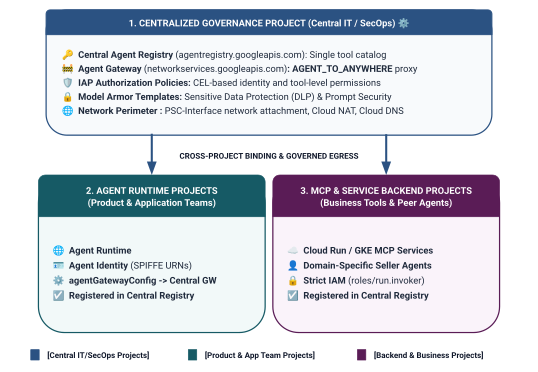
Abbildung 2. Dreistufige projektübergreifende Governance-Architektur und Grenzen
Zweistufiges Identitätsbereichsmodell in Unified Access Policies
Wenn Agenten über das Central Agent Gateway kommunizieren, wertet Identity-Aware Proxy (IAP v2) den Zugriff anhand der Agentenidentität des Aufrufers aus. Das ist eine kryptografisch bestätigte, SPIFFE-basierte Identität, die automatisch für den Laufzeitcontainer ausgestellt wird. Die Auswertung erfolgt anhand einer globalen IAM-Zugriffsrichtlinie:
- Stufe 1: Google Cloud-Basis-APIs (grobkörnig über
principalSet://in Regel 1): Projektweite Autorisierung für ausgehenden Traffic, die es allen Agent-Laufzeiten in Spoke-Projekten ermöglicht, Standard-Google-APIs (aiplatform,iamcredentials,telemetry,agentregistry) für die Ermittlung, die Tokengenerierung und die Inferenz zu erreichen. - Stufe 2: Geschäftstools und A2A-Dienste (feingranular über
principal://in den Regeln 2 und 3): Strenger Zugriff mit dem geringsten Berechtigungsprinzip, der an einzelne Reasoning Engine-Instanzen gebunden ist und mit CEL-Bedingungen (Common Expression Language) erzwungen wird, die auf bestimmte registrierte Agent Registry-Dienste (destination.agent_registry.agent.name) ausgerichtet sind.
Was Sie erstellen
- Zentrales Agent Gateway (
centralized-agw) inPROJECT_GOVERNANCE - IAP v2-Autorisierungsdienst-Erweiterung und Autorisierungsrichtlinie im strengen ENFORCE-Modus (
failOpen: false) - Fundamentale IAM Unified Access Policy (
uap-rules.json) und Projektrichtlinienbindung - IAM-Berechtigungen für dienstübergreifende Dienst-Agents (
ar_agw_cross_project_sa) - Gemeinsamer zentraler Google Cloud Storage-Staging-Bucket (GCS)
- Isolierte Burger- und Pizzaverkäufer in
PROJECT_SELLERS - Concierge-Agent für Käufe mit dynamischer REST-Autodiscovery in
PROJECT_CONCIERGE - Dienstregistrierungen in der zentralen Agent Registry mit projektübergreifenden mTLS-URLs
- Dynamische Aktualisierungen der IAP v2-Ausgangsrichtlinie mit Live-Überprüfung und Cloud Logging-Prüfungen

Abbildung 3. Schrittweise Implementierungssequenz
Lerninhalte
- IAM-Berechtigungen für projektübergreifende Dienst-Agents für zentralisierte Gateways konfigurieren
- Ausgehenden Traffic der Agent Runtime in Multi-Projekt-Umgebungen über ein zentrales Agent Gateway weiterleiten
- Agent Gateway-Autorisierung mit Service Extensions (
iapPolicyVersion: "V2") an Identity-Aware Proxy (IAP v2) delegieren - IAM Unified Access Policies (UAP) mit CEL-Regeln (Common Expression Language) für registrierte Agent Registry-Ziele (
destination.agent_registry.*) erstellen und binden - Hartcodierte Agent-IDs und ‑URLs mithilfe der automatischen Erkennung zur Laufzeit in der Agent Registry entfernen
- Zero-Trust-Blockierung am echten Perimeter testen (
HTTP 403 Forbidden) und Live-Richtlinienaktualisierungen in Cloud Logging prüfen
Voraussetzungen
- 3 Google Cloud-Projekte mit aktivierter Abrechnung:
PROJECT_GOVERNANCE: Zentrale Governance-, Gateway-, Registrierungs- und IAM-ZugriffsrichtlinienPROJECT_CONCIERGE: Orchestrator-Agent für den Kauf-ConciergePROJECT_SELLERS: Verkäufer-Kundenservicemitarbeiter für Burger und Pizza
- Ein IAM-Nutzer oder Dienstkonto mit
roles/owner- oder Administratorberechtigungen für alle drei Projekte - Eine Google Cloud-Organisation (für die Zuordnung von SPIFFE-Vertrauensdomains)
- Google Cloud Shell oder ein lokaler Computer mit installierter
gcloudCLI,python(3.11+) unduv
Das war die Einführung. Als Nächstes geht es mit dem Abschnitt Einrichtung und Umgebung weiter.
2. Einrichtung
Diese Architektur umfasst zwar drei verschiedene Google Cloud-Projekte, Sie können jedoch 100% der Terminal-Bereitstellungsbefehle, Repository-Downloads und Staging-Vorgänge über ein einzelnes Cloud Shell-Terminal ausführen, das auf PROJECT_GOVERNANCE festgelegt ist. Jedes Bereitstellungsskript und jeder gcloud-Befehl richtet sich über CLI-Flags (--project) explizit an das entsprechende Zielprojekt.
Rufen Sie zuerst die Befehlszeile Ihres Google Cloud-Projekts auf:
- Cloud Shell unter
shell.cloud.google.comoder - Ein lokales Terminal mit
gcloudCLI installiert
Projektkontext festlegen
# set terminal project context to Central Governance Project
gcloud config set project SET_YOUR_GOVERNANCE_PROJECT_ID_HERE
# login to gcloud cli
gcloud auth login
# login for application default credentials
gcloud auth application-default login
gcloud-CLI aktualisieren (empfohlen)
# update gcloud components
gcloud components update --quiet
Shell-Umgebungsvariablen festlegen
Geben Sie Ihre projektspezifischen Kennungen ein.
# 1. Project Identifiers
export PROJECT_GOVERNANCE="SET_YOUR_GOVERNANCE_PROJECT_ID_HERE"
export PROJECT_CONCIERGE="SET_YOUR_CONCIERGE_PROJECT_ID_HERE"
export PROJECT_SELLERS="SET_YOUR_SELLERS_PROJECT_ID_HERE"
Diese Shell-Variablen werden automatisch abgeleitet.
# 2. Regional & Gateway Settings
export REGION="us-central1"
export AGW_NAME="centralized-agw"
export UAP_POLICY_NAME="uap-policy-${AGW_NAME}"
export UAP_BINDING_NAME="uap-binding-${AGW_NAME}"

# 3. Retrieve Project Numbers
export PROJECT_NUMBER_GOVERNANCE=$(gcloud projects describe ${PROJECT_GOVERNANCE} --format="value(projectNumber)")
export PROJECT_NUMBER_CONCIERGE=$(gcloud projects describe ${PROJECT_CONCIERGE} --format="value(projectNumber)")
export PROJECT_NUMBER_SELLERS=$(gcloud projects describe ${PROJECT_SELLERS} --format="value(projectNumber)")

# 4. Obtain Organization ID
export ORG_ID=$(gcloud projects get-ancestors ${PROJECT_GOVERNANCE} --format="value(id, type)" | grep organization | awk '{print $1}')

# 5. Set Application Default Credentials (ADC) Quota Project
gcloud auth application-default set-quota-project ${PROJECT_GOVERNANCE}

echo "Governance Project: ${PROJECT_GOVERNANCE} (${PROJECT_NUMBER_GOVERNANCE})"
echo "Concierge Project:  ${PROJECT_CONCIERGE} (${PROJECT_NUMBER_CONCIERGE})"
echo "Sellers Project:    ${PROJECT_SELLERS} (${PROJECT_NUMBER_SELLERS})"
echo "Organization ID:    ${ORG_ID}"
echo "UAP Policy Name:    ${UAP_POLICY_NAME}"
echo "UAP Binding Name:   ${UAP_BINDING_NAME}"
Lokales Verzeichnis für Konfigurationsdateien erstellen
# create config folder
mkdir -p cfg
Rolle „Access Policy Admin“ für Unified Access Policies zuweisen
# grant Access Policy Admin and Project IAM Admin to current user in Governance Project
for ROLE in "roles/iam.accessPolicyAdmin" "roles/resourcemanager.projectIamAdmin"; do
  gcloud projects add-iam-policy-binding ${PROJECT_GOVERNANCE} \
    --member="user:$(gcloud config get-value account)" \
    --role="${ROLE}" \
    --condition=None
done
Cloud-Audit-Logs zum Datenzugriff für IAP v2 aktivieren
Standardmäßig sind Audit-Logs zum Datenzugriff in Google Cloud deaktiviert, um unbeabsichtigte Speicherkosten zu vermeiden. Da IAP v2 Autorisierungsentscheidungen (granted=true und granted=false) als Audit-Logs zum Datenzugriff ausgibt, aktivieren Sie die Protokollierung von ADMIN_READ, DATA_READ und DATA_WRITE für iap.googleapis.com in PROJECT_GOVERNANCE:
# 1. export current IAM policy for PROJECT_GOVERNANCE
gcloud projects get-iam-policy ${PROJECT_GOVERNANCE} \
  --format=json > cfg/gov_iam_policy.json
# 2. append auditConfigs for iap.googleapis.com
python3 -c "
import json
with open('cfg/gov_iam_policy.json') as f:
    policy = json.load(f)
audit_configs = [c for c in policy.get('auditConfigs', []) if c.get('service') != 'iap.googleapis.com']
audit_configs.append({
    'service': 'iap.googleapis.com',
    'auditLogConfigs': [
        {'logType': 'ADMIN_READ'},
        {'logType': 'DATA_READ'},
        {'logType': 'DATA_WRITE'}
    ]
})
policy['auditConfigs'] = audit_configs
with open('cfg/gov_iam_policy.json', 'w') as f:
    json.dump(policy, f, indent=2)
"
# 3. apply updated policy
gcloud projects set-iam-policy ${PROJECT_GOVERNANCE} cfg/gov_iam_policy.json
# 4. verify auditConfigs applied
gcloud projects get-iam-policy ${PROJECT_GOVERNANCE} --format="yaml(auditConfigs)"
Erforderliche Google Cloud APIs aktivieren
# enable google apis (agent platform & security bundle, part 1)
for PROJ in ${PROJECT_GOVERNANCE} ${PROJECT_CONCIERGE} ${PROJECT_SELLERS}; do
  gcloud services enable \
    agentregistry.googleapis.com \
    aiplatform.googleapis.com \
    apphub.googleapis.com \
    apptopology.googleapis.com \
    cloudapiregistry.googleapis.com \
    cloudtrace.googleapis.com \
    compute.googleapis.com \
    dataform.googleapis.com \
    iam.googleapis.com \
    agentidentity.googleapis.com \
    iap.googleapis.com \
    logging.googleapis.com \
    modelarmor.googleapis.com \
    monitoring.googleapis.com \
    networksecurity.googleapis.com \
    networkservices.googleapis.com \
    notebooks.googleapis.com \
    observability.googleapis.com \
    --project=${PROJ}
done
# enable google apis (agent platform bundle, part 2)
for PROJ in ${PROJECT_GOVERNANCE} ${PROJECT_CONCIERGE} ${PROJECT_SELLERS}; do
  gcloud services enable \
    securitycenter.googleapis.com \
    saasservicemgmt.googleapis.com \
    storage.googleapis.com \
    telemetry.googleapis.com \
    texttospeech.googleapis.com \
    --project=${PROJ}
done
# enable google apis (foundational & agent runtime build bundle, part 3)
for PROJ in ${PROJECT_GOVERNANCE} ${PROJECT_CONCIERGE} ${PROJECT_SELLERS}; do
  gcloud services enable \
    artifactregistry.googleapis.com \
    cloudbuild.googleapis.com \
    cloudresourcemanager.googleapis.com \
    iamcredentials.googleapis.com \
    serviceusage.googleapis.com \
    run.googleapis.com \
    orgpolicy.googleapis.com \
    --project=${PROJ}
done
API-Aktivierung für alle Projekte prüfen
Wenn in allen drei Projekten (PROJECT_GOVERNANCE, PROJECT_CONCIERGE und PROJECT_SELLERS) genau dieselben APIs aktiviert sind, wird die betriebliche Konsistenz sichergestellt und es werden Fehler beim Erstellen von Laufzeittokens, Fehler bei der Schemakatalogisierung oder Telemetrieausfälle verhindert.
Führen Sie das folgende Validierungsskript in Cloud Shell aus, um die API-Parität in allen drei Projekten zu prüfen:
# validate that all required APIs are enabled across all 3 projects
python3 - << 'EOF'
import subprocess
import os
import sys

REQUIRED_APIS = [
    "agentregistry.googleapis.com",
    "aiplatform.googleapis.com",
    "apphub.googleapis.com",
    "apptopology.googleapis.com",
    "cloudapiregistry.googleapis.com",
    "cloudtrace.googleapis.com",
    "compute.googleapis.com",
    "dataform.googleapis.com",
    "iam.googleapis.com",
    "agentidentity.googleapis.com",
    "iap.googleapis.com",
    "logging.googleapis.com",
    "modelarmor.googleapis.com",
    "monitoring.googleapis.com",
    "networksecurity.googleapis.com",
    "networkservices.googleapis.com",
    "notebooks.googleapis.com",
    "observability.googleapis.com",
    "securitycenter.googleapis.com",
    "saasservicemgmt.googleapis.com",
    "storage.googleapis.com",
    "telemetry.googleapis.com",
    "texttospeech.googleapis.com",
    "artifactregistry.googleapis.com",
    "cloudbuild.googleapis.com",
    "cloudresourcemanager.googleapis.com",
    "iamcredentials.googleapis.com",
    "serviceusage.googleapis.com",
    "run.googleapis.com",
    "orgpolicy.googleapis.com"
]

projects = {
    "GOVERNANCE": os.environ.get("PROJECT_GOVERNANCE", ""),
    "CONCIERGE": os.environ.get("PROJECT_CONCIERGE", ""),
    "SELLERS": os.environ.get("PROJECT_SELLERS", "")
}

enabled = {}
for role, proj in projects.items():
    if not proj:
        print(f"Error: Environment variable for {role} is not set.")
        sys.exit(1)
    res = subprocess.run(
        ["gcloud", "services", "list", "--enabled", f"--project={proj}", "--format=value(config.name)"],
        capture_output=True, text=True, check=True
    )
    enabled[role] = set(res.stdout.strip().splitlines())

print(f"\n{'API Name':<36} | {'GOVERNANCE':<12} | {'CONCIERGE':<12} | {'SELLERS':<12}")
print("-" * 78)

all_synced = True
for api in REQUIRED_APIS:
    g_status = "ENABLED" if api in enabled["GOVERNANCE"] else "MISSING"
    c_status = "ENABLED" if api in enabled["CONCIERGE"] else "MISSING"
    s_status = "ENABLED" if api in enabled["SELLERS"] else "MISSING"
    if "MISSING" in (g_status, c_status, s_status):
        all_synced = False
    print(f"{api:<36} | {g_status:<12} | {c_status:<12} | {s_status:<12}")

print("-" * 78)
if all_synced:
    print("✅ All 29 required APIs are ENABLED and synchronized across all three projects.\n")
else:
    print("❌ Discrepancies detected. Please re-run the enablement commands for missing services.\n")
    sys.exit(1)
EOF
Beispiel für die Validierungsausgabe:
Alle APIs sollten aktiviert sein.
✅ All 30 required APIs are ENABLED and synchronized across all three projects.
Organisationsrichtlinien konfigurieren
Standardmäßige Google Cloud-Organisationsrichtlinien erzwingen Einschränkungen, die IAM v3-Zugriffsrichtlinienbindungen auf Ressourcen (constraints/iam.managed.disableAccessPolicyBinding) beschränken.
Überschreiben Sie alle geerbten Einschränkungen von Organisationsrichtlinien auf Projektebene, indem Sie enforce: false explizit auf „Zulassen“ festlegen.
# disable iam v3 constraint (allow v3 access policies)
gcloud org-policies set-policy /dev/stdin << EOF
name: projects/${PROJECT_NUMBER_GOVERNANCE}/policies/iam.managed.disableAccessPolicyBinding
spec:
  rules:
  - enforce: false
EOF
# verify org policy constraints on project
gcloud org-policies describe iam.managed.disableAccessPolicyBinding \
  --project=${PROJECT_GOVERNANCE} --effective
Damit ist die Einrichtung abgeschlossen. Fahren Sie mit dem Abschnitt Core Google-APIs registrieren fort.
3. Agent Registry
Core Google APIs Endpoint Service registrieren
Für Agent Gateway müssen Google API-URLs in der Central Agent Registry registriert sein, damit Agents, die mit agent_gateway_config konfiguriert sind, den ausgehenden Traffic sicher an die wichtigsten Google Cloud-Backend-Dienste (z. B. aiplatform, IAM-Anmeldedaten und Telemetrie) weiterleiten können.
core-gapi-services in der Agent Registry erstellen
# register core google api endpoints in agent registry with standard and :443 port variants
gcloud agent-registry services create core-gapi-services \
  --project=${PROJECT_GOVERNANCE} \
  --location=${REGION} \
  --display-name="gapi.core.services" \
  --description="Core Google Cloud APIs and Service Endpoints" \
  --endpoint-spec-type=no-spec \
  --interfaces=protocolBinding=JSONRPC,url=https://telemetry.googleapis.com \
  --interfaces=protocolBinding=JSONRPC,url=https://telemetry.mtls.googleapis.com \
  --interfaces=protocolBinding=JSONRPC,url=https://${REGION}-aiplatform.googleapis.com \
  --interfaces=protocolBinding=JSONRPC,url=https://${REGION}-aiplatform.googleapis.com:443 \
  --interfaces=protocolBinding=JSONRPC,url=https://${REGION}-aiplatform.mtls.googleapis.com \
  --interfaces=protocolBinding=JSONRPC,url=https://${REGION}-aiplatform.mtls.googleapis.com:443 \
  --interfaces=protocolBinding=JSONRPC,url=https://aiplatform.googleapis.com \
  --interfaces=protocolBinding=JSONRPC,url=https://aiplatform.googleapis.com:443 \
  --interfaces=protocolBinding=JSONRPC,url=https://aiplatform.mtls.googleapis.com \
  --interfaces=protocolBinding=JSONRPC,url=https://aiplatform.mtls.googleapis.com:443 \
  --interfaces=protocolBinding=JSONRPC,url=https://cloudresourcemanager.googleapis.com \
  --interfaces=protocolBinding=JSONRPC,url=https://iamcredentials.googleapis.com \
  --interfaces=protocolBinding=JSONRPC,url=https://iamcredentials.mtls.googleapis.com \
  --interfaces=protocolBinding=JSONRPC,url=https://agentregistry.googleapis.com \
  --interfaces=protocolBinding=JSONRPC,url=https://agentregistry.mtls.googleapis.com \
  --interfaces=protocolBinding=JSONRPC,url=https://agentregistry.googleapis.com:443 \
  --interfaces=protocolBinding=JSONRPC,url=https://agentregistry.mtls.googleapis.com:443
Endpoint-Ressourcen-ID der Capture Core APIs
# capture the underlying Agent Registry endpoint ID
export ENDPOINT_ID=$(gcloud agent-registry services describe core-gapi-services \
  --project=${PROJECT_GOVERNANCE} \
  --location=${REGION} \
  --format="value(registryResource)" | awk -F'/' '{print $NF}')
echo "Core APIs Endpoint ID: ${ENDPOINT_ID}"
principalSet und principal in der KI-Agentenidentität
In Google Cloud IAM und der Gemini Enterprise Agent Platform verwenden Maschinenidentitäten, die für die Ausführung von Agent-Containern ausgestellt werden, kryptografisch bestätigte SPIFFE-URNs, die von Identity-Aware Proxy (IAP v2) ausgewertet werden. Beim Konfigurieren von IAM Unified Access Policies können Sie entweder auf eine bestimmte einzelne principal oder auf eine attributbasierte principalSet abzielen:
Dimension |
|
|
IAM-Syntax |
|
|
Detaillierungsgrad | Feingranular (auf Instanzebene): Gibt eine einzelne, bestimmte Reasoning Engine-Containerinstanz an. | Grobkörnig (auf Projektebene): Hier werden alle Reasoning-Engines identifiziert, die ein gemeinsames Projektattribut haben. |
URN-Muster |
|
|
Anwendungsfall in der Agent Platform | Stufe 2 (Business Tools und A2A): Autorisieren bestimmter Orchestrator-Agents zum Aufrufen von Tools der Zieldomäne (z.B. Einkaufs-Concierge $\rightarrow$ Burger-Verkäufer). | Tier 1 (Foundational Infrastructure): Allen Agents in einem Projekt wird der Egress-Zugriff auf Google Cloud-APIs ( |
Auswirkungen auf den Lebenszyklus | Wenn ein Agent gelöscht und neu erstellt wird, ist für seine neue Engine-ID eine aktualisierte IAM-Richtlinienbindung erforderlich. | Sie wird automatisch auf neu bereitgestellte Agents in diesem Projekt angewendet, ohne dass zusätzliche IAM-Updates erforderlich sind. |
Deklarative Governance mit Unified Access Policies (UAP / IAP v2)
In der alten IAP v1 wurden Egress-Richtlinien mit gcloud beta iap web add-iam-policy-binding direkt an einzelne Agent Registry-Ressourcen angehängt. Unter IAP v2 und Unified Access Policies werden Bindungen pro Ressource zugunsten einer einzelnen, zentralen IAM-Zugriffsrichtlinie (cfg/uap-rules.json) entfernt.
Die grundlegende Autorisierung für ausgehenden Traffic für core-gapi-services wird als Regel 1 in der einheitlichen Zugriffsrichtlinie in Abschnitt 5 konfiguriert. So wird sichergestellt, dass für alle Agent-Container vor der Bereitstellung grundlegende Routen für ausgehenden Traffic eingerichtet sind.
Weitere technische Details zu Hauptkonto-IDs und Workload Identity finden Sie unter:
- Google Cloud IAM: Principal-IDs und Principal-Sets
- Funktionsweise der Agent-Identität
- IAM Unified Access Policies für Agent Gateway konfigurieren
Damit ist die Endpunktregistrierung für Core APIs abgeschlossen. Fahren Sie mit dem Abschnitt Zentrales Agent Gateway bereitstellen fort.
4. Agent Gateway
Zentrales KI-Agenten-Gateway bereitstellen
Stellen Sie das zentralisierte Agent Gateway (centralized-agw) im AGENT_TO_ANYWHERE-Egress-Modus im $PROJECT_GOVERNANCE-Projekt bereit.
Gateway-Konfigurationsmanifest definieren
Erstellen Sie cfg/${AGW_NAME}.yaml für die Governance von ausgehendem Traffic:
# generate agent gateway config yaml
cat > cfg/${AGW_NAME}.yaml << EOF
name: ${AGW_NAME}
protocols:
  - MCP
googleManaged:
  governedAccessPath: AGENT_TO_ANYWHERE
registries:
  - "//agentregistry.googleapis.com/projects/${PROJECT_GOVERNANCE}/locations/${REGION}"
EOF
Konfiguration des KI-Agenten-Gateways importieren
# import and create agent gateway
gcloud network-services agent-gateways import ${AGW_NAME} \
  --source="cfg/${AGW_NAME}.yaml" \
  --location=${REGION} \
  --project=${PROJECT_GOVERNANCE}
Details zum KI-Agenten-Gateway prüfen
# show agent gateway status
gcloud network-services agent-gateways describe ${AGW_NAME} \
  --location=${REGION} \
  --project=${PROJECT_GOVERNANCE}
Beispielausgabe:
agentGatewayCard:
  mtlsEndpoint: projects/${AGW_TP_ID}/regions/us-central1/serviceAttachments/unitkind1-swp-mtls-psc-sa
  rootCertificates:
  - |
    -----BEGIN CERTIFICATE-----
    MIIDwzCCAqugAwIBAgITNQuWGopdOZaHdcK7r7AYFhonqDANBgkqhkiG9w0BAQsF
    ...
    -----END CERTIFICATE-----
  serviceExtensionsServiceAccount: service-${PROJ_NO}@gcp-sa-dep.iam.gserviceaccount.com
createTime: 'YYYY-MM-DDT12:34:56.789098765Z'
googleManaged:
  governedAccessPath: AGENT_TO_ANYWHERE
name: projects/${PROJECT_GOVERNANCE}/locations/us-central1/agentGateways/centralized-agw
protocols:
- MCP
registries:
- //agentregistry.googleapis.com/projects/${PROJECT_GOVERNANCE}/locations/us-central1
updateTime: 'YYYY-MM-DDT12:34:56.789098765Z'
Damit ist die Gateway-Bereitstellung abgeschlossen. Fahren Sie mit dem Abschnitt Autorisierung konfigurieren fort.
5. Autorisierung
Autorisierung für das KI-Agenten-Gateway und grundlegende UAP konfigurieren
Agent Gateway schützt und steuert den ausgehenden Tool- und Agent-Traffic mithilfe von Autorisierungsrichtlinien (networksecurity.authzPolicies), die in Unified Access Policies (UAP) für Identity-Aware Proxy (IAP v2) eingebunden sind.
Übersicht über die Autorisierungsarchitektur

Abbildung 4. Übersicht über die Autorisierungsarchitektur
Die Autorisierungsarchitektur besteht aus drei miteinander verbundenen Ebenen:
- IAP-Diensterweiterung (
authzExtension): Regionale Ressource, die mitservice: iap.googleapis.com,metadata: iapPolicyVersion: "V2"undfailOpen: falsefür die strikte Zero-Trust-Durchsetzung des Perimeters konfiguriert ist. - Gateway Authorization Policy (
authzPolicy): Regionale Ressource, die auf Ihr Agent-Gateway mitpolicyProfile: REQUEST_AUTHZundaction: CUSTOMausgerichtet ist und Autorisierungsprüfungen an die IAP Authz Extension weiterleitet. - Einheitliche IAM-Zugriffsrichtlinie und -Bindung (
accessPolicy&policyBinding): Globale IAM v3-Ressource, die von IAP ausgewertet wird. Sie prüft die universelle Berechtigungiap.googleapis.com/resources.egressViaIAPanhand der SPIFFE-Identitäten des Aufrufers und der CEL-Katalogbedingungen.
Schritt 1: IAP v2-Autorisierungserweiterung erstellen und importieren
Erstellen Sie das Manifest der Diensterweiterung mit iapPolicyVersion: "V2" und failOpen: false im strengen ENFORCE-Modus:
# create authz extension config file in ENFORCE mode
cat > cfg/${AGW_NAME}-svc-ext-authz-iap.yaml << EOF
name: ${AGW_NAME}-svc-ext-authz-iap
service: iap.googleapis.com
failOpen: false
timeout: 1s
metadata:
  iapPolicyVersion: "V2"
EOF
Importieren Sie die Autorisierungserweiterung:
# import IAP v2 authz extension
gcloud service-extensions authz-extensions import ${AGW_NAME}-svc-ext-authz-iap \
  --source=cfg/${AGW_NAME}-svc-ext-authz-iap.yaml \
  --location=${REGION} \
  --project=${PROJECT_GOVERNANCE}
Prüfen Sie, ob die Authz-Erweiterung aktiv ist:
# describe authz extension
gcloud service-extensions authz-extensions describe ${AGW_NAME}-svc-ext-authz-iap \
  --location=${REGION} \
  --project=${PROJECT_GOVERNANCE}
Beispielausgabe:
createTime: 'YYYY-MM-DDT12:34:56.789098765Z'
failOpen: false
metadata:
  iapPolicyVersion: V2
name: projects/${PROJECT_GOVERNANCE}/locations/us-central1/authzExtensions/centralized-agw-svc-ext-authz-iap
service: iap.googleapis.com
timeout: 1s
Schritt 2: Gateway-Autorisierungsrichtlinie erstellen und importieren
Erstellen Sie eine Autorisierungsrichtlinienkonfiguration, die an das Agent Gateway angehängt wird und die Anfrageüberprüfung an die IAP Authz Extension delegiert:
# create authz policy manifest
cat > cfg/${AGW_NAME}-authz-policy-profile-iap.yaml << EOF
name: ${AGW_NAME}-authz-policy-profile-iap
target:
  resources:
    - "projects/${PROJECT_GOVERNANCE}/locations/${REGION}/agentGateways/${AGW_NAME}"
policyProfile: REQUEST_AUTHZ
action: CUSTOM
customProvider:
  authzExtension:
    resources:
      - "projects/${PROJECT_GOVERNANCE}/locations/${REGION}/authzExtensions/${AGW_NAME}-svc-ext-authz-iap"
EOF
Importieren Sie die Autorisierungsrichtlinie:
# import authz policy
gcloud beta network-security authz-policies import ${AGW_NAME}-authz-policy-profile-iap \
  --source=cfg/${AGW_NAME}-authz-policy-profile-iap.yaml \
  --location=${REGION} \
  --project=${PROJECT_GOVERNANCE}
Aktive AuthorizationPolicy prüfen:
# describe authz policy
gcloud beta network-security authz-policies describe ${AGW_NAME}-authz-policy-profile-iap \
  --location=${REGION} \
  --project=${PROJECT_GOVERNANCE}
Schritt 3: Erste Unified Access Policy erstellen (Regel 1: Wichtige Google-APIs)
Erstellen Sie cfg/uap-rules.json mit Regel 1, die den drei Projekt-principalSets die Berechtigung erteilt, core-gapi-services zu erreichen:
# create initial unified access policy rules manifest
cat > cfg/uap-rules.json << EOF
[
  {
    "description": "Rule 1: Allow agent runtimes across all 3 projects to reach Core Google APIs",
    "effect": "ALLOW",
    "principals": [
      "principalSet://agents.global.org-${ORG_ID}.system.id.goog/attribute.platformContainer/aiplatform/projects/${PROJECT_NUMBER_GOVERNANCE}",
      "principalSet://agents.global.org-${ORG_ID}.system.id.goog/attribute.platformContainer/aiplatform/projects/${PROJECT_NUMBER_CONCIERGE}",
      "principalSet://agents.global.org-${ORG_ID}.system.id.goog/attribute.platformContainer/aiplatform/projects/${PROJECT_NUMBER_SELLERS}"
    ],
    "operation": {
      "permissions": [
        "iap.googleapis.com/resources.egressViaIAP"
      ]
    },
    "conditions": {
      "iap.googleapis.com": {
        "expression": \
        "destination.is_registered == true && \
         destination.agent_registry.resource_type == 'ENDPOINT' && ( \
         destination.agent_registry.endpoint.name == 'projects/${PROJECT_GOVERNANCE}/locations/${REGION}/endpoints/core-gapi-services' || \
         destination.agent_registry.endpoint.name == 'projects/${PROJECT_GOVERNANCE}/locations/${REGION}/endpoints/${ENDPOINT_ID}' || \
         destination.agent_registry.endpoint.name == 'projects/${PROJECT_NUMBER_GOVERNANCE}/locations/${REGION}/endpoints/${ENDPOINT_ID}')"
      }
    }
  }
]
EOF
Schritt 4: IAM-Zugriffsrichtlinie erstellen und binden
Globale IAM-Zugriffsrichtlinie erstellen:
# create global IAM access policy
gcloud iam access-policies create ${UAP_POLICY_NAME} \
  --details-rules=cfg/uap-rules.json \
  --project=${PROJECT_GOVERNANCE} \
  --location=global
Binden Sie die Zugriffsrichtlinie an PROJECT_GOVERNANCE:
# bind access policy to governance project
gcloud iam policy-bindings create ${UAP_BINDING_NAME} \
  --policy="projects/${PROJECT_GOVERNANCE}/locations/global/accessPolicies/${UAP_POLICY_NAME}" \
  --target-resource="//cloudresourcemanager.googleapis.com/projects/${PROJECT_GOVERNANCE}" \
  --project=${PROJECT_GOVERNANCE} \
  --location=global
Prüfen Sie, ob die Richtlinienbindung aktiv ist:
# verify policy binding
gcloud iam policy-bindings describe ${UAP_BINDING_NAME} \
  --project=${PROJECT_GOVERNANCE} \
  --location=global
Beispielausgabe:
name: projects/${PROJECT_GOVERNANCE}/locations/global/policyBindings/uap-binding-centralized-agw
policy: projects/${PROJECT_GOVERNANCE}/locations/global/accessPolicies/uap-policy-centralized-agw
policyKind: ACCESS_POLICY
target:
  resource: //cloudresourcemanager.googleapis.com/projects/${PROJECT_GOVERNANCE}
Der ausgehende Traffic auf die Google Cloud-API ist jetzt in allen drei Projekten im strikten ENFORCE-Modus sicher autorisiert.
Damit ist die Einrichtung der Gateway-Autorisierung abgeschlossen. Fahren Sie mit dem Abschnitt IAM-Berechtigungen für projektübergreifenden Zugriff konfigurieren fort.
6. IAM für mehrere Projekte
Projektübergreifende IAM-Berechtigungen konfigurieren
In dieser Topologie mit mehreren Projekten befinden sich die Agent-Laufzeiten in den Spoke-Projekten (PROJECT_CONCIERGE und PROJECT_SELLERS), während sich das zentrale Agent-Gateway und die Agent-Registry in PROJECT_GOVERNANCE befinden.
Da Google Cloud-Projekte isolierte Sicherheitsgrenzen sind, muss der projektübergreifende Zugriff explizit auf zwei Betriebsebenen gewährt werden:
- Steuerungsebene (Bereitstellungszeit): Wenn Sie einen Agent-Container bereitstellen, der mit
--agent-gateway-configkonfiguriert ist, muss der Agent Runtime Service Agent (service-) des Spoke-Projekts den Container an das zentrale Gateway anhängen. Wir erstellen eine minimale benutzerdefinierte Rolle (@gcp-sa-aiplatform.iam.gserviceaccount.com ar_agw_cross_project_sa), dienetworkservices.agentGateways.use,getundoperations.getinPROJECT_GOVERNANCEgewährt. - Datenebene (Laufzeitausführung)
- :
- Katalogermittlung:Spoke-Identitäten benötigen
roles/agentregistry.viewerinPROJECT_GOVERNANCE, um Ziel-Agent-Endpunkte dynamisch aufzulösen. - Zielaufruf:Der Concierge-Agent benötigt
roles/aiplatform.userinPROJECT_SELLERS, um Abfragen für die Reasoning Engines des Verkäufers auszuführen.
- Katalogermittlung:Spoke-Identitäten benötigen
Benutzerdefinierte IAM-Rolle in PROJECT_GOVERNANCE erstellen
# create custom role in central governance project
gcloud iam roles create ar_agw_cross_project_sa \
  --project=${PROJECT_GOVERNANCE} \
  --title="Runtime Agent Gateway Cross-Project SA" \
  --description="Custom role for cross-project service agents to access Central Agent Gateway" \
  --permissions="networkservices.agentGateways.get,networkservices.agentGateways.use,networkservices.operations.get" \
  --stage="GA"
Benutzerdefinierte Rolle für Agent Runtime-Dienst-Agents zuweisen
# 1. ensure aiplatform service identities are provisioned across all projects
for PROJ in ${PROJECT_GOVERNANCE} ${PROJECT_CONCIERGE} ${PROJECT_SELLERS}; do
  gcloud beta services identity create --service=aiplatform.googleapis.com --project=${PROJ}
done
# 2. derive aiplatform service agent emails
export CONCIERGE_AI_SA="service-${PROJECT_NUMBER_CONCIERGE}@gcp-sa-aiplatform.iam.gserviceaccount.com"
export CONCIERGE_RE_SA="service-${PROJECT_NUMBER_CONCIERGE}@gcp-sa-aiplatform-re.iam.gserviceaccount.com"
export CONCIERGE_COMPUTE_SA="${PROJECT_NUMBER_CONCIERGE}-compute@developer.gserviceaccount.com"

export SELLERS_AI_SA="service-${PROJECT_NUMBER_SELLERS}@gcp-sa-aiplatform.iam.gserviceaccount.com"
export SELLERS_RE_SA="service-${PROJECT_NUMBER_SELLERS}@gcp-sa-aiplatform-re.iam.gserviceaccount.com"
export SELLERS_COMPUTE_SA="${PROJECT_NUMBER_SELLERS}-compute@developer.gserviceaccount.com"
# 3. grant custom role & network viewer to Concierge and Sellers Service Agents
for SA in ${CONCIERGE_AI_SA} ${SELLERS_AI_SA}; do
  gcloud projects add-iam-policy-binding ${PROJECT_GOVERNANCE} \
    --member="serviceAccount:${SA}" \
    --role="projects/${PROJECT_GOVERNANCE}/roles/ar_agw_cross_project_sa" \
    --condition=None

  gcloud projects add-iam-policy-binding ${PROJECT_GOVERNANCE} \
    --member="serviceAccount:${SA}" \
    --role="roles/networkservices.viewer" \
    --condition=None
done
# 4. grant agent registry viewer on Governance Project for dynamic autodiscovery
for MEMBER in "serviceAccount:${CONCIERGE_AI_SA}" "serviceAccount:${CONCIERGE_RE_SA}" "serviceAccount:${CONCIERGE_COMPUTE_SA}" "serviceAccount:${SELLERS_AI_SA}" "serviceAccount:${SELLERS_RE_SA}" "serviceAccount:${SELLERS_COMPUTE_SA}" "principalSet://agents.global.org-${ORG_ID}.system.id.goog/attribute.platformContainer/aiplatform/projects/${PROJECT_NUMBER_CONCIERGE}" "principalSet://agents.global.org-${ORG_ID}.system.id.goog/attribute.platformContainer/aiplatform/projects/${PROJECT_NUMBER_SELLERS}"; do
  gcloud projects add-iam-policy-binding ${PROJECT_GOVERNANCE} \
    --member="${MEMBER}" \
    --role="roles/agentregistry.viewer" \
    --condition=None
done
# 5. grant agent project viewer on Governance Project for dynamic autodiscovery
for SA in ${CONCIERGE_COMPUTE_SA} ${CONCIERGE_AI_SA}; do
  gcloud projects add-iam-policy-binding ${PROJECT_GOVERNANCE} \
    --member="serviceAccount:${SA}" \
    --role="roles/viewer" \
    --condition=None
done
# 6. grant aitplatform user on Sellers project to Concierge for cross-project A2A invocation
for MEMBER in "serviceAccount:${CONCIERGE_AI_SA}" "serviceAccount:${CONCIERGE_RE_SA}" "serviceAccount:${CONCIERGE_COMPUTE_SA}" "principalSet://agents.global.org-${ORG_ID}.system.id.goog/attribute.platformContainer/aiplatform/projects/${PROJECT_NUMBER_CONCIERGE}"; do
  gcloud projects add-iam-policy-binding ${PROJECT_SELLERS} \
    --member="${MEMBER}" \
    --role="roles/aiplatform.user" \
    --condition=None
done
Damit ist die projektübergreifende IAM-Einrichtung abgeschlossen. Fahren Sie mit dem Abschnitt Verkäufer- und Concierge-Agents bereitstellen fort.
7. Agent Runtime
Verkäufer- und Concierge-Agents bereitstellen
Die für dieses Codelab verwendete Codebasis und die Bereitstellungsskripts der Multi-Agenten-Anwendung werden in einem Remote-Google Cloud-GitHub-Repository verwaltet. In den folgenden Schritten wird das Repository lokal geklont, die erforderlichen Dateien werden in die aktuelle Arbeitsverzeichnisstruktur kopiert, temporäre Dateien werden bereinigt und Abhängigkeiten werden mit uv installiert.
Remote-Artefakte abrufen
# clone remote repository to temp local dir
git clone https://github.com/GoogleCloudPlatform/cloud-networking-solutions.git ./temp_agw_cuj_arun_multiproject
# copy multi-agent application files to current working directory
cp -r temp_agw_cuj_arun_multiproject/codelabs/agw-cuj-arun-multiproject ./cross-project-multiagent
# remove temporary directory
rm -rf temp_agw_cuj_arun_multiproject
# install dependencies
uv sync --directory ./cross-project-multiagent
Freigegebenes zentrales Staging-Bucket erstellen
# create shared central staging bucket
gcloud storage buckets create gs://${PROJECT_GOVERNANCE}-shared-staging \
  --project=${PROJECT_GOVERNANCE} \
  --location=${REGION}
# grant cross-project read/write access to runtime service agents
gcloud storage buckets add-iam-policy-binding gs://${PROJECT_GOVERNANCE}-shared-staging \
  --member="serviceAccount:service-${PROJECT_NUMBER_CONCIERGE}@gcp-sa-aiplatform.iam.gserviceaccount.com" \
  --role="roles/storage.objectAdmin"

gcloud storage buckets add-iam-policy-binding gs://${PROJECT_GOVERNANCE}-shared-staging \
  --member="serviceAccount:service-${PROJECT_NUMBER_SELLERS}@gcp-sa-aiplatform.iam.gserviceaccount.com" \
  --role="roles/storage.objectAdmin"
Funktionsweise der projektübergreifenden Agent Gateway-Bindung
In diesem Schritt stellen Sie die Verkäufer-Agents im Spoke-Projekt (PROJECT_SELLERS) bereit und konfigurieren sie so, dass der ausgehende Traffic über das zentrale Agenten-Gateway in PROJECT_GOVERNANCE geleitet wird:
# !-- for example purposes -- NOT a command to execute --!
# snippet from deploy_burger.py
burger_config = {
    "staging_bucket": staging_bucket_uri,
    "gcs_dir_name": "burger_agent",
    "display_name": "burger-seller-agent-adk",
    "identity_type": "AGENT_IDENTITY",
    "agent_gateway_config": {
        "agent_to_anywhere_config": {
            "agent_gateway": f"projects/{args.governance_project}/locations/{args.region}/agentGateways/{args.gateway}"
        }
    },
}
deployed_burger = client.agent_engines.create(agent=burger_playground, config=burger_config)
Da Regel 1 bereits in unserer Unified Access Policy festgelegt wurde, sind Containerinitialisierungsanfragen an Google Cloud APIs über das Gateway ohne Unterbrechung zulässig.
KI-Agenten für Burger- und Pizzaverkäufer auf PROJECT_SELLERS bereitstellen
# 1. deploy Burger Seller Agent to PROJECT_SELLERS
uv run --directory ./cross-project-multiagent python deploy_burger.py \
  --project=${PROJECT_SELLERS} \
  --region=${REGION} \
  --governance-project=${PROJECT_GOVERNANCE} \
  --gateway=projects/${PROJECT_GOVERNANCE}/locations/${REGION}/agentGateways/${AGW_NAME}
# 2. deploy Pizza Seller Agent to PROJECT_SELLERS
uv run --directory ./cross-project-multiagent python deploy_pizza.py \
  --project=${PROJECT_SELLERS} \
  --region=${REGION} \
  --governance-project=${PROJECT_GOVERNANCE} \
  --gateway=projects/${PROJECT_GOVERNANCE}/locations/${REGION}/agentGateways/${AGW_NAME}
Seller Gateway-Routing validieren
# retrieve deployed seller reasoning engine IDs
export BURGER_ENGINE_ID=$(grep BURGER_SELLER_AGENT_ID cross-project-multiagent/burger_agent.env | awk -F'/' '{print $NF}')
export PIZZA_ENGINE_ID=$(grep PIZZA_SELLER_AGENT_ID cross-project-multiagent/pizza_agent.env | awk -F'/' '{print $NF}')

echo "Burger Engine ID: ${BURGER_ENGINE_ID}"
echo "Pizza Engine ID:  ${PIZZA_ENGINE_ID}"
# inspect runtime configuration for both Seller Agents
for ENGINE_ID in ${BURGER_ENGINE_ID} ${PIZZA_ENGINE_ID}; do
  curl -s -X GET "https://${REGION}-aiplatform.googleapis.com/v1beta1/projects/${PROJECT_SELLERS}/locations/${REGION}/reasoningEngines/${ENGINE_ID}" \
    -H "Authorization: Bearer $(gcloud auth application-default print-access-token)" \
    -H "Content-Type: application/json" \
    | jq '{displayName: .displayName, identityType: .spec.identityType, effectiveIdentity: .spec.effectiveIdentity, agentGatewayConfig: .spec.deploymentSpec.agentGatewayConfig}'
done
Purchasing Concierge Agent in PROJECT_CONCIERGE bereitstellen
# deploy Purchasing Concierge to PROJECT_CONCIERGE
uv run --directory ./cross-project-multiagent python deploy_concierge_adk.py \
  --project=${PROJECT_CONCIERGE} \
  --region=${REGION} \
  --staging-bucket=gs://${PROJECT_GOVERNANCE}-shared-staging \
  --gateway-name=${AGW_NAME} \
  --gateway-project=${PROJECT_GOVERNANCE}
Routing des Kauf-Gateways validieren
# retrieve Concierge engine ID
export CONCIERGE_ENGINE_ID=$(grep CONCIERGE_AGENT_ID cross-project-multiagent/concierge_agent.env | awk -F'/' '{print $NF}')
echo "Concierge Engine ID: ${CONCIERGE_ENGINE_ID}"
# inspect runtime configuration for Purchasing Concierge
curl -s -X GET "https://${REGION}-aiplatform.googleapis.com/v1beta1/projects/${PROJECT_CONCIERGE}/locations/${REGION}/reasoningEngines/${CONCIERGE_ENGINE_ID}" \
  -H "Authorization: Bearer $(gcloud auth application-default print-access-token)" \
  -H "Content-Type: application/json" \
  | jq '{displayName: .displayName, identityType: .spec.identityType, effectiveIdentity: .spec.effectiveIdentity, agentGatewayConfig: .spec.deploymentSpec.agentGatewayConfig}'
Die Ausgabe sollte die Laufzeitidentität und das Projekt des Concierge-Agents sowie die Bindung an das Agenten-Gateway des Governance-Projekts enthalten.
{
  "displayName": "purchasing-concierge-adk",
  "identityType": "AGENT_IDENTITY",
  "effectiveIdentity": "agents.global.org-${ORG_ID}.system.id.goog/resources/aiplatform/projects/${PROJECT_CONCIERGE}/locations/us-central1/reasoningEngines/${CONCIERGE_ENGINE_ID}",
  "agentGatewayConfig": {
    "agentToAnywhereConfig": {
      "agentGateway": "projects/${PROJECT_GOVERNANCE}/locations/us-central1/agentGateways/centralized-agw"
    }
  }
}
Damit sind die Agent-Bereitstellungen abgeschlossen. Fahren Sie mit dem Abschnitt Agents in der zentralen Agent Registry registrieren fort.
8. Projektübergreifende Registry
KI-Agenten in der zentralen Agent Registry registrieren
Registrieren Sie alle drei Agenten in der zentralen Agent-Registry in PROJECT_GOVERNANCE mit projektübergreifenden regionalen mTLS-Endpunkten und numerischen Projektnummern.
Dienste als Nicht-A2A-Agenten in Agent Registry registrieren
# 1. register Burger Seller Agent
gcloud agent-registry services create burger-seller-agent \
  --project=${PROJECT_GOVERNANCE} \
  --location=${REGION} \
  --display-name="Burger Seller Agent" \
  --description="Specialist agent that sells burgers and fries" \
  --agent-spec-type=no-spec \
  --interfaces=protocolBinding=JSONRPC,url=https://${REGION}-aiplatform.mtls.googleapis.com/v1/projects/${PROJECT_NUMBER_SELLERS}/locations/${REGION}/reasoningEngines/${BURGER_ENGINE_ID}:query \
  --interfaces=protocolBinding=JSONRPC,url=https://${REGION}-aiplatform.mtls.googleapis.com/v1beta1/projects/${PROJECT_NUMBER_SELLERS}/locations/${REGION}/reasoningEngines/${BURGER_ENGINE_ID}:query
# 2. register Pizza Seller Agent
gcloud agent-registry services create pizza-seller-agent \
  --project=${PROJECT_GOVERNANCE} \
  --location=${REGION} \
  --display-name="Pizza Seller Agent" \
  --description="Specialist agent that sells pizzas and pasta" \
  --agent-spec-type=no-spec \
  --interfaces=protocolBinding=JSONRPC,url=https://${REGION}-aiplatform.mtls.googleapis.com/v1/projects/${PROJECT_NUMBER_SELLERS}/locations/${REGION}/reasoningEngines/${PIZZA_ENGINE_ID}:query \
  --interfaces=protocolBinding=JSONRPC,url=https://${REGION}-aiplatform.mtls.googleapis.com/v1beta1/projects/${PROJECT_NUMBER_SELLERS}/locations/${REGION}/reasoningEngines/${PIZZA_ENGINE_ID}:query
# 3. register Purchasing Concierge Agent
gcloud agent-registry services create purchasing-concierge-adk \
  --project=${PROJECT_GOVERNANCE} \
  --location=${REGION} \
  --display-name="Purchasing Concierge Agent" \
  --description="Orchestrator concierge agent that routes purchasing requests" \
  --agent-spec-type=no-spec \
  --interfaces=protocolBinding=JSONRPC,url=https://${REGION}-aiplatform.mtls.googleapis.com/v1/projects/${PROJECT_NUMBER_CONCIERGE}/locations/${REGION}/reasoningEngines/${CONCIERGE_ENGINE_ID}:query \
  --interfaces=protocolBinding=JSONRPC,url=https://${REGION}-aiplatform.mtls.googleapis.com/v1beta1/projects/${PROJECT_NUMBER_CONCIERGE}/locations/${REGION}/reasoningEngines/${CONCIERGE_ENGINE_ID}:query
Zugrunde liegende Agent Registry-IDs erfassen
# capture underlying Agent Registry Agent UUIDs
export BURGER_AGENT_ID=$(gcloud agent-registry services describe burger-seller-agent --project=${PROJECT_GOVERNANCE} --location=${REGION} --format="value(registryResource)" | awk -F'/' '{print $NF}')
export PIZZA_AGENT_ID=$(gcloud agent-registry services describe pizza-seller-agent --project=${PROJECT_GOVERNANCE} --location=${REGION} --format="value(registryResource)" | awk -F'/' '{print $NF}')
export CONCIERGE_AGENT_ID=$(gcloud agent-registry services describe purchasing-concierge-adk --project=${PROJECT_GOVERNANCE} --location=${REGION} --format="value(registryResource)" | awk -F'/' '{print $NF}')

echo "Burger Agent ID:    ${BURGER_AGENT_ID}"
echo "Pizza Agent ID:     ${PIZZA_AGENT_ID}"
echo "Concierge Agent ID: ${CONCIERGE_AGENT_ID}"
Damit ist die Registry-Konfiguration abgeschlossen. Weiter geht es mit dem Abschnitt A2A-Ausgangsrichtlinien konfigurieren.
9. UAP-Richtlinien
Richtlinien für ausgehenden A2A-Traffic in Unified Access Policy konfigurieren
Unter der Default Deny-Architektur des Agent-Gateways im strengen ENFORCE-Modus:
- Regel 1 (Baseline Google Cloud APIs): Ermöglicht es Agent-Containern in allen drei Projekten,
core-gapi-serviceszu erreichen. - Regel 2 (Burger Seller Agent: ALLOW): Ermöglicht es der Purchasing Concierge Agent-Instanz, den Burger Seller Agent aufzurufen.
- Pizza Seller Agent (STANDARDMÄSSIG ABGELEHNT): Wurde absichtlich aus den Richtlinienregeln herausgelassen. Im Modus
ENFORCE(failOpen: false) wird jeder Versuch des Concierge, den Pizzaverkäufer aufzurufen, sofort am Gateway-Perimeter mitHTTP 403 Forbiddenbeendet.
Concierge-Agentenidentität formulieren
# formulate the exact SPIFFE machine identity for the Concierge Agent
export CONCIERGE_SPIFFE_PRINCIPAL="principal://agents.global.org-${ORG_ID}.system.id.goog/resources/aiplatform/projects/${PROJECT_NUMBER_CONCIERGE}/locations/${REGION}/reasoningEngines/${CONCIERGE_ENGINE_ID}"
echo "Concierge SPIFFE Principal: ${CONCIERGE_SPIFFE_PRINCIPAL}"
Manifest mit Regel 1 und Regel 2 aktualisieren
Erstellen Sie neue cfg/uap-rules-update-2.json, um Regel 1 (Core APIs) und jetzt Regel 2 (Burger Seller Agent) einzuschließen:
# create addendum to update policy manifest with Rule 2 for Burger Agent
cat > cfg/uap-rules-update-2.json << EOF
[
  {
    "description": "Rule 2: Allow Purchasing Concierge to invoke Burger Seller Agent via Central Gateway",
    "effect": "ALLOW",
    "principals": [
      "${CONCIERGE_SPIFFE_PRINCIPAL}"
    ],
    "operation": {
      "permissions": [
        "iap.googleapis.com/resources.egressViaIAP"
      ]
    },
    "conditions": {
      "iap.googleapis.com": {
        "expression": \
        "destination.is_registered == true && \
         destination.agent_registry.resource_type == 'AGENT' && ( \
         destination.agent_registry.agent.name == 'projects/${PROJECT_GOVERNANCE}/locations/${REGION}/agents/burger-seller-agent' || \
         destination.agent_registry.agent.name == 'projects/${PROJECT_GOVERNANCE}/locations/${REGION}/agents/${BURGER_AGENT_ID}' || \
         destination.agent_registry.agent.name == 'projects/${PROJECT_NUMBER_GOVERNANCE}/locations/${REGION}/agents/${BURGER_AGENT_ID}')"
      }
    }
  }
]
EOF
Aktualisierte Zugriffsrichtlinie anwenden
# update IAM access policy with Burger rule
gcloud iam access-policies update ${UAP_POLICY_NAME} \
  --add-details-rules=cfg/uap-rules-update-2.json \
  --project=${PROJECT_GOVERNANCE} \
  --location=global
Details zur IAM-Zugriffsrichtlinie prüfen
# inspect updated access policy
gcloud iam access-policies describe ${UAP_POLICY_NAME} \
  --project=${PROJECT_GOVERNANCE} \
  --location=global
Beispielausgabe:
details:
  rules:
  - conditions:
      iap.googleapis.com:
        expression: destination.is_registered == true && destination.agent_registry.resource_type
          == 'ENDPOINT' && (destination.agent_registry.endpoint.name == 'projects/${PROJECT_GOVERNANCE}/locations/us-central1/endpoints/core-gapi-services'
          || destination.agent_registry.endpoint.name == 'projects/${PROJECT_NUMBER_GOVERNANCE}/locations/us-central1/endpoints/${ENDPOINT_ID}')
    description: 'Rule 1: Allow agent runtimes across all 3 projects to reach Core
      Google APIs'
    effect: ALLOW
    operation:
      permissions:
      - iap.googleapis.com/resources.egressViaIAP
    principals:
    - principalSet://agents.global.org-${ORG_ID}.system.id.goog/attribute.platformContainer/aiplatform/projects/${PROJECT_NUMBER_GOVERNANCE}
    - principalSet://agents.global.org-${ORG_ID}.system.id.goog/attribute.platformContainer/aiplatform/projects/${PROJECT_NUMBER_CONCIERGE}
    - principalSet://agents.global.org-${ORG_ID}.system.id.goog/attribute.platformContainer/aiplatform/projects/${PROJECT_NUMBER_SELLERS}
  - conditions:
      iap.googleapis.com:
        expression: (destination.is_registered == true) && (destination.agent_registry.resource_type
          == 'AGENT') && (destination.agent_registry.agent.name == 'projects/${PROJECT_GOVERNANCE}/locations/us-central1/agents/burger-seller-agent'
          || destination.agent_registry.agent.name == 'projects/${PROJECT_NUMBER_GOVERNANCE}/locations/us-central1/agents/${BURGER_AGENT_ID}')
    description: 'Rule 2: Allow Purchasing Concierge to invoke Burger Seller Agent
      via Central Gateway'
    effect: ALLOW
    operation:
      permissions:
      - iap.googleapis.com/resources.egressViaIAP
    principals:
    - principal://agents.global.org-${ORG_ID}.system.id.goog/resources/aiplatform/projects/${PROJECT_NUMBER_CONCIERGE}/locations/us-central1/reasoningEngines/${CONCIERGE_ENGINE_ID}
name: projects/${PROJECT_GOVERNANCE}/locations/global/accessPolicies/uap-policy-centralized-agw
Damit ist die Einrichtung der Richtlinie abgeschlossen. Fahren Sie mit dem Abschnitt Governance-Richtlinien testen und überprüfen fort.
10. Richtlinien überprüfen
Governance-Richtlinien über Cloud Logging testen und prüfen
In diesem Abschnitt testen Sie projektübergreifende Agent-to-Agent-Interaktionen (A2A) im AI Playground für die Agent Runtime, beobachten das Blockieren von Perimetern HTTP 403 Forbidden im strengen Modus ENFORCE, ändern die Unified Access Policy live und validieren die sofortige Genehmigung von Bestellungen.
Schritt 1: AI Playground für Agent Runtime in PROJECT_CONCIERGE öffnen
- Öffnen Sie die Google Cloud Console.
- Wechseln Sie in der oberen Projektauswahlleiste zu
PROJECT_CONCIERGE. - Klicken Sie im Navigationsmenü auf Agent Platform > Agents > Deployments (Agent-Plattform > Agents > Bereitstellungen).
- Klicken Sie auf
purchasing-concierge-adk. - Wählen Sie Playground aus, um die interaktive Chatoberfläche auf der rechten Seite des Bildschirms zu öffnen.
Schritt 2: Burger Order testen (Regel 2-Abgleich → 200 OK)
Geben Sie im Chatfenster von Playground den folgenden Prompt ein:
I would like 10 Classic Cheeseburgers. Place this order now.
Wenn eine Bestätigungsantwort erforderlich ist, senden Sie die folgende Antwort:
Confirmed, please place the order.
Alternativ können Sie den Test programmatisch über Cloud Shell / das Terminal ausführen:
uv run --directory ./cross-project-multiagent python -c "
import vertexai
from vertexai.preview import reasoning_engines
vertexai.init(project='${PROJECT_CONCIERGE}', location='${REGION}')
agent = reasoning_engines.ReasoningEngine('projects/${PROJECT_CONCIERGE}/locations/${REGION}/reasoningEngines/${CONCIERGE_ENGINE_ID}')
response = agent.query(input={'message': 'I would like 22 Spicy Cajun Burgers please. Place this order now.'})
print(response)
"
Wenn eine Bestätigungsantwort erforderlich ist, verwenden Sie diesen Befehl:
uv run --directory ./cross-project-multiagent python -c "
import vertexai
from vertexai.preview import reasoning_engines
vertexai.init(project='${PROJECT_CONCIERGE}', location='${REGION}')
agent = reasoning_engines.ReasoningEngine('projects/${PROJECT_CONCIERGE}/locations/${REGION}/reasoningEngines/${CONCIERGE_ENGINE_ID}')
response = agent.query(input='Yes please place the order now.')
print(response['text'])
"
Was passiert hinter den Kulissen:
- Dynamische Ermittlung:Beim Start der Sitzung hat der Purchasing Concierge die zentrale Agent Registry in
PROJECT_GOVERNANCE(übercore-gapi-servicesdurch Agent Gateway, autorisiert durch Regel 1) abgefragt, um den regionalen mTLS-Endpunkt fürburger-seller-agentzu ermitteln. - Absichtserkennung und A2A-Aufruf:Gemini im Purchasing Concierge analysiert die Absicht der Essensbestellung und ruft den Burger Seller Agent über einen ausgehenden RPC an
https://${REGION}-aiplatform.mtls.googleapis.com/.../reasoningEngines/${BURGER_ENGINE_ID}auf. - Gateway-Abfangen und SPIFFE-Weitergabe:Ausgehender Traffic wird von
agent_gateway_configerfasst und an das zentrale Agent Gateway inPROJECT_GOVERNANCEweitergeleitet. Dabei wird die kryptografische SPIFFE-Identität (principal://...) des Concierge übertragen. - IAP v2-Richtlinienevaluierung:Das Central Agent Gateway ruft die IAP-Autorisierungserweiterung (
authzExtension) auf. IAP v2 wertet Regel 2 in der IAM Unified Access Policy aus. Da der Aufrufer mit${CONCIERGE_SPIFFE_PRINCIPAL}und das Ziel mitburger-seller-agentübereinstimmt, gibt IAPALLOW(granted: true) zurück. - Projektübergreifende Ausführung:Das Agent Gateway leitet die autorisierte Anfrage projektübergreifend an
PROJECT_SELLERSweiter. Dort verarbeitet die Burger Seller Reasoning Engine die Bestellung und gibt eine Bestätigung zurück.
Erwartete Antwort:
Your order for 10 Classic Cheeseburger(s) has been placed!
Here is a summary of your order:
- 10x Classic Cheeseburger @ IDR 85,000/each = IDR 850,000

Total: IDR 850,000
Your Order ID is: e8f9c732-f347-4cc4-acff-cfe09ccbeddd
Schritt 3: Agent Gateway- und IAP v2-Audit-Logs prüfen (HTTP 200 / ALLOWED)
Anfragelogs für Agent Gateway in PROJECT_GOVERNANCE abfragen:
# query Agent Gateway logs for successful 200 OK requests
gcloud logging read "
  logName=\"projects/${PROJECT_GOVERNANCE}/logs/networkservices.googleapis.com%2Fgateway_requests\"
  AND jsonPayload.authzPolicyInfo.result=\"ALLOWED\"
" \
  --project="${PROJECT_GOVERNANCE}" \
  --limit=10 \
  --format="table(
    timestamp.date('%H:%M:%S'):label=TIME,
    httpRequest.requestMethod:label=METHOD,
    httpRequest.status:label=STATUS,
    jsonPayload.authzPolicyInfo.result:label=AUTHZ,
    httpRequest.requestUrl:label=URL
  )"
In den Logs sollte ausgehender Traffic aus beiden Spoke-Projekten (PROJECT_CONCIERGE und PROJECT_SELLERS) mit Egress-Feldern für Gemini-Reasoning-Aufrufe (generateContent), Cloud Trace-Telemetrie (/v1/traces) und IAM-Anmeldedaten-Lookups erfasst werden, die transparent von Regel 1 (core-gapi-services) abgefangen und autorisiert werden.
Fragen Sie die Cloud-Audit-Logs zum Datenzugriff von IAP v2 ab, um die Richtlinienversion POLICY_VERSION_V2 zu prüfen:
# query IAP v2 audit logs with shortened principal and resource fields
gcloud logging read "
  logName=\"projects/${PROJECT_GOVERNANCE}/logs/cloudaudit.googleapis.com%2Fdata_access\"
  AND protoPayload.serviceName=\"iap.googleapis.com\"
" \
  --project="${PROJECT_GOVERNANCE}" \
  --limit=5 \
  --format="table(
    timestamp.date('%H:%M:%S'):label=TIME,
    protoPayload.authenticationInfo.principalSubject.sub('\.global\..*\/reasoningEngines\/', '.[...]/reasoningEngines/'):label=CALLER,
    protoPayload.authorizationInfo[0].granted:label=GRANTED,
    protoPayload.metadata.destination.agent_registry.resource_type.basename():label=TYPE,
    protoPayload.metadata.destination.agent_registry.resource_id.basename():label=RESOURCE_ID,
    protoPayload.authorizationInfo[0].permission.basename():label=PERMISSION
  )"
Beispielausgabe:
TIME      CALLER                                                            GRANTED  TYPE      RESOURCE_ID     PERMISSION
HH:MM:SS  principal://agents.[...]/reasoningEngines/${CONCIERGE_ENGINE_ID}  True     Endpoint  ${ENDPOINT_ID}  resources.egressViaIAP
HH:MM:SS  principal://agents.[...]/reasoningEngines/${BURGER_ENGINE_ID}     True     Endpoint  ${ENDPOINT_ID}  resources.egressViaIAP
HH:MM:SS  principal://agents.[...]/reasoningEngines/${CONCIERGE_ENGINE_ID}  True     Endpoint  ${ENDPOINT_ID}  resources.egressViaIAP
HH:MM:SS  principal://agents.[...]/reasoningEngines/${BURGER_ENGINE_ID}     True     Endpoint  ${ENDPOINT_ID}  resources.egressViaIAP
Schritt 4: Pizza bestellen (Standardablehnung –> HTTP 403 Forbidden ERZWUNGEN)
Geben Sie im selben Playground-Chatfenster den folgenden Prompt für die Pizzabestellung ein:
I would like 10 BBQ Chicken Pizzas. Place this order now.
Wenn eine Bestätigungsantwort erforderlich ist, senden Sie die folgende Antwort:
Confirmed, please place the order.
Alternativ können Sie den Test programmatisch über Cloud Shell / das Terminal ausführen:
uv run --directory ./cross-project-multiagent python -c "
import vertexai
from vertexai.preview import reasoning_engines
vertexai.init(project='${PROJECT_CONCIERGE}', location='${REGION}')
agent = reasoning_engines.ReasoningEngine('projects/${PROJECT_CONCIERGE}/locations/${REGION}/reasoningEngines/${CONCIERGE_ENGINE_ID}')
response = agent.query(input='I would like 8 Hawaiian pizzas, please. Place this order now.')
print(response)
"
Wenn eine Bestätigungsantwort erforderlich ist, verwenden Sie diesen Befehl:
uv run --directory ./cross-project-multiagent python -c "
import vertexai
from vertexai.preview import reasoning_engines
vertexai.init(project='${PROJECT_CONCIERGE}', location='${REGION}')
agent = reasoning_engines.ReasoningEngine('projects/${PROJECT_CONCIERGE}/locations/${REGION}/reasoningEngines/${CONCIERGE_ENGINE_ID}')
response = agent.query(input='Yes please place the order now.')
print(response['text'])
"
Erwartete Antwort:
I apologize, but I am unable to process that request at the moment. It seems
there was an issue connecting to the pizza seller agent. Please try again later.
Was passiert hinter den Kulissen:
- Dynamische Suche:Der Purchasing Concierge hat den
pizza-seller-agent-Endpunkt beim Start aus der Central Agent Registry aufgelöst. - Intent Resolution & A2A Invocation (Intent-Auflösung und A2A-Aufruf): Gemini im Einkaufs-Concierge versucht, die Pizza-Bestellanfrage an den Pizzaverkäufer-Endpunkt in
PROJECT_SELLERSzu senden. - Gateway-Abfang: Der ausgehende RPC wird von
agent_gateway_configabgefangen und an das zentrale Agent Gateway weitergeleitet. - IAP v2-Richtlinienauswertung (Standardablehnung): Das Central Agent Gateway ruft IAP v2 auf. Da in der Unified Access Policy keine Regel vorhanden ist, die mit
pizza-seller-agentübereinstimmt, gibt IAPDENY(granted: false) zurück. - Strenge Perimeter-Blockierung:Da sich die Autorisierungserweiterung im ENFORCE-Modus (
failOpen: false) befindet, beendet das Central Agent Gateway die ausgehende Verbindung sofort und gibtHTTP 403 Forbiddenzurück. Der Traffic verlässt das Gateway nie und erreichtPROJECT_SELLERSnie.
Schritt 5: Agent Gateway-Protokolle auf blockierte Anfragen prüfen (HTTP 403 / DENIED)
# query Agent Gateway logs for blocked 403 requests
gcloud logging read "
  logName=\"projects/${PROJECT_GOVERNANCE}/logs/networkservices.googleapis.com%2Fgateway_requests\"
  AND httpRequest.status=403
" \
  --project="${PROJECT_GOVERNANCE}" \
  --limit=5 \
  --format="table(
    timestamp.date('%H:%M:%S'):label=TIME,
    httpRequest.requestMethod:label=METHOD,
    httpRequest.status:label=STATUS,
    jsonPayload.authzPolicyInfo.result:label=AUTHZ,
    httpRequest.requestUrl:label=URL
  )"
Beispiel für die Logausgabe bei verweigertem Zugriff:
TIME      METHOD  STATUS  AUTHZ   URL
HH:MM:SS  POST    403     DENIED  https://us-central1-aiplatform.mtls.googleapis.com/v1beta1/projects/${PROJECT_SELLERS}/locations/us-central1/reasoningEngines/${PIZZA_ENGINE_ID}:query
IAP v2-Audit-Logs zum Datenzugriff für die abgelehnte Entscheidung abfragen:
# query IAP v2 audit logs with shortened principal and resource fields
gcloud logging read "
  logName=\"projects/${PROJECT_GOVERNANCE}/logs/cloudaudit.googleapis.com%2Fdata_access\"
  AND protoPayload.serviceName=\"iap.googleapis.com\"
" \
  --project="${PROJECT_GOVERNANCE}" \
  --limit=5 \
  --format="table(
    timestamp.date('%H:%M:%S'):label=TIME,
    protoPayload.authenticationInfo.principalSubject.sub('\.global\..*\/reasoningEngines\/', '.[...]/reasoningEngines/'):label=CALLER,
    protoPayload.authorizationInfo[0].granted:label=GRANTED,
    protoPayload.metadata.destination.agent_registry.resource_type.basename():label=TYPE,
    protoPayload.metadata.destination.agent_registry.resource_id.basename():label=RESOURCE_ID,
    protoPayload.authorizationInfo[0].permission.basename():label=PERMISSION
  )"
Beispiel für die Ausgabe eines Audit-Logs für abgelehnte Anfragen:
TIME      CALLER                                                            GRANTED  TYPE      RESOURCE_ID     PERMISSION
HH:MM:SS  principal://agents.[...]/reasoningEngines/${PIZZA_ENGINE_ID}      True     Endpoint  ${REGISTRY_ID}  resources.egressViaIAP
HH:MM:SS  principal://agents.[...]/reasoningEngines/${PIZZA_ENGINE_ID}      True     Endpoint  ${REGISTRY_ID}  resources.egressViaIAP
HH:MM:SS  principal://agents.[...]/reasoningEngines/${CONCIERGE_ENGINE_ID}  False    Agent     ${REGISTRY_ID}  resources.egressViaIAP
HH:MM:SS  principal://agents.[...]/reasoningEngines/${PIZZA_ENGINE_ID}      True     Endpoint  ${REGISTRY_ID}  resources.egressViaIAP
Schritt 6: Dynamisch Egress-Zugriff für Pizza Agent gewähren
Erstellen Sie neue cfg/uap-rules-update-3.json, die Regel 1 (Core APIs), Regel 2 (Burger Seller Agent) und jetzt Regel 3 (Pizza Seller Agent) enthalten.
# create addendum to update policy manifest with Rule 3 for Pizza Agent
cat > cfg/uap-rules-update-3.json << EOF
[
  {
    "description": "Rule 3: Allow Purchasing Concierge to invoke Pizza Seller Agent via Central Gateway",
    "effect": "ALLOW",
    "principals": [
      "${CONCIERGE_SPIFFE_PRINCIPAL}"
    ],
    "operation": {
      "permissions": [
        "iap.googleapis.com/resources.egressViaIAP"
      ]
    },
    "conditions": {
      "iap.googleapis.com": {
        "expression": \
        "destination.is_registered == true && \
         destination.agent_registry.resource_type == 'AGENT' && ( \
         destination.agent_registry.agent.name == 'projects/${PROJECT_GOVERNANCE}/locations/${REGION}/agents/pizza-seller-agent' || \
         destination.agent_registry.agent.name == 'projects/${PROJECT_GOVERNANCE}/locations/${REGION}/agents/${PIZZA_AGENT_ID}' || \
         destination.agent_registry.agent.name == 'projects/${PROJECT_NUMBER_GOVERNANCE}/locations/${REGION}/agents/${PIZZA_AGENT_ID}')"
      }
    }
  }
]
EOF
Wenden Sie die Richtlinienaktualisierung an:
# update IAM access policy with Pizza rule
gcloud iam access-policies update ${UAP_POLICY_NAME} \
  --add-details-rules=cfg/uap-rules-update-3.json \
  --project=${PROJECT_GOVERNANCE} \
  --location=global
Schritt 7: Pizza-Agent noch einmal abfragen (sofortiger 200 OK-Erfolg)
Senden Sie den Prompt für die Pizzabestellung noch einmal im Chatfenster des Playgrounds:
I would like 10 BBQ Chicken Pizzas. Place this order now.
Wenn eine Bestätigungsantwort erforderlich ist, senden Sie die folgende Antwort:
Confirmed, please place the order.
Alternativ können Sie den Test programmatisch über Cloud Shell / das Terminal ausführen:
uv run --directory ./cross-project-multiagent python -c "
import vertexai
from vertexai.preview import reasoning_engines
vertexai.init(project='${PROJECT_CONCIERGE}', location='${REGION}')
agent = reasoning_engines.ReasoningEngine('projects/${PROJECT_CONCIERGE}/locations/${REGION}/reasoningEngines/${CONCIERGE_ENGINE_ID}')
response = agent.query(input='I would like 11 Veggie pizzas, please. Place this order now.')
print(response)
"
Wenn eine Bestätigungsantwort erforderlich ist, verwenden Sie diesen Befehl:
uv run --directory ./cross-project-multiagent python -c "
import vertexai
from vertexai.preview import reasoning_engines
vertexai.init(project='${PROJECT_CONCIERGE}', location='${REGION}')
agent = reasoning_engines.ReasoningEngine('projects/${PROJECT_CONCIERGE}/locations/${REGION}/reasoningEngines/${CONCIERGE_ENGINE_ID}')
response = agent.query(input='Yes please place the order now.')
print(response['text'])
"
Erwartete Antwort:
Your order has been placed!

**Order ID:** 8d6c13d7-31dc-4d80-b6a7-80d1e50b6411

**Order Details:**
*   10 x BBQ Chicken Pizza @ IDR 130,000 each = IDR 1,300,000

**Total: IDR 1,300,000**
Was passiert hinter den Kulissen:
- Dynamische Richtlinienaktualisierung:Wenn Sie die IAM Unified Access Policy aktualisieren, wird die Änderung sofort in der IAP-Bewertungs-Engine wirksam. Es gibt keine Ausfallzeiten und es müssen keine Container neu bereitgestellt werden.
- A2A-Aufruf:Der Concierge leitet die Anfrage über das Central Agent Gateway weiter.
- IAP v2-Richtlinienauswertung (Genehmigung): IAP v2 entspricht Regel 3, prüft die Identität des Aufrufers und den CEL-Ausdruck des Ziels und gibt
ALLOW(granted: true) zurück. - Projektabhängige Ausführung:Das Central Agent Gateway leitet den autorisierten Traffic an
PROJECT_SELLERSweiter, wo der Pizzalieferant die Bestellung verarbeitet.
Schritt 8: Agent Gateway-Protokolle auf gewährte Pizzaanfragen prüfen
# query Agent Gateway logs for successful 200 OK requests
gcloud logging read "
  logName=\"projects/${PROJECT_GOVERNANCE}/logs/networkservices.googleapis.com%2Fgateway_requests\"
  AND jsonPayload.authzPolicyInfo.result=\"ALLOWED\"
" \
  --project="${PROJECT_GOVERNANCE}" \
  --limit=10 \
  --format="table(
    timestamp.date('%H:%M:%S'):label=TIME,
    httpRequest.requestMethod:label=METHOD,
    httpRequest.status:label=STATUS,
    jsonPayload.authzPolicyInfo.result:label=AUTHZ,
    httpRequest.requestUrl:label=URL
  )"
Beispiel für die Ausgabe eines gewährten Logs:
TIME      METHOD  STATUS  AUTHZ    URL
HH:MM:SS  POST    200     ALLOWED  https://us-central1-aiplatform.mtls.googleapis.com/v1beta1/projects/${PROJECT_SELLERS}/locations/us-central1/publishers/google/models/gemini-2.5-flash:generateContent
HH:MM:SS  POST    200     ALLOWED  https://us-central1-aiplatform.mtls.googleapis.com/v1beta1/projects/${PROJECT_SELLERS}/locations/us-central1/reasoningEngines/${PIZZA_ENGINE_ID}:query
Damit sind die Tests und die Überprüfung abgeschlossen. Weiter geht es mit dem Abschnitt Bereinigen.
11. Bereinigen
So vermeiden Sie, dass Ihrem Google Cloud-Konto die in diesem Codelab verwendeten Ressourcen in Rechnung gestellt werden:
1. Reasoning Engine-Bereitstellungen bereinigen
Führen Sie das enthaltene cleanup_old_deployments.py-Skript in beiden Laufzeitprojekten aus, um die Reasoning Engines zu löschen und auf die lange laufenden Vorgänge zu warten:
# delete all Reasoning Engines deployed in Concierge and Sellers projects
uv run --directory ./cross-project-multiagent python cleanup_old_deployments.py --project=${PROJECT_CONCIERGE} --region=${REGION}
uv run --directory ./cross-project-multiagent python cleanup_old_deployments.py --project=${PROJECT_SELLERS} --region=${REGION}
Alternativ können Sie Reasoning Engines inline auflisten und löschen:
uv run --directory ./cross-project-multiagent python -c '
import vertexai
import os
from vertexai.preview import reasoning_engines

region = os.environ.get("REGION", "us-central1")
for proj in [os.environ.get("PROJECT_CONCIERGE"), os.environ.get("PROJECT_SELLERS")]:
    if not proj:
        continue
    print(f"Cleaning reasoning engines in {proj}...")
    vertexai.init(project=proj, location=region)
    for eng in reasoning_engines.ReasoningEngine.list():
        print(f"  Deleting {eng.resource_name} ({eng.display_name})...")
        eng.delete()
'
2. Agent Registry-Dienste löschen
# delete agent registry services in Central Governance Project
for SERVICE in burger-seller-agent pizza-seller-agent purchasing-concierge-adk core-gapi-services; do
  gcloud agent-registry services delete ${SERVICE} \
    --project=${PROJECT_GOVERNANCE} \
    --location=${REGION} \
    --quiet || true
done
3. IAM Unified Access Policy-Bindung und Zugriffsrichtlinie löschen
# 1. delete IAM policy binding
gcloud -q iam policy-bindings delete ${UAP_BINDING_NAME} \
  --project=${PROJECT_GOVERNANCE} \
  --location=global || true

# 2. delete IAM access policy
gcloud -q iam access-policies delete ${UAP_POLICY_NAME} \
  --project=${PROJECT_GOVERNANCE} \
  --location=global || true
4. KI-Agenten-Gateway und Sicherheitsrichtlinien löschen
# 1. delete authorization policy
gcloud beta network-security authz-policies delete ${AGW_NAME}-authz-policy-profile-iap \
  --location=${REGION} \
  --project=${PROJECT_GOVERNANCE} --quiet || true

# 2. delete authorization extension
gcloud service-extensions authz-extensions delete ${AGW_NAME}-svc-ext-authz-iap \
  --location=${REGION} \
  --project=${PROJECT_GOVERNANCE} --quiet || true
# 3. delete agent gateway
gcloud network-services agent-gateways delete ${AGW_NAME} \
  --project=${PROJECT_GOVERNANCE} \
  --location=${REGION} --quiet || true
5. Projektübergreifende IAM-Bindungen und benutzerdefinierte Rolle entfernen
# 1. remove custom role and network viewer bindings for spoke service agents
for NUM in "${PROJECT_NUMBER_CONCIERGE}" "${PROJECT_NUMBER_SELLERS}"; do
  SA="service-${NUM}@gcp-sa-aiplatform.iam.gserviceaccount.com"

  gcloud projects remove-iam-policy-binding ${PROJECT_GOVERNANCE} \
    --member="serviceAccount:${SA}" \
    --role="projects/${PROJECT_GOVERNANCE}/roles/ar_agw_cross_project_sa" --quiet || true

  gcloud projects remove-iam-policy-binding ${PROJECT_GOVERNANCE} \
    --member="serviceAccount:${SA}" \
    --role="roles/networkservices.viewer" --quiet || true
done
# 2. remove registry viewer permissions across both spoke projects
for NUM in "${PROJECT_NUMBER_CONCIERGE}" "${PROJECT_NUMBER_SELLERS}"; do
  for MEMBER in \
    "serviceAccount:service-${NUM}@gcp-sa-aiplatform.iam.gserviceaccount.com" \
    "serviceAccount:service-${NUM}@gcp-sa-aiplatform-re.iam.gserviceaccount.com" \
    "serviceAccount:${NUM}-compute@developer.gserviceaccount.com" \
    "principalSet://agents.global.org-${ORG_ID}.system.id.goog/attribute.platformContainer/aiplatform/projects/${NUM}"; do
      gcloud projects remove-iam-policy-binding ${PROJECT_GOVERNANCE} \
        --member="${MEMBER}" \
        --role="roles/agentregistry.viewer" --quiet || true
  done
done
# 3. remove project viewer permissions
for MEMBER in \
  "serviceAccount:${PROJECT_NUMBER_CONCIERGE}-compute@developer.gserviceaccount.com" \
  "serviceAccount:service-${PROJECT_NUMBER_CONCIERGE}@gcp-sa-aiplatform.iam.gserviceaccount.com"; do
    gcloud projects remove-iam-policy-binding ${PROJECT_GOVERNANCE} \
      --member="${MEMBER}" \
      --role="roles/viewer" --quiet || true
done
# 4. remove spoke-to-spoke delegation in Sellers project
for MEMBER in \
  "serviceAccount:service-${PROJECT_NUMBER_CONCIERGE}@gcp-sa-aiplatform.iam.gserviceaccount.com" \
  "serviceAccount:service-${PROJECT_NUMBER_CONCIERGE}@gcp-sa-aiplatform-re.iam.gserviceaccount.com" \
  "serviceAccount:${PROJECT_NUMBER_CONCIERGE}-compute@developer.gserviceaccount.com" \
  "principalSet://agents.global.org-${ORG_ID}.system.id.goog/attribute.platformContainer/aiplatform/projects/${PROJECT_NUMBER_CONCIERGE}"; do
    gcloud projects remove-iam-policy-binding ${PROJECT_SELLERS} \
      --member="${MEMBER}" \
      --role="roles/aiplatform.user" --quiet || true
done
# 5. delete custom IAM role after all bindings have been unlinked
gcloud iam roles delete ar_agw_cross_project_sa \
  --project=${PROJECT_GOVERNANCE} --quiet || true
Wenn Sie roles/iam.accessPolicyAdmin und roles/resourcemanager.projectIamAdmin während der Einrichtungsphase zugewiesen haben, entfernen Sie sie aus Ihrem aktiven Nutzerkonto, um das Prinzip der geringsten Berechtigung wiederherzustellen:
# 6. remove Access Policy Admin and Project IAM Admin roles from user
for ROLE in "roles/iam.accessPolicyAdmin" "roles/resourcemanager.projectIamAdmin"; do
  gcloud projects remove-iam-policy-binding ${PROJECT_GOVERNANCE} \
    --member="user:$(gcloud config get-value account)" \
    --role="${ROLE}" \
    --condition=None --quiet || true
done
6. Audit-Daten-Logging und Einschränkungen für Organisationsrichtlinien zurücksetzen
# 1. Export current Central Governance IAM policy
gcloud projects get-iam-policy ${PROJECT_GOVERNANCE} --format=json > cfg/gov_iam_policy.json
# 2. Filter out iap.googleapis.com from auditConfigs
python3 -c "
import json
with open('cfg/gov_iam_policy.json') as f:
    policy = json.load(f)

if 'auditConfigs' in policy:
    # Remove iap.googleapis.com; if nothing else remains, clear the list
    policy['auditConfigs'] = [
        ac for ac in policy['auditConfigs'] if ac.get('service') != 'iap.googleapis.com'
    ]

with open('cfg/gov_iam_policy.json', 'w') as f:
    json.dump(policy, f, indent=2)
"
# 3. Apply the updated policy to revert audit logging to default
gcloud projects set-iam-policy ${PROJECT_GOVERNANCE} cfg/gov_iam_policy.json
7. Einschränkungen für Organisationsrichtlinien zurücksetzen
# revert iam v3 access policy binding org policy on project to org level setting
gcloud org-policies delete iam.managed.disableAccessPolicyBinding --project=${PROJECT_GOVERNANCE}
8. Geteilten GCS-Staging-Bucket und lokale Artefakte löschen
# delete central staging bucket
gcloud storage rm -r gs://${PROJECT_GOVERNANCE}-shared-staging
# remove local configuration manifests, environment files, and application
rm -rf cfg/ cross-project-multiagent/ *.env
Damit ist die Bereinigung abgeschlossen. Als Nächstes folgt das Fazit.
12. Fazit
Glückwunsch! Sie haben eine Multi-Projekt-Architektur für Agent-to-Agent (A2A) in Google Cloud mit Vertex AI Agent Runtime, Central Agent Gateway, Agent Registry und IAM Unified Access Policies (UAP) bereitgestellt und verwaltet.
Zusammenfassung der wichtigsten Konzepte
- Zentralisierter Egress-Perimeter:Die Laufzeitcontainer der Spoke-Instanz (
PROJECT_CONCIERGE,PROJECT_SELLERS) werden über ein zentrales Agent Gateway inPROJECT_GOVERNANCEmitagentGatewayConfigweitergeleitet. - Deklarative Governance (UAP): Fragmentierte Bindungen pro Ressource wurden durch eine einzelne, prüfbare IAM-Zugriffsrichtlinie ersetzt, die vom IAP v2 am Gateway ausgewertet wird.
- Kryptografische Identität:Erzwingen des Egress mit dem geringsten Berechtigungsniveau mithilfe von Container-SPIFFE-Identitäten (
principal://...) anstelle von langlebigen Schlüsseln. - Dynamische Dienstermittlung:Peer-Agent-Endpunkte werden zur Laufzeit über die Central Agent Registry aufgelöst. Dadurch werden hartcodierte URLs und Projekt-IDs vermieden.
- Runtime Policy Agility:
pizza-seller-agentwurde in Echtzeit über eine Richtlinienaktualisierung von „Standardmäßig ablehnen“ (403 Forbidden) zu „Zulässig“ (200 OK) geändert, ohne dass Container neu gestartet werden mussten.

Cosmopup sagt: „Kundenservicemitarbeiter sind toll – sie erledigen die projektübergreifende Arbeit, während ich mich auf mein Hauptziel konzentriere: ein Nickerchen machen!“
Nächste Schritte und Dokumentation
- Übersicht über die Gemini Enterprise Agent Platform
- Agent Gateway konfigurieren und bereitstellen
- Agent Identity & SPIFFE Attestation Deep Dive
- IAM Unified Access Policies und CEL-Attribute
- Agent Registry Service Catalog – Übersicht
- Model Armor-Schutzmaßnahmen und Schutz sensibler Daten
- Private Service Connect-Schnittstellen (PSC-I) mit Agent Gateway