

1. מבוא
ככל שארגונים גדולים מאמצים AI גנרטיבי, הארכיטקטורות מתפתחות במהירות מצ'אטבוטים עצמאיים ומונוליטיים למערכות מבוזרות מרובות סוכנים (Agent-to-Agent / A2A). בטופולוגיות מודרניות כאלה, סוכני תזמור ברמה גבוהה מתאמים תהליכי עבודה עסקיים מורכבים על ידי הקצאת משימות לסוכני עובדים בתחום מיוחד, לשרתי כלים של Model Context Protocol (MCP) ולמסדי נתונים ארגוניים בעורף, בפרויקטים עצמאיים של Google Cloud.
עם זאת, הפעלה של מערכות מרובות סוכנים בקנה מידה גדול יוצרת אתגרים קריטיים בתחום האבטחה, הניהול והתפעול:
- התפשטות של סוכנים וכלים: כשצוותי פיתוח פורסים סוכנים בפרויקטים מבודדים ללא קטלוג מרכזי, הארגונים מאבדים את היכולת לראות אילו כלים וסוכני משנה קיימים.
- תעבורת נתונים יוצאת חוצה-פרויקטים ללא מעקב: מתן אפשרות לסוכנים להשתמש במסלולי רשת ישירים שלא נבדקים יוצר סיכונים של זליגת נתונים ועוקף את גבולות גזרה של האבטחה.
- שילובים מקודדים קשיחים שנוטים להיפגע: קידוד קשיח של כתובות URL של סוכנים במורד הזרם ומזהים של מנוע הנימוקים יוצר תלות שברירית שנפגעת במהלך שדרוגים או פריסות מחדש.
- אין זהות עם הרשאות מינימליות: חשבונות שירות משותפים לא מספקים מניעת הכחשה קריפטוגרפית ברמת המופע של הסוכן.
כדי להתמודד עם האתגרים האלה, פלטפורמת הסוכנים של Gemini Enterprise מספקת מישור בקרה מאוחד לניהול וקישוריות, שמורכב מארבעה עמודי תווך:
- Agent Gateway (
networkservices.googleapis.com): פרוקסי מנוהל לאכיפת מדיניות ברשת אזורית. הוא פועל בAGENT_TO_ANYWHEREמצב יציאה, מיירט תעבורת נתונים יוצאת של סוכנים, מעביר הערכות של הרשאות לתוספי אבטחה ומנתב בקשות בין גבולות הפרויקט. - Agent Registry (
agentregistry.googleapis.com): קטלוג שירותים ארגוני יחיד. הוא מספק ספרייה מרכזית ומאומתת של כל הכלים הזמינים, שרתי ה-MCP והסוכנים העמיתים בארגון, ומאפשר גילוי אוטומטי דינמי בזמן ריצה ללא נקודות קצה שמוגדרות בהארדקוד. - Agent Identity & IAP v2 Governance (
iap.googleapis.com&iam.googleapis.com): מסגרת קריפטוגרפית לניהול זהויות והרשאות גישה. סוכנים שמבצעים פעולות מקבלים מספרי URN ייחודיים של מכונות SPIFFE (מסוגprincipal://...) שעברו אימות. תעבורת היציאה מוערכת בהתאם למדיניות גישה מאוחדת (UAP / IAP v2) של IAM, שמאמתת את ההרשאה האוניברסליתiap.googleapis.com/resources.egressViaIAPבאמצעות תנאים עשירים של קטלוג בשפת הביטויים הנפוצה (CEL) (מסוגdestination.agent_registry.*). - Agent Runtime (מנועי חשיבה רציונלית): פלטפורמת הרצה מנוהלת במלואה, בלי שרת (serverless) לאפליקציות סוכני מבוססות-Python, עם קישורי תצורה מקוריים (
agent_gateway_config) לשערי גישה מרכזיים.
תרחיש עסקי ב-Codelab: רכישת מזון ומשקאות בכמה פרויקטים
בשיעור Codelab הזה תלמדו איך ליצור ולנהל מערכת רכישות מרובת פרויקטים שמבוססת על שלושה פרויקטים שונים ב-Google Cloud:
- פרויקט ניהול מרכזי (
PROJECT_GOVERNANCE): בבעלות צוות ה-IT המרכזי וצוות SecOps, ומארח את שער הסוכנים המרכזי, את רישום הסוכנים המרכזי ואת מדיניות הגישה המאוחדת של IAM. - פרויקט Consumer Orchestrator (
PROJECT_CONCIERGE): בבעלות צוות הרכש, מארח את הסוכן Purchasing Concierge שמגלה באופן דינמי ספקים ומנתב הזמנות של לקוחות. - פרויקט ספק דומיין (
PROJECT_SELLERS): בבעלות ספקים חיצוניים או מחלקתיים, ומארח את הסוכן למכירת המבורגרים ואת הסוכן למכירת פיצה.

איור 1. ארכיטקטורה של ניהול מרכזי בכמה פרויקטים
למה כדאי להשתמש בניהול מרכזי של הרשאות בין פרויקטים?
בארגונים גדולים, צוותי מוצרים וקבוצות של מדעני נתונים יוצרים סוכני AI בעשרות פרויקטים עצמאיים ב-Google Cloud. מתן שליטה ישירה לכל צוות על רישום כלי, על נתיבי תעבורת נתונים יוצאת ברשת ועל אמצעי הגנה על האבטחה יוצר התפשטות של כלים שלא נבדקו, מדיניות DLP לא עקבית, תעבורת נתונים יוצאת ב-VPC שלא נמצאת במעקב ויומני ביקורת מפוצלים.
ניהול מרכזי של פרויקטים שונים מפריד בין כתיבת המדיניות לבין הפעלת הסוכן:
- צוותי IT ו-SecOps מרכזיים יוצרים מדיניות אבטחה, בודקים כלים ועוקבים אחרי תעבורת נתונים יוצאת במסגרת פרויקט ניהול מרכזי יחיד.
- צוותי מוצרים ואפליקציות מתמקדים אך ורק בלוגיקה עסקית בפרויקטים עצמאיים של Agent Runtime, ומתחברים ישירות לשער המרכזי ללא התקורה התפעולית של ניהול רשתות VPC מקומיות, חיבורים או מנועי מדיניות מפוצלים.
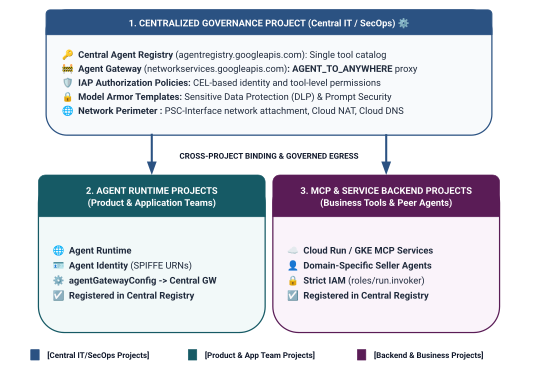
איור 2. ארכיטקטורה וגבולות של ניהול פרויקטים בשלוש שכבות
מודל דו-שכבתי של הגדרת היקף הזהות במערכת גישה מאוחדת לכללי מדיניות (UAP)
כשסוכנים מתקשרים דרך Central Agent Gateway, Identity-Aware Proxy (IAP v2) מעריך את הגישה על סמך זהות הסוכן של המתקשר – זהות מבוססת-SPIFFE שמאומתת באמצעות הצפנה ומונפקת באופן אוטומטי למאגר זמן הריצה – בהשוואה למדיניות גישה גלובלית של IAM:
- רמה 1: ממשקי Google Cloud API בסיסיים (גסות גרגר באמצעות
principalSet://בכלל 1): הרשאת יציאה ברמת הפרויקט שמאפשרת לכל זמני הריצה של הסוכנים בפרויקטים מסוג Spoke להגיע לממשקי Google API רגילים (aiplatform,iamcredentials,telemetry,agentregistry) לצורך גילוי, יצירת טוקנים והסקת מסקנות. - רמה 2: כלים עסקיים ושירותי A2A (גרנולריים באמצעות
principal://בכללים 2 ו-3): גישה מוגבלת עם הרשאות מינימליות שקשורה למופעים ספציפיים של Reasoning Engine, נאכפת באמצעות תנאים של Common Expression Language (CEL) שמכוונים לשירותים ספציפיים של Agent Registry (destination.agent_registry.agent.name).
מה תפַתחו
- Agent Gateway (
centralized-agw) מרכזי ב-PROJECT_GOVERNANCE - תוסף שירות ההרשאה של IAP v2 ומדיניות ההרשאה במצב ENFORCE מחמיר (
failOpen: false) - מדיניות גישה מאוחדת בסיסית של IAM (
uap-rules.json) וקישור מדיניות לפרויקט - הרשאות IAM של סוכני שירות בפרויקטים שונים (
ar_agw_cross_project_sa) - קטגוריית אחסון זמני מרכזית משותפת ב-Google Cloud Storage (GCS)
- נציגים של מוכרי המבורגרים ופיצות ב
PROJECT_SELLERS - רכישת סוכן Concierge עם גילוי אוטומטי דינמי של REST ב-
PROJECT_CONCIERGE - רישום שירותים ב-Central Agent Registry עם כתובות URL של mTLS בין פרויקטים
- עדכונים דינמיים של מדיניות תעבורת נתונים יוצאת (egress) של רכישות מתוך האפליקציה (IAP) גרסה 2 עם אימות בזמן אמת וביקורות ב-Cloud Logging

איור 3. רצף הטמעה מפורט
מה לומדים
- איך מגדירים הרשאות IAM לסוכן שירות בין פרויקטים בשערים מרכזיים
- איך לנתב תעבורת נתונים יוצאת (egress) של Agent Runtime דרך Agent Gateway מרכזי בסביבות מרובות פרויקטים
- איך להאציל הרשאה ל-Agent Gateway לשרת proxy לאימות זהויות (IAP v2) באמצעות Service Extensions (
iapPolicyVersion: "V2") - איך יוצרים ומקשרים מדיניות מאוחדת של ניהול זהויות והרשאות גישה (IAM) עם כללי Common Expression Language (CEL) ששולטים ביעדים רשומים של Agent Registry (
destination.agent_registry.*) - איך מבטלים מזהי סוכן וכתובות URL שמוגדרים בהגדרות קשיחות באמצעות גילוי אוטומטי בזמן ריצה מול Agent Registry
- איך בודקים חסימה אמיתית של גבולות גזרה אפס אמון (
HTTP 403 Forbidden) ומוודאים שעדכוני המדיניות מתבצעים בזמן אמת ב-Cloud Logging
מה צריך
- 3 פרויקטים ב-Google Cloud עם חיוב מופעל:
-
PROJECT_GOVERNANCE: ניהול מרכזי, שער, רישום ומדיניות גישה של IAM -
PROJECT_CONCIERGE: סוכן לניהול תהליכי עבודה של קניינים -
PROJECT_SELLERS: נציגי מכירות מומחים למכירת המבורגרים ופיצות
-
- משתמש IAM או חשבון שירות עם הרשאות
roles/ownerאו הרשאות אדמין בכל 3 הפרויקטים - ארגון ב-Google Cloud (למיפוי של תחום מהימן ב-SPIFFE)
- Google Cloud Shell או מכונה מקומית עם
gcloudCLI,python(גרסה 3.11 ואילך) ו-uvמותקנים
סיימנו את חלק המבוא. עכשיו נעבור לקטע הגדרה וסביבה.
2. הגדרה
למרות שהארכיטקטורה הזו משתרעת על פני 3 פרויקטים שונים ב-Google Cloud, אפשר להריץ 100% מהפקודות לפריסת הטרמינל, להורדת המאגר ולפעולות ההעברה לבמה מטרמינל Cloud Shell יחיד שמוגדר ל-PROJECT_GOVERNANCE. כל סקריפט פריסה וכל פקודת gcloud מטרגטים באופן מפורש את פרויקט היעד המתאים באמצעות דגלי CLI (--project).
כדי להתחיל, ניגשים לשורת הפקודה של הפרויקט בענן ב-Google Cloud:
- Cloud Shell בכתובת
shell.cloud.google.com, או - מסוף מקומי עם
gcloudCLI מותקן
הגדרת ההקשר של הפרויקט
# set terminal project context to Central Governance Project
gcloud config set project SET_YOUR_GOVERNANCE_PROJECT_ID_HERE
# login to gcloud cli
gcloud auth login
# login for application default credentials
gcloud auth application-default login
עדכון gcloud CLI (מומלץ)
# update gcloud components
gcloud components update --quiet
הגדרת סביבת מעטפת
מזינים את המזהים הספציפיים של הפרויקט.
# 1. Project Identifiers
export PROJECT_GOVERNANCE="SET_YOUR_GOVERNANCE_PROJECT_ID_HERE"
export PROJECT_CONCIERGE="SET_YOUR_CONCIERGE_PROJECT_ID_HERE"
export PROJECT_SELLERS="SET_YOUR_SELLERS_PROJECT_ID_HERE"
משתני המעטפת האלה יופקו באופן אוטומטי.
# 2. Regional & Gateway Settings
export REGION="us-central1"
export AGW_NAME="centralized-agw"
export UAP_POLICY_NAME="uap-policy-${AGW_NAME}"
export UAP_BINDING_NAME="uap-binding-${AGW_NAME}"

# 3. Retrieve Project Numbers
export PROJECT_NUMBER_GOVERNANCE=$(gcloud projects describe ${PROJECT_GOVERNANCE} --format="value(projectNumber)")
export PROJECT_NUMBER_CONCIERGE=$(gcloud projects describe ${PROJECT_CONCIERGE} --format="value(projectNumber)")
export PROJECT_NUMBER_SELLERS=$(gcloud projects describe ${PROJECT_SELLERS} --format="value(projectNumber)")

# 4. Obtain Organization ID
export ORG_ID=$(gcloud projects get-ancestors ${PROJECT_GOVERNANCE} --format="value(id, type)" | grep organization | awk '{print $1}')

# 5. Set Application Default Credentials (ADC) Quota Project
gcloud auth application-default set-quota-project ${PROJECT_GOVERNANCE}

echo "Governance Project: ${PROJECT_GOVERNANCE} (${PROJECT_NUMBER_GOVERNANCE})"
echo "Concierge Project:  ${PROJECT_CONCIERGE} (${PROJECT_NUMBER_CONCIERGE})"
echo "Sellers Project:    ${PROJECT_SELLERS} (${PROJECT_NUMBER_SELLERS})"
echo "Organization ID:    ${ORG_ID}"
echo "UAP Policy Name:    ${UAP_POLICY_NAME}"
echo "UAP Binding Name:   ${UAP_BINDING_NAME}"
יצירת ספרייה מקומית לקובצי תצורה
# create config folder
mkdir -p cfg
הקצאת תפקיד אדמין של מדיניות גישה למערכת גישה מאוחדת לכללי מדיניות (UAP)
# grant Access Policy Admin and Project IAM Admin to current user in Governance Project
for ROLE in "roles/iam.accessPolicyAdmin" "roles/resourcemanager.projectIamAdmin"; do
  gcloud projects add-iam-policy-binding ${PROJECT_GOVERNANCE} \
    --member="user:$(gcloud config get-value account)" \
    --role="${ROLE}" \
    --condition=None
done
הפעלה של יומני ביקורת של גישה לנתונים ב-IAP v2
כברירת מחדל, Google Cloud משבית את יומני הביקורת Data Access כדי למנוע עלויות אחסון לא מכוונות. מכיוון ש-IAP v2 מפיק החלטות הרשאה (granted=true ו-granted=false) כיומני ביקורת של גישה לנתונים, צריך להפעיל את הרישום ביומן של ADMIN_READ, DATA_READ ו-DATA_WRITE עבור iap.googleapis.com ב-PROJECT_GOVERNANCE:
# 1. export current IAM policy for PROJECT_GOVERNANCE
gcloud projects get-iam-policy ${PROJECT_GOVERNANCE} \
  --format=json > cfg/gov_iam_policy.json
# 2. append auditConfigs for iap.googleapis.com
python3 -c "
import json
with open('cfg/gov_iam_policy.json') as f:
    policy = json.load(f)
audit_configs = [c for c in policy.get('auditConfigs', []) if c.get('service') != 'iap.googleapis.com']
audit_configs.append({
    'service': 'iap.googleapis.com',
    'auditLogConfigs': [
        {'logType': 'ADMIN_READ'},
        {'logType': 'DATA_READ'},
        {'logType': 'DATA_WRITE'}
    ]
})
policy['auditConfigs'] = audit_configs
with open('cfg/gov_iam_policy.json', 'w') as f:
    json.dump(policy, f, indent=2)
"
# 3. apply updated policy
gcloud projects set-iam-policy ${PROJECT_GOVERNANCE} cfg/gov_iam_policy.json
# 4. verify auditConfigs applied
gcloud projects get-iam-policy ${PROJECT_GOVERNANCE} --format="yaml(auditConfigs)"
הפעלת ממשקי ה-API הנדרשים של Google Cloud
# enable google apis (agent platform & security bundle, part 1)
for PROJ in ${PROJECT_GOVERNANCE} ${PROJECT_CONCIERGE} ${PROJECT_SELLERS}; do
  gcloud services enable \
    agentregistry.googleapis.com \
    aiplatform.googleapis.com \
    apphub.googleapis.com \
    apptopology.googleapis.com \
    cloudapiregistry.googleapis.com \
    cloudtrace.googleapis.com \
    compute.googleapis.com \
    dataform.googleapis.com \
    iam.googleapis.com \
    agentidentity.googleapis.com \
    iap.googleapis.com \
    logging.googleapis.com \
    modelarmor.googleapis.com \
    monitoring.googleapis.com \
    networksecurity.googleapis.com \
    networkservices.googleapis.com \
    notebooks.googleapis.com \
    observability.googleapis.com \
    --project=${PROJ}
done
# enable google apis (agent platform bundle, part 2)
for PROJ in ${PROJECT_GOVERNANCE} ${PROJECT_CONCIERGE} ${PROJECT_SELLERS}; do
  gcloud services enable \
    securitycenter.googleapis.com \
    saasservicemgmt.googleapis.com \
    storage.googleapis.com \
    telemetry.googleapis.com \
    texttospeech.googleapis.com \
    --project=${PROJ}
done
# enable google apis (foundational & agent runtime build bundle, part 3)
for PROJ in ${PROJECT_GOVERNANCE} ${PROJECT_CONCIERGE} ${PROJECT_SELLERS}; do
  gcloud services enable \
    artifactregistry.googleapis.com \
    cloudbuild.googleapis.com \
    cloudresourcemanager.googleapis.com \
    iamcredentials.googleapis.com \
    serviceusage.googleapis.com \
    run.googleapis.com \
    orgpolicy.googleapis.com \
    --project=${PROJ}
done
אימות ההפעלה של ה-API בכל הפרויקטים
כדי להבטיח עקביות תפעולית ולמנוע כשלים בהנפקת טוקנים בזמן ריצה, שגיאות בקטלוג סכימות או נטישת טלמטריה, צריך לוודא שכל שלושת הפרויקטים (PROJECT_GOVERNANCE, PROJECT_CONCIERGE ו-PROJECT_SELLERS) כוללים בדיוק את אותם ממשקי API מופעלים.
מריצים את סקריפט האימות הבא ב-Cloud Shell כדי לוודא שיש שוויון בין ממשקי ה-API בכל שלושת הפרויקטים:
# validate that all required APIs are enabled across all 3 projects
python3 - << 'EOF'
import subprocess
import os
import sys

REQUIRED_APIS = [
    "agentregistry.googleapis.com",
    "aiplatform.googleapis.com",
    "apphub.googleapis.com",
    "apptopology.googleapis.com",
    "cloudapiregistry.googleapis.com",
    "cloudtrace.googleapis.com",
    "compute.googleapis.com",
    "dataform.googleapis.com",
    "iam.googleapis.com",
    "agentidentity.googleapis.com",
    "iap.googleapis.com",
    "logging.googleapis.com",
    "modelarmor.googleapis.com",
    "monitoring.googleapis.com",
    "networksecurity.googleapis.com",
    "networkservices.googleapis.com",
    "notebooks.googleapis.com",
    "observability.googleapis.com",
    "securitycenter.googleapis.com",
    "saasservicemgmt.googleapis.com",
    "storage.googleapis.com",
    "telemetry.googleapis.com",
    "texttospeech.googleapis.com",
    "artifactregistry.googleapis.com",
    "cloudbuild.googleapis.com",
    "cloudresourcemanager.googleapis.com",
    "iamcredentials.googleapis.com",
    "serviceusage.googleapis.com",
    "run.googleapis.com",
    "orgpolicy.googleapis.com"
]

projects = {
    "GOVERNANCE": os.environ.get("PROJECT_GOVERNANCE", ""),
    "CONCIERGE": os.environ.get("PROJECT_CONCIERGE", ""),
    "SELLERS": os.environ.get("PROJECT_SELLERS", "")
}

enabled = {}
for role, proj in projects.items():
    if not proj:
        print(f"Error: Environment variable for {role} is not set.")
        sys.exit(1)
    res = subprocess.run(
        ["gcloud", "services", "list", "--enabled", f"--project={proj}", "--format=value(config.name)"],
        capture_output=True, text=True, check=True
    )
    enabled[role] = set(res.stdout.strip().splitlines())

print(f"\n{'API Name':<36} | {'GOVERNANCE':<12} | {'CONCIERGE':<12} | {'SELLERS':<12}")
print("-" * 78)

all_synced = True
for api in REQUIRED_APIS:
    g_status = "ENABLED" if api in enabled["GOVERNANCE"] else "MISSING"
    c_status = "ENABLED" if api in enabled["CONCIERGE"] else "MISSING"
    s_status = "ENABLED" if api in enabled["SELLERS"] else "MISSING"
    if "MISSING" in (g_status, c_status, s_status):
        all_synced = False
    print(f"{api:<36} | {g_status:<12} | {c_status:<12} | {s_status:<12}")

print("-" * 78)
if all_synced:
    print("✅ All 29 required APIs are ENABLED and synchronized across all three projects.\n")
else:
    print("❌ Discrepancies detected. Please re-run the enablement commands for missing services.\n")
    sys.exit(1)
EOF
פלט אימות לדוגמה:
יוצגו כל ממשקי ה-API המופעלים.
✅ All 30 required APIs are ENABLED and synchronized across all three projects.
הגדרה של מדיניות הארגון
כללי מדיניות ברירת המחדל של Google Cloud אוכפים אילוצים שמגבילים את הקישורים למדיניות הגישה של IAM v3 למשאבים (constraints/iam.managed.disableAccessPolicyBinding).
כדי לבטל את המגבלות של מדיניות הארגון שמועברות בירושה ברמת הפרויקט, צריך להגדיר במפורש את enforce: false כהרשאה.
# disable iam v3 constraint (allow v3 access policies)
gcloud org-policies set-policy /dev/stdin << EOF
name: projects/${PROJECT_NUMBER_GOVERNANCE}/policies/iam.managed.disableAccessPolicyBinding
spec:
  rules:
  - enforce: false
EOF
# verify org policy constraints on project
gcloud org-policies describe iam.managed.disableAccessPolicyBinding \
  --project=${PROJECT_GOVERNANCE} --effective
כאן מסתיים חלק ההגדרה. עכשיו עוברים לקטע רישום של ממשקי ליבה של Google APIs.
3. Agent Registry
רישום של שירות נקודת קצה של ממשקי Google API מרכזיים
Agent Gateway דורש שכתובות ה-URL של Google API יירשמו ב-Agent Registry כדי שהסוכנים שהוגדרו באמצעות agent_gateway_config יוכלו לנתב תנועת יציאה בצורה מאובטחת לשירותי קצה עורפיים מרכזיים של Google Cloud (כמו aiplatform, IAM Credentials ו-Telemetry).
יצירת core-gapi-services ב-Agent Registry
# register core google api endpoints in agent registry with standard and :443 port variants
gcloud agent-registry services create core-gapi-services \
  --project=${PROJECT_GOVERNANCE} \
  --location=${REGION} \
  --display-name="gapi.core.services" \
  --description="Core Google Cloud APIs and Service Endpoints" \
  --endpoint-spec-type=no-spec \
  --interfaces=protocolBinding=JSONRPC,url=https://telemetry.googleapis.com \
  --interfaces=protocolBinding=JSONRPC,url=https://telemetry.mtls.googleapis.com \
  --interfaces=protocolBinding=JSONRPC,url=https://${REGION}-aiplatform.googleapis.com \
  --interfaces=protocolBinding=JSONRPC,url=https://${REGION}-aiplatform.googleapis.com:443 \
  --interfaces=protocolBinding=JSONRPC,url=https://${REGION}-aiplatform.mtls.googleapis.com \
  --interfaces=protocolBinding=JSONRPC,url=https://${REGION}-aiplatform.mtls.googleapis.com:443 \
  --interfaces=protocolBinding=JSONRPC,url=https://aiplatform.googleapis.com \
  --interfaces=protocolBinding=JSONRPC,url=https://aiplatform.googleapis.com:443 \
  --interfaces=protocolBinding=JSONRPC,url=https://aiplatform.mtls.googleapis.com \
  --interfaces=protocolBinding=JSONRPC,url=https://aiplatform.mtls.googleapis.com:443 \
  --interfaces=protocolBinding=JSONRPC,url=https://cloudresourcemanager.googleapis.com \
  --interfaces=protocolBinding=JSONRPC,url=https://iamcredentials.googleapis.com \
  --interfaces=protocolBinding=JSONRPC,url=https://iamcredentials.mtls.googleapis.com \
  --interfaces=protocolBinding=JSONRPC,url=https://agentregistry.googleapis.com \
  --interfaces=protocolBinding=JSONRPC,url=https://agentregistry.mtls.googleapis.com \
  --interfaces=protocolBinding=JSONRPC,url=https://agentregistry.googleapis.com:443 \
  --interfaces=protocolBinding=JSONRPC,url=https://agentregistry.mtls.googleapis.com:443
איך מאתרים את מזהה משאב נקודת הקצה של Capture Core APIs
# capture the underlying Agent Registry endpoint ID
export ENDPOINT_ID=$(gcloud agent-registry services describe core-gapi-services \
  --project=${PROJECT_GOVERNANCE} \
  --location=${REGION} \
  --format="value(registryResource)" | awk -F'/' '{print $NF}')
echo "Core APIs Endpoint ID: ${ENDPOINT_ID}"
ההבדל בין principalSet לבין principal ב-Agent Identity
ב-Google Cloud IAM וב-Gemini Enterprise Agent Platform, זהויות המכונה שמונפקות למאגרי סוכנים (agent containers) פועלים באמצעות מזהי SPIFFE URN מאומתים קריפטוגרפית שמוערכים על ידי שרת proxy לאימות זהויות (IAP v2). כשמגדירים כללי מדיניות מאוחדים של IAM, אפשר לטרגט principal ספציפי או principalSet שמבוסס על מאפיינים:
מאפיין | |
|
תחביר IAM |
|
|
רמת פירוט | גרנולריות גבוהה (ברמת המכונה): מזהה מופע ספציפי יחיד של קונטיינר Reasoning Engine. | גס (ברמת הפרויקט): מזהה את כל מנועי ההסקה שמשתפים מאפיין פרויקט משותף. |
תבנית URN |
|
|
תרחיש שימוש ב-Agent Platform | רמה 2 (כלים עסקיים ו-A2A): מתן הרשאה לסוכני תזמור ספציפיים להפעיל כלים של דומיין היעד (לדוגמה, Purchasing Concierge $\rightarrow$ Burger Seller). | רמה 1 (תשתית בסיסית): מתן גישה לכל הסוכנים בפרויקט ל-Google Cloud APIs ( |
השפעה על מחזור החיים | אם סוכן נמחק ונוצר מחדש, צריך לעדכן את הקישור של מדיניות IAM למזהה המנוע החדש שלו. | ההרשאה חלה באופן אוטומטי על סוכנים חדשים שנפרסו בפרויקט הזה, ללא צורך בעדכוני IAM נוספים. |
ניהול הרשאות גישה באמצעות מדיניות מאוחדת לניהול הרשאות גישה (UAP / IAP v2)
ב-IAP v1 מדור קודם, מדיניות יציאה צורפה ישירות למשאבים ספציפיים של Agent Registry באמצעות gcloud beta iap web add-iam-policy-binding. בקטע IAP v2 ומדיניות גישה מאוחדת, ביטול ההרשאות לכל משאב נעשה לטובת מדיניות גישה יחידה ומרוכזת ב-IAM (cfg/uap-rules.json).
הרשאת יציאה בסיסית ל-core-gapi-services תוגדר ככלל 1 במדיניות הגישה המאוחדת בקטע 5, כדי להבטיח שכל מאגרי הסוכנים יקבלו נתיבי יציאה בסיסיים לפני הפריסה.
לפרטים טכניים נוספים על מזהי ישויות מורשות ועל המנגנונים של זהויות לעומסי עבודה, אפשר לעיין במאמרים הבאים:
- Google Cloud IAM: מזהים של ישויות ומערכות של ישויות
- איך פועלת התכונה 'זהות הנציג'
- הגדרת כללי מדיניות מאוחדים של IAM לגישה ל-Agent Gateway
כאן מסתיים הרישום של נקודת הקצה של ממשקי ה-API המרכזיים... עכשיו עוברים לקטע פריסת שער מרכזי של סוכנים.
4. Agent Gateway
פריסה של Agent Gateway מרכזי
פרוס את ה-Agent Gateway המרכזי (centralized-agw) במצב AGENT_TO_ANYWHERE יציאה (egress) בתוך פרויקט $PROJECT_GOVERNANCE.
הגדרת קובץ מניפסט של שער
יצירת cfg/${AGW_NAME}.yaml לניהול תעבורת נתונים יוצאת:
# generate agent gateway config yaml
cat > cfg/${AGW_NAME}.yaml << EOF
name: ${AGW_NAME}
protocols:
  - MCP
googleManaged:
  governedAccessPath: AGENT_TO_ANYWHERE
registries:
  - "//agentregistry.googleapis.com/projects/${PROJECT_GOVERNANCE}/locations/${REGION}"
EOF
ייבוא הגדרות של Agent Gateway
# import and create agent gateway
gcloud network-services agent-gateways import ${AGW_NAME} \
  --source="cfg/${AGW_NAME}.yaml" \
  --location=${REGION} \
  --project=${PROJECT_GOVERNANCE}
אימות הפרטים של Agent Gateway
# show agent gateway status
gcloud network-services agent-gateways describe ${AGW_NAME} \
  --location=${REGION} \
  --project=${PROJECT_GOVERNANCE}
פלט לדוגמה:
agentGatewayCard:
  mtlsEndpoint: projects/${AGW_TP_ID}/regions/us-central1/serviceAttachments/unitkind1-swp-mtls-psc-sa
  rootCertificates:
  - |
    -----BEGIN CERTIFICATE-----
    MIIDwzCCAqugAwIBAgITNQuWGopdOZaHdcK7r7AYFhonqDANBgkqhkiG9w0BAQsF
    ...
    -----END CERTIFICATE-----
  serviceExtensionsServiceAccount: service-${PROJ_NO}@gcp-sa-dep.iam.gserviceaccount.com
createTime: 'YYYY-MM-DDT12:34:56.789098765Z'
googleManaged:
  governedAccessPath: AGENT_TO_ANYWHERE
name: projects/${PROJECT_GOVERNANCE}/locations/us-central1/agentGateways/centralized-agw
protocols:
- MCP
registries:
- //agentregistry.googleapis.com/projects/${PROJECT_GOVERNANCE}/locations/us-central1
updateTime: 'YYYY-MM-DDT12:34:56.789098765Z'
כאן מסתיים תהליך הפריסה של השער. עכשיו עוברים לקטע הגדרת הרשאה.
5. אישור
הגדרת הרשאות של Agent Gateway ו-UAP בסיסי
ה-Agent Gateway מאבטח את התעבורה של כלים וסוכנים יוצאים ושולט בה באמצעות מדיניות הרשאות (networksecurity.authzPolicies) שמשולבת עם מדיניות מאוחדת לגישה (UAP) של שרת proxy לאימות זהויות (IAP v2).
סקירה כללית של ארכיטקטורת ההרשאות

איור 4. סקירה כללית על ארכיטקטורת ההרשאות
ארכיטקטורת ההרשאה מורכבת משלוש שכבות שמחוברות ביניהן:
- IAP Service Extension (
authzExtension): משאב אזורי שהוגדר עםservice: iap.googleapis.com,metadata: iapPolicyVersion: "V2"ו-failOpen: falseלאכיפה מחמירה של גבולות גזרה אפס אמון. - מדיניות הרשאה של Agent Gateway (
authzPolicy): משאב אזורי שמטרגט את Agent Gateway עםpolicyProfile: REQUEST_AUTHZו-action: CUSTOM, ומנתב בדיקות הרשאה לתוסף IAP Authz. - IAM Unified Access Policy & Binding (
accessPolicy&policyBinding): משאב IAM v3 גלובלי שנבדק על ידי IAP. הוא מאמת את ההרשאה האוניברסליתiap.googleapis.com/resources.egressViaIAPמול זהויות SPIFFE של המתקשר ותנאי קטלוג CEL.
שלב 1: יצירה וייבוא של תוסף IAP v2 Authz
יוצרים את מניפסט תוסף השירות עם iapPolicyVersion: "V2" ו-failOpen: false במצב ENFORCE מחמיר:
# create authz extension config file in ENFORCE mode
cat > cfg/${AGW_NAME}-svc-ext-authz-iap.yaml << EOF
name: ${AGW_NAME}-svc-ext-authz-iap
service: iap.googleapis.com
failOpen: false
timeout: 1s
metadata:
  iapPolicyVersion: "V2"
EOF
מייבאים את תוסף ההרשאות:
# import IAP v2 authz extension
gcloud service-extensions authz-extensions import ${AGW_NAME}-svc-ext-authz-iap \
  --source=cfg/${AGW_NAME}-svc-ext-authz-iap.yaml \
  --location=${REGION} \
  --project=${PROJECT_GOVERNANCE}
מוודאים שתוסף ההרשאות פעיל:
# describe authz extension
gcloud service-extensions authz-extensions describe ${AGW_NAME}-svc-ext-authz-iap \
  --location=${REGION} \
  --project=${PROJECT_GOVERNANCE}
פלט לדוגמה:
createTime: 'YYYY-MM-DDT12:34:56.789098765Z'
failOpen: false
metadata:
  iapPolicyVersion: V2
name: projects/${PROJECT_GOVERNANCE}/locations/us-central1/authzExtensions/centralized-agw-svc-ext-authz-iap
service: iap.googleapis.com
timeout: 1s
שלב 2: יצירה וייבוא של מדיניות הרשאה של שער
יוצרים הגדרה של מדיניות הרשאות שמתחברת ל-Agent Gateway ומקצה את אימות הבקשות ל-IAP Authz Extension:
# create authz policy manifest
cat > cfg/${AGW_NAME}-authz-policy-profile-iap.yaml << EOF
name: ${AGW_NAME}-authz-policy-profile-iap
target:
  resources:
    - "projects/${PROJECT_GOVERNANCE}/locations/${REGION}/agentGateways/${AGW_NAME}"
policyProfile: REQUEST_AUTHZ
action: CUSTOM
customProvider:
  authzExtension:
    resources:
      - "projects/${PROJECT_GOVERNANCE}/locations/${REGION}/authzExtensions/${AGW_NAME}-svc-ext-authz-iap"
EOF
מייבאים את מדיניות ההרשאות:
# import authz policy
gcloud beta network-security authz-policies import ${AGW_NAME}-authz-policy-profile-iap \
  --source=cfg/${AGW_NAME}-authz-policy-profile-iap.yaml \
  --location=${REGION} \
  --project=${PROJECT_GOVERNANCE}
בודקים את מדיניות ההרשאות הפעילה:
# describe authz policy
gcloud beta network-security authz-policies describe ${AGW_NAME}-authz-policy-profile-iap \
  --location=${REGION} \
  --project=${PROJECT_GOVERNANCE}
שלב 3: יצירת מדיניות גישה מאוחדת ראשונית (כלל 1: ממשקי ליבה של Google API)
יוצרים את cfg/uap-rules.json עם כלל 1 שמאשר לשלושת הפרויקטים principalSet להגיע אל core-gapi-services:
# create initial unified access policy rules manifest
cat > cfg/uap-rules.json << EOF
[
  {
    "description": "Rule 1: Allow agent runtimes across all 3 projects to reach Core Google APIs",
    "effect": "ALLOW",
    "principals": [
      "principalSet://agents.global.org-${ORG_ID}.system.id.goog/attribute.platformContainer/aiplatform/projects/${PROJECT_NUMBER_GOVERNANCE}",
      "principalSet://agents.global.org-${ORG_ID}.system.id.goog/attribute.platformContainer/aiplatform/projects/${PROJECT_NUMBER_CONCIERGE}",
      "principalSet://agents.global.org-${ORG_ID}.system.id.goog/attribute.platformContainer/aiplatform/projects/${PROJECT_NUMBER_SELLERS}"
    ],
    "operation": {
      "permissions": [
        "iap.googleapis.com/resources.egressViaIAP"
      ]
    },
    "conditions": {
      "iap.googleapis.com": {
        "expression": \
        "destination.is_registered == true && \
         destination.agent_registry.resource_type == 'ENDPOINT' && ( \
         destination.agent_registry.endpoint.name == 'projects/${PROJECT_GOVERNANCE}/locations/${REGION}/endpoints/core-gapi-services' || \
         destination.agent_registry.endpoint.name == 'projects/${PROJECT_GOVERNANCE}/locations/${REGION}/endpoints/${ENDPOINT_ID}' || \
         destination.agent_registry.endpoint.name == 'projects/${PROJECT_NUMBER_GOVERNANCE}/locations/${REGION}/endpoints/${ENDPOINT_ID}')"
      }
    }
  }
]
EOF
שלב 4: יצירה של מדיניות גישה ב-IAM וקישור שלה
יוצרים את מדיניות הגישה הגלובלית ב-IAM:
# create global IAM access policy
gcloud iam access-policies create ${UAP_POLICY_NAME} \
  --details-rules=cfg/uap-rules.json \
  --project=${PROJECT_GOVERNANCE} \
  --location=global
קישור מדיניות הגישה אל PROJECT_GOVERNANCE:
# bind access policy to governance project
gcloud iam policy-bindings create ${UAP_BINDING_NAME} \
  --policy="projects/${PROJECT_GOVERNANCE}/locations/global/accessPolicies/${UAP_POLICY_NAME}" \
  --target-resource="//cloudresourcemanager.googleapis.com/projects/${PROJECT_GOVERNANCE}" \
  --project=${PROJECT_GOVERNANCE} \
  --location=global
מוודאים שהמדיניות פעילה:
# verify policy binding
gcloud iam policy-bindings describe ${UAP_BINDING_NAME} \
  --project=${PROJECT_GOVERNANCE} \
  --location=global
פלט לדוגמה:
name: projects/${PROJECT_GOVERNANCE}/locations/global/policyBindings/uap-binding-centralized-agw
policy: projects/${PROJECT_GOVERNANCE}/locations/global/accessPolicies/uap-policy-centralized-agw
policyKind: ACCESS_POLICY
target:
  resource: //cloudresourcemanager.googleapis.com/projects/${PROJECT_GOVERNANCE}
יציאה (egress) של נתונים מממשקי API בסיסיים של Google Cloud מורשית עכשיו באופן מאובטח בכל שלושת הפרויקטים במצב ENFORCE מחמיר.
כאן מסתיימת ההגדרה של הרשאות השער. עכשיו אפשר לעבור לקטע הגדרת הרשאות IAM בין פרויקטים.
6. IAM בין פרויקטים
הגדרת הרשאות IAM בין פרויקטים
בטופולוגיה מרובת הפרויקטים הזו, Agent Runtimes נמצאים בפרויקטים מסוג Spoke (PROJECT_CONCIERGE ו-PROJECT_SELLERS), בעוד ש-Agent Gateway המרכזי ו-Agent Registry נמצאים ב-PROJECT_GOVERNANCE.
מכיוון שפרויקטים ב-Google Cloud הם גבולות אבטחה מבודדים, צריך להעניק גישה בין פרויקטים באופן מפורש בשתי שכבות תפעוליות:
- מישור הבקרה (זמן פריסה): כשפורסים קונטיינר סוכנים שהוגדר עם
--agent-gateway-config, Agent Runtime Service Agent (service-) של פרויקט ה-spoke צריך לחבר את הקונטיינר לשער המרכזי. אנחנו יוצרים תפקיד מינימלי בהתאמה אישית (@gcp-sa-aiplatform.iam.gserviceaccount.com ar_agw_cross_project_sa) שמעניק את ההרשאותnetworkservices.agentGateways.use, getו-operations.getב-PROJECT_GOVERNANCE. - מישור הנתונים (הפעלה בזמן ריצה):
- גילוי קטלוג: כדי לפתור את נקודות הקצה של סוכני היעד באופן דינמי, זהויות ה-Spoke צריכות
roles/agentregistry.viewerב-PROJECT_GOVERNANCE. - הפעלת היעד: לסוכן Concierge נדרש
roles/aiplatform.userב-PROJECT_SELLERSכדי להריץ שאילתות במנועי הנימוקים של המוכר.
- גילוי קטלוג: כדי לפתור את נקודות הקצה של סוכני היעד באופן דינמי, זהויות ה-Spoke צריכות
יצירת תפקיד IAM בהתאמה אישית ב-PROJECT_GOVERNANCE
# create custom role in central governance project
gcloud iam roles create ar_agw_cross_project_sa \
  --project=${PROJECT_GOVERNANCE} \
  --title="Runtime Agent Gateway Cross-Project SA" \
  --description="Custom role for cross-project service agents to access Central Agent Gateway" \
  --permissions="networkservices.agentGateways.get,networkservices.agentGateways.use,networkservices.operations.get" \
  --stage="GA"
הקצאת תפקיד בהתאמה אישית לסוכני שירות של Agent Runtime
# 1. ensure aiplatform service identities are provisioned across all projects
for PROJ in ${PROJECT_GOVERNANCE} ${PROJECT_CONCIERGE} ${PROJECT_SELLERS}; do
  gcloud beta services identity create --service=aiplatform.googleapis.com --project=${PROJ}
done
# 2. derive aiplatform service agent emails
export CONCIERGE_AI_SA="service-${PROJECT_NUMBER_CONCIERGE}@gcp-sa-aiplatform.iam.gserviceaccount.com"
export CONCIERGE_RE_SA="service-${PROJECT_NUMBER_CONCIERGE}@gcp-sa-aiplatform-re.iam.gserviceaccount.com"
export CONCIERGE_COMPUTE_SA="${PROJECT_NUMBER_CONCIERGE}-compute@developer.gserviceaccount.com"

export SELLERS_AI_SA="service-${PROJECT_NUMBER_SELLERS}@gcp-sa-aiplatform.iam.gserviceaccount.com"
export SELLERS_RE_SA="service-${PROJECT_NUMBER_SELLERS}@gcp-sa-aiplatform-re.iam.gserviceaccount.com"
export SELLERS_COMPUTE_SA="${PROJECT_NUMBER_SELLERS}-compute@developer.gserviceaccount.com"
# 3. grant custom role & network viewer to Concierge and Sellers Service Agents
for SA in ${CONCIERGE_AI_SA} ${SELLERS_AI_SA}; do
  gcloud projects add-iam-policy-binding ${PROJECT_GOVERNANCE} \
    --member="serviceAccount:${SA}" \
    --role="projects/${PROJECT_GOVERNANCE}/roles/ar_agw_cross_project_sa" \
    --condition=None

  gcloud projects add-iam-policy-binding ${PROJECT_GOVERNANCE} \
    --member="serviceAccount:${SA}" \
    --role="roles/networkservices.viewer" \
    --condition=None
done
# 4. grant agent registry viewer on Governance Project for dynamic autodiscovery
for MEMBER in "serviceAccount:${CONCIERGE_AI_SA}" "serviceAccount:${CONCIERGE_RE_SA}" "serviceAccount:${CONCIERGE_COMPUTE_SA}" "serviceAccount:${SELLERS_AI_SA}" "serviceAccount:${SELLERS_RE_SA}" "serviceAccount:${SELLERS_COMPUTE_SA}" "principalSet://agents.global.org-${ORG_ID}.system.id.goog/attribute.platformContainer/aiplatform/projects/${PROJECT_NUMBER_CONCIERGE}" "principalSet://agents.global.org-${ORG_ID}.system.id.goog/attribute.platformContainer/aiplatform/projects/${PROJECT_NUMBER_SELLERS}"; do
  gcloud projects add-iam-policy-binding ${PROJECT_GOVERNANCE} \
    --member="${MEMBER}" \
    --role="roles/agentregistry.viewer" \
    --condition=None
done
# 5. grant agent project viewer on Governance Project for dynamic autodiscovery
for SA in ${CONCIERGE_COMPUTE_SA} ${CONCIERGE_AI_SA}; do
  gcloud projects add-iam-policy-binding ${PROJECT_GOVERNANCE} \
    --member="serviceAccount:${SA}" \
    --role="roles/viewer" \
    --condition=None
done
# 6. grant aitplatform user on Sellers project to Concierge for cross-project A2A invocation
for MEMBER in "serviceAccount:${CONCIERGE_AI_SA}" "serviceAccount:${CONCIERGE_RE_SA}" "serviceAccount:${CONCIERGE_COMPUTE_SA}" "principalSet://agents.global.org-${ORG_ID}.system.id.goog/attribute.platformContainer/aiplatform/projects/${PROJECT_NUMBER_CONCIERGE}"; do
  gcloud projects add-iam-policy-binding ${PROJECT_SELLERS} \
    --member="${MEMBER}" \
    --role="roles/aiplatform.user" \
    --condition=None
done
בזה מסתיים תהליך ההגדרה של IAM בין פרויקטים. עכשיו אפשר לעבור לקטע פריסת סוכני מכירות וסוכני תמיכה.
7. Agent Runtime
Deploy Seller & Concierge Agents
קוד הבסיס של האפליקציה מרובת הסוכנים וסקריפטים הפריסה שמשמשים ב-Codelab הזה מתעדכנים במאגר GitHub מרוחק של Google Cloud. בשלבים הבאים יבוצע שיבוט של המאגר באופן מקומי, העתקה של הקבצים הנדרשים למבנה של ספריית העבודה הנוכחית, ניקוי של קבצים זמניים והתקנה של יחסי תלות באמצעות uv.
אחזור פריטי מידע שנוצרים בתהליך פיתוח (Artifact) מרוחקים
# clone remote repository to temp local dir
git clone https://github.com/GoogleCloudPlatform/cloud-networking-solutions.git ./temp_agw_cuj_arun_multiproject
# copy multi-agent application files to current working directory
cp -r temp_agw_cuj_arun_multiproject/codelabs/agw-cuj-arun-multiproject ./cross-project-multiagent
# remove temporary directory
rm -rf temp_agw_cuj_arun_multiproject
# install dependencies
uv sync --directory ./cross-project-multiagent
יצירת קטגוריה מרכזית משותפת של Staging
# create shared central staging bucket
gcloud storage buckets create gs://${PROJECT_GOVERNANCE}-shared-staging \
  --project=${PROJECT_GOVERNANCE} \
  --location=${REGION}
# grant cross-project read/write access to runtime service agents
gcloud storage buckets add-iam-policy-binding gs://${PROJECT_GOVERNANCE}-shared-staging \
  --member="serviceAccount:service-${PROJECT_NUMBER_CONCIERGE}@gcp-sa-aiplatform.iam.gserviceaccount.com" \
  --role="roles/storage.objectAdmin"

gcloud storage buckets add-iam-policy-binding gs://${PROJECT_GOVERNANCE}-shared-staging \
  --member="serviceAccount:service-${PROJECT_NUMBER_SELLERS}@gcp-sa-aiplatform.iam.gserviceaccount.com" \
  --role="roles/storage.objectAdmin"
איך פועל שילוב של Agent Gateway בין פרויקטים
בשלב הזה, תפרסו את סוכני המוכר בפרויקט spoke (PROJECT_SELLERS) ותגדירו אותם להפניית תעבורת יציאה דרך שער הסוכן המרכזי ב-PROJECT_GOVERNANCE:
# !-- for example purposes -- NOT a command to execute --!
# snippet from deploy_burger.py
burger_config = {
    "staging_bucket": staging_bucket_uri,
    "gcs_dir_name": "burger_agent",
    "display_name": "burger-seller-agent-adk",
    "identity_type": "AGENT_IDENTITY",
    "agent_gateway_config": {
        "agent_to_anywhere_config": {
            "agent_gateway": f"projects/{args.governance_project}/locations/{args.region}/agentGateways/{args.gateway}"
        }
    },
}
deployed_burger = client.agent_engines.create(agent=burger_playground, config=burger_config)
מכיוון שכלל 1 הוגדר מוקדם יותר במדיניות הגישה המאוחדת שלנו, בקשות לאתחול מאגרי תגים אל ממשקי Google Cloud API מורשות דרך שער הכניסה ללא הפרעה.
פריסת סוכני מכירת המבורגרים ופיצות בPROJECT_SELLERS
# 1. deploy Burger Seller Agent to PROJECT_SELLERS
uv run --directory ./cross-project-multiagent python deploy_burger.py \
  --project=${PROJECT_SELLERS} \
  --region=${REGION} \
  --governance-project=${PROJECT_GOVERNANCE} \
  --gateway=projects/${PROJECT_GOVERNANCE}/locations/${REGION}/agentGateways/${AGW_NAME}
# 2. deploy Pizza Seller Agent to PROJECT_SELLERS
uv run --directory ./cross-project-multiagent python deploy_pizza.py \
  --project=${PROJECT_SELLERS} \
  --region=${REGION} \
  --governance-project=${PROJECT_GOVERNANCE} \
  --gateway=projects/${PROJECT_GOVERNANCE}/locations/${REGION}/agentGateways/${AGW_NAME}
אימות הניתוב של שער המוכר
# retrieve deployed seller reasoning engine IDs
export BURGER_ENGINE_ID=$(grep BURGER_SELLER_AGENT_ID cross-project-multiagent/burger_agent.env | awk -F'/' '{print $NF}')
export PIZZA_ENGINE_ID=$(grep PIZZA_SELLER_AGENT_ID cross-project-multiagent/pizza_agent.env | awk -F'/' '{print $NF}')

echo "Burger Engine ID: ${BURGER_ENGINE_ID}"
echo "Pizza Engine ID:  ${PIZZA_ENGINE_ID}"
# inspect runtime configuration for both Seller Agents
for ENGINE_ID in ${BURGER_ENGINE_ID} ${PIZZA_ENGINE_ID}; do
  curl -s -X GET "https://${REGION}-aiplatform.googleapis.com/v1beta1/projects/${PROJECT_SELLERS}/locations/${REGION}/reasoningEngines/${ENGINE_ID}" \
    -H "Authorization: Bearer $(gcloud auth application-default print-access-token)" \
    -H "Content-Type: application/json" \
    | jq '{displayName: .displayName, identityType: .spec.identityType, effectiveIdentity: .spec.effectiveIdentity, agentGatewayConfig: .spec.deploymentSpec.agentGatewayConfig}'
done
פריסת סוכן של Concierge לרכישות ב-PROJECT_CONCIERGE
# deploy Purchasing Concierge to PROJECT_CONCIERGE
uv run --directory ./cross-project-multiagent python deploy_concierge_adk.py \
  --project=${PROJECT_CONCIERGE} \
  --region=${REGION} \
  --staging-bucket=gs://${PROJECT_GOVERNANCE}-shared-staging \
  --gateway-name=${AGW_NAME} \
  --gateway-project=${PROJECT_GOVERNANCE}
אימות הניתוב של שער הרכישה
# retrieve Concierge engine ID
export CONCIERGE_ENGINE_ID=$(grep CONCIERGE_AGENT_ID cross-project-multiagent/concierge_agent.env | awk -F'/' '{print $NF}')
echo "Concierge Engine ID: ${CONCIERGE_ENGINE_ID}"
# inspect runtime configuration for Purchasing Concierge
curl -s -X GET "https://${REGION}-aiplatform.googleapis.com/v1beta1/projects/${PROJECT_CONCIERGE}/locations/${REGION}/reasoningEngines/${CONCIERGE_ENGINE_ID}" \
  -H "Authorization: Bearer $(gcloud auth application-default print-access-token)" \
  -H "Content-Type: application/json" \
  | jq '{displayName: .displayName, identityType: .spec.identityType, effectiveIdentity: .spec.effectiveIdentity, agentGatewayConfig: .spec.deploymentSpec.agentGatewayConfig}'
הפלט צריך להציג את זהות זמן הריצה של סוכן Concierge, את הפרויקט ואת הקישור ל-Agent Gateway של פרויקט Governance.
{
  "displayName": "purchasing-concierge-adk",
  "identityType": "AGENT_IDENTITY",
  "effectiveIdentity": "agents.global.org-${ORG_ID}.system.id.goog/resources/aiplatform/projects/${PROJECT_CONCIERGE}/locations/us-central1/reasoningEngines/${CONCIERGE_ENGINE_ID}",
  "agentGatewayConfig": {
    "agentToAnywhereConfig": {
      "agentGateway": "projects/${PROJECT_GOVERNANCE}/locations/us-central1/agentGateways/centralized-agw"
    }
  }
}
כאן מסתיים תהליך הפריסה של הסוכנים… עכשיו נעבור אל הקטע רישום סוכנים ב-Agent Registry המרכזי.
8. מאגר נתונים חוצה-פרויקטים
רישום סוכנים ב-Central Agent Registry
צריך לרשום את שלושת הסוכנים ב-Agent Registry המרכזי ב-PROJECT_GOVERNANCE באמצעות נקודות קצה אזוריות של mTLS בין פרויקטים ומספרי פרויקטים מספריים.
רישום שירותים כסוכנים שאינם A2A ב-Agent Registry
# 1. register Burger Seller Agent
gcloud agent-registry services create burger-seller-agent \
  --project=${PROJECT_GOVERNANCE} \
  --location=${REGION} \
  --display-name="Burger Seller Agent" \
  --description="Specialist agent that sells burgers and fries" \
  --agent-spec-type=no-spec \
  --interfaces=protocolBinding=JSONRPC,url=https://${REGION}-aiplatform.mtls.googleapis.com/v1/projects/${PROJECT_NUMBER_SELLERS}/locations/${REGION}/reasoningEngines/${BURGER_ENGINE_ID}:query \
  --interfaces=protocolBinding=JSONRPC,url=https://${REGION}-aiplatform.mtls.googleapis.com/v1beta1/projects/${PROJECT_NUMBER_SELLERS}/locations/${REGION}/reasoningEngines/${BURGER_ENGINE_ID}:query
# 2. register Pizza Seller Agent
gcloud agent-registry services create pizza-seller-agent \
  --project=${PROJECT_GOVERNANCE} \
  --location=${REGION} \
  --display-name="Pizza Seller Agent" \
  --description="Specialist agent that sells pizzas and pasta" \
  --agent-spec-type=no-spec \
  --interfaces=protocolBinding=JSONRPC,url=https://${REGION}-aiplatform.mtls.googleapis.com/v1/projects/${PROJECT_NUMBER_SELLERS}/locations/${REGION}/reasoningEngines/${PIZZA_ENGINE_ID}:query \
  --interfaces=protocolBinding=JSONRPC,url=https://${REGION}-aiplatform.mtls.googleapis.com/v1beta1/projects/${PROJECT_NUMBER_SELLERS}/locations/${REGION}/reasoningEngines/${PIZZA_ENGINE_ID}:query
# 3. register Purchasing Concierge Agent
gcloud agent-registry services create purchasing-concierge-adk \
  --project=${PROJECT_GOVERNANCE} \
  --location=${REGION} \
  --display-name="Purchasing Concierge Agent" \
  --description="Orchestrator concierge agent that routes purchasing requests" \
  --agent-spec-type=no-spec \
  --interfaces=protocolBinding=JSONRPC,url=https://${REGION}-aiplatform.mtls.googleapis.com/v1/projects/${PROJECT_NUMBER_CONCIERGE}/locations/${REGION}/reasoningEngines/${CONCIERGE_ENGINE_ID}:query \
  --interfaces=protocolBinding=JSONRPC,url=https://${REGION}-aiplatform.mtls.googleapis.com/v1beta1/projects/${PROJECT_NUMBER_CONCIERGE}/locations/${REGION}/reasoningEngines/${CONCIERGE_ENGINE_ID}:query
קבלת מזהים של סוכנים בסיסיים ב-Agent Registry
# capture underlying Agent Registry Agent UUIDs
export BURGER_AGENT_ID=$(gcloud agent-registry services describe burger-seller-agent --project=${PROJECT_GOVERNANCE} --location=${REGION} --format="value(registryResource)" | awk -F'/' '{print $NF}')
export PIZZA_AGENT_ID=$(gcloud agent-registry services describe pizza-seller-agent --project=${PROJECT_GOVERNANCE} --location=${REGION} --format="value(registryResource)" | awk -F'/' '{print $NF}')
export CONCIERGE_AGENT_ID=$(gcloud agent-registry services describe purchasing-concierge-adk --project=${PROJECT_GOVERNANCE} --location=${REGION} --format="value(registryResource)" | awk -F'/' '{print $NF}')

echo "Burger Agent ID:    ${BURGER_AGENT_ID}"
echo "Pizza Agent ID:     ${PIZZA_AGENT_ID}"
echo "Concierge Agent ID: ${CONCIERGE_AGENT_ID}"
כאן מסתיימת ההגדרה של ה-Registry. עכשיו עוברים אל הקטע הגדרת מדיניות יציאה מ-A2A.
9. מדיניות UAP
הגדרת מדיניות יציאה מאפליקציה לאפליקציה במדיניות גישה מאוחדת
בארכיטקטורה של Default Deny ב-Agent Gateway במצב ENFORCE הקפדני:
- כלל 1 (ממשקי Cloud APIs בסיסיים של Google): מאפשר לקונטיינרים של סוכנים בכל 3 הפרויקטים להגיע אל
core-gapi-services. - כלל 2 (סוכן מכירת המבורגרים: ALLOW): מאפשר למופע של סוכן הרכישה להפעיל באופן ספציפי את סוכן מכירת ההמבורגרים.
- סוכן למכירת פיצה (נדחה כברירת מחדל): לא נכלל בכוונה בכללי המדיניות. במצב
ENFORCE(failOpen: false), כל ניסיון של שירות ה-Concierge להפעיל את מוכר הפיצה יסתיים באופן מיידי בפרימטר של השער עםHTTP 403 Forbidden.
יצירת זהות של סוכן Concierge
# formulate the exact SPIFFE machine identity for the Concierge Agent
export CONCIERGE_SPIFFE_PRINCIPAL="principal://agents.global.org-${ORG_ID}.system.id.goog/resources/aiplatform/projects/${PROJECT_NUMBER_CONCIERGE}/locations/${REGION}/reasoningEngines/${CONCIERGE_ENGINE_ID}"
echo "Concierge SPIFFE Principal: ${CONCIERGE_SPIFFE_PRINCIPAL}"
עדכון המניפסט עם כלל 1 וכלל 2
יוצרים cfg/uap-rules-update-2.json חדש כדי לכלול את כלל 1 (ממשקי API מרכזיים) ועכשיו גם את כלל 2 (הסוכן למכירת המבורגרים):
# create addendum to update policy manifest with Rule 2 for Burger Agent
cat > cfg/uap-rules-update-2.json << EOF
[
  {
    "description": "Rule 2: Allow Purchasing Concierge to invoke Burger Seller Agent via Central Gateway",
    "effect": "ALLOW",
    "principals": [
      "${CONCIERGE_SPIFFE_PRINCIPAL}"
    ],
    "operation": {
      "permissions": [
        "iap.googleapis.com/resources.egressViaIAP"
      ]
    },
    "conditions": {
      "iap.googleapis.com": {
        "expression": \
        "destination.is_registered == true && \
         destination.agent_registry.resource_type == 'AGENT' && ( \
         destination.agent_registry.agent.name == 'projects/${PROJECT_GOVERNANCE}/locations/${REGION}/agents/burger-seller-agent' || \
         destination.agent_registry.agent.name == 'projects/${PROJECT_GOVERNANCE}/locations/${REGION}/agents/${BURGER_AGENT_ID}' || \
         destination.agent_registry.agent.name == 'projects/${PROJECT_NUMBER_GOVERNANCE}/locations/${REGION}/agents/${BURGER_AGENT_ID}')"
      }
    }
  }
]
EOF
החלת מדיניות גישה מעודכנת
# update IAM access policy with Burger rule
gcloud iam access-policies update ${UAP_POLICY_NAME} \
  --add-details-rules=cfg/uap-rules-update-2.json \
  --project=${PROJECT_GOVERNANCE} \
  --location=global
אימות הפרטים של מדיניות הגישה ב-IAM
# inspect updated access policy
gcloud iam access-policies describe ${UAP_POLICY_NAME} \
  --project=${PROJECT_GOVERNANCE} \
  --location=global
פלט לדוגמה:
details:
  rules:
  - conditions:
      iap.googleapis.com:
        expression: destination.is_registered == true && destination.agent_registry.resource_type
          == 'ENDPOINT' && (destination.agent_registry.endpoint.name == 'projects/${PROJECT_GOVERNANCE}/locations/us-central1/endpoints/core-gapi-services'
          || destination.agent_registry.endpoint.name == 'projects/${PROJECT_NUMBER_GOVERNANCE}/locations/us-central1/endpoints/${ENDPOINT_ID}')
    description: 'Rule 1: Allow agent runtimes across all 3 projects to reach Core
      Google APIs'
    effect: ALLOW
    operation:
      permissions:
      - iap.googleapis.com/resources.egressViaIAP
    principals:
    - principalSet://agents.global.org-${ORG_ID}.system.id.goog/attribute.platformContainer/aiplatform/projects/${PROJECT_NUMBER_GOVERNANCE}
    - principalSet://agents.global.org-${ORG_ID}.system.id.goog/attribute.platformContainer/aiplatform/projects/${PROJECT_NUMBER_CONCIERGE}
    - principalSet://agents.global.org-${ORG_ID}.system.id.goog/attribute.platformContainer/aiplatform/projects/${PROJECT_NUMBER_SELLERS}
  - conditions:
      iap.googleapis.com:
        expression: (destination.is_registered == true) && (destination.agent_registry.resource_type
          == 'AGENT') && (destination.agent_registry.agent.name == 'projects/${PROJECT_GOVERNANCE}/locations/us-central1/agents/burger-seller-agent'
          || destination.agent_registry.agent.name == 'projects/${PROJECT_NUMBER_GOVERNANCE}/locations/us-central1/agents/${BURGER_AGENT_ID}')
    description: 'Rule 2: Allow Purchasing Concierge to invoke Burger Seller Agent
      via Central Gateway'
    effect: ALLOW
    operation:
      permissions:
      - iap.googleapis.com/resources.egressViaIAP
    principals:
    - principal://agents.global.org-${ORG_ID}.system.id.goog/resources/aiplatform/projects/${PROJECT_NUMBER_CONCIERGE}/locations/us-central1/reasoningEngines/${CONCIERGE_ENGINE_ID}
name: projects/${PROJECT_GOVERNANCE}/locations/global/accessPolicies/uap-policy-centralized-agw
כאן מסתיים תהליך הגדרת המדיניות. עכשיו אפשר לעבור אל הקטע בדיקה ואימות של מדיניות ניהול.
10. אימות המדיניות
בדיקה ואימות של מדיניות ניהול באמצעות Cloud Logging
בקטע הזה תבדקו אינטראקציות בין סוכנים (A2A) בין פרויקטים ב-Agent Runtime AI Playground, תראו חסימה אמיתית של גבולות גזרה HTTP 403 Forbidden במצב קפדני ENFORCE, תשנו את מערכת גישה מאוחדת לכללי מדיניות (UAP) בזמן אמת ותאמתו אישור מיידי של הזמנה.
שלב 1: פותחים את Agent Runtime AI Playground ב-PROJECT_CONCIERGE
- פותחים את מסוף Google Cloud.
- בסרגל העליון של רשימת הפרויקטים, עוברים אל
PROJECT_CONCIERGE. - בתפריט הניווט, עוברים אל Agent Platform > Agents > Deployments (פלטפורמת סוכנים > סוכנים > פריסות).
- לוחצים על
purchasing-concierge-adk. - לוחצים על Playground כדי לפתוח את ממשק הצ'אט האינטראקטיבי בצד שמאל של המסך.
שלב 2: בדיקת הזמנת המבורגר (התאמה לכלל 2 -> 200 OK)
בחלון הצ'אט של Playground, שולחים את פרומפט ההזמנה הבא:
I would like 10 Classic Cheeseburgers. Place this order now.
אם נדרשת תגובת אישור, שולחים את התגובה הבאה:
Confirmed, please place the order.
אפשרות אחרת היא לבדוק באופן פרוגרמטי מ-Cloud Shell או מהטרמינל:
uv run --directory ./cross-project-multiagent python -c "
import vertexai
from vertexai.preview import reasoning_engines
vertexai.init(project='${PROJECT_CONCIERGE}', location='${REGION}')
agent = reasoning_engines.ReasoningEngine('projects/${PROJECT_CONCIERGE}/locations/${REGION}/reasoningEngines/${CONCIERGE_ENGINE_ID}')
response = agent.query(input={'message': 'I would like 22 Spicy Cajun Burgers please. Place this order now.'})
print(response)
"
אם צריך תגובת אישור, משתמשים בפקודה הזו:
uv run --directory ./cross-project-multiagent python -c "
import vertexai
from vertexai.preview import reasoning_engines
vertexai.init(project='${PROJECT_CONCIERGE}', location='${REGION}')
agent = reasoning_engines.ReasoningEngine('projects/${PROJECT_CONCIERGE}/locations/${REGION}/reasoningEngines/${CONCIERGE_ENGINE_ID}')
response = agent.query(input='Yes please place the order now.')
print(response['text'])
"
מה קורה מאחורי הקלעים:
- גילוי דינמי: במהלך הפעלת הסשן, עוזר הקניות שאל את מאגר הסוכנים המרכזי ב-
PROJECT_GOVERNANCE(דרךcore-gapi-servicesדרך שער הסוכנים שאושר על ידי כלל 1) כדי לגלות את נקודת הקצה האזורית של mTLS עבורburger-seller-agent. - זיהוי כוונות והפעלת A2A: Gemini בתוך Purchasing Concierge מנתח את הכוונה להזמין המבורגר ומפעיל את Burger Seller Agent באמצעות RPC יוצא אל
https://${REGION}-aiplatform.mtls.googleapis.com/.../reasoningEngines/${BURGER_ENGINE_ID}. - יירוץ שער והפצת SPIFFE: תעבורת נתונים יוצאת נלכדת על ידי
agent_gateway_configומופנית אל Agent Gateway המרכזי ב-PROJECT_GOVERNANCE, כשהיא נושאת את זהות ה-SPIFFE הקריפטוגרפית של Concierge (principal://...). - הערכת מדיניות IAP v2: ה-Agent Gateway המרכזי מפעיל את תוסף ההרשאה של IAP (
authzExtension). IAP v2 מעריך את כלל 2 במדיניות הגישה המאוחדת של IAM. מכיוון שהמתקשר תואם ל-${CONCIERGE_SPIFFE_PRINCIPAL}והיעד תואם ל-burger-seller-agent, IAP מחזירה את הערךALLOW(granted: true). - ביצוע בין פרויקטים: שער הסוכן מעביר את הבקשה המורשית בין פרויקטים אל
PROJECT_SELLERS, שם מנוע הנימוקים של מוכר ההמבורגרים מעבד את ההזמנה ומחזיר אישור.
התשובה הצפויה:
Your order for 10 Classic Cheeseburger(s) has been placed!
Here is a summary of your order:
- 10x Classic Cheeseburger @ IDR 85,000/each = IDR 850,000

Total: IDR 850,000
Your Order ID is: e8f9c732-f347-4cc4-acff-cfe09ccbeddd
שלב 3: בודקים את יומני הביקורת של Agent Gateway ו-IAP v2 (HTTP 200 / ALLOWED)
שליחת שאילתות על יומני הבקשות של Agent Gateway ב-PROJECT_GOVERNANCE:
# query Agent Gateway logs for successful 200 OK requests
gcloud logging read "
  logName=\"projects/${PROJECT_GOVERNANCE}/logs/networkservices.googleapis.com%2Fgateway_requests\"
  AND jsonPayload.authzPolicyInfo.result=\"ALLOWED\"
" \
  --project="${PROJECT_GOVERNANCE}" \
  --limit=10 \
  --format="table(
    timestamp.date('%H:%M:%S'):label=TIME,
    httpRequest.requestMethod:label=METHOD,
    httpRequest.status:label=STATUS,
    jsonPayload.authzPolicyInfo.result:label=AUTHZ,
    httpRequest.requestUrl:label=URL
  )"
היומנים צריכים לתעד תעבורה יוצאת שמגיעה משני הפרויקטים המחוברים (PROJECT_CONCIERGE ו-PROJECT_SELLERS) עם שדות של תעבורת נתונים יוצאת (egress), כמו קריאות של Gemini לחשיבה רציונלית (generateContent), טלמטריה של Cloud Trace (/v1/traces) וחיפושים של פרטי כניסה ב-IAM – שנקלטים ומאושרים באופן שקוף על ידי כלל 1 (core-gapi-services).
כדי לאמת את גרסת המדיניות POLICY_VERSION_V2, מריצים שאילתה ביומני הביקורת של Data Access ב-IAP v2 Cloud:
# query IAP v2 audit logs with shortened principal and resource fields
gcloud logging read "
  logName=\"projects/${PROJECT_GOVERNANCE}/logs/cloudaudit.googleapis.com%2Fdata_access\"
  AND protoPayload.serviceName=\"iap.googleapis.com\"
" \
  --project="${PROJECT_GOVERNANCE}" \
  --limit=5 \
  --format="table(
    timestamp.date('%H:%M:%S'):label=TIME,
    protoPayload.authenticationInfo.principalSubject.sub('\.global\..*\/reasoningEngines\/', '.[...]/reasoningEngines/'):label=CALLER,
    protoPayload.authorizationInfo[0].granted:label=GRANTED,
    protoPayload.metadata.destination.agent_registry.resource_type.basename():label=TYPE,
    protoPayload.metadata.destination.agent_registry.resource_id.basename():label=RESOURCE_ID,
    protoPayload.authorizationInfo[0].permission.basename():label=PERMISSION
  )"
פלט לדוגמה:
TIME      CALLER                                                            GRANTED  TYPE      RESOURCE_ID     PERMISSION
HH:MM:SS  principal://agents.[...]/reasoningEngines/${CONCIERGE_ENGINE_ID}  True     Endpoint  ${ENDPOINT_ID}  resources.egressViaIAP
HH:MM:SS  principal://agents.[...]/reasoningEngines/${BURGER_ENGINE_ID}     True     Endpoint  ${ENDPOINT_ID}  resources.egressViaIAP
HH:MM:SS  principal://agents.[...]/reasoningEngines/${CONCIERGE_ENGINE_ID}  True     Endpoint  ${ENDPOINT_ID}  resources.egressViaIAP
HH:MM:SS  principal://agents.[...]/reasoningEngines/${BURGER_ENGINE_ID}     True     Endpoint  ${ENDPOINT_ID}  resources.egressViaIAP
שלב 4: בדיקת הזמנת פיצה (דחייה כברירת מחדל -> HTTP 403 Forbidden ENFORCED)
באותו חלון צ'אט ב-Playground, שולחים את הפרומפט הבא להזמנת פיצה:
I would like 10 BBQ Chicken Pizzas. Place this order now.
אם נדרשת תגובת אישור, שולחים את התגובה הבאה:
Confirmed, please place the order.
אפשרות אחרת היא לבדוק באופן פרוגרמטי מ-Cloud Shell או מהטרמינל:
uv run --directory ./cross-project-multiagent python -c "
import vertexai
from vertexai.preview import reasoning_engines
vertexai.init(project='${PROJECT_CONCIERGE}', location='${REGION}')
agent = reasoning_engines.ReasoningEngine('projects/${PROJECT_CONCIERGE}/locations/${REGION}/reasoningEngines/${CONCIERGE_ENGINE_ID}')
response = agent.query(input='I would like 8 Hawaiian pizzas, please. Place this order now.')
print(response)
"
אם צריך תגובת אישור, משתמשים בפקודה הזו:
uv run --directory ./cross-project-multiagent python -c "
import vertexai
from vertexai.preview import reasoning_engines
vertexai.init(project='${PROJECT_CONCIERGE}', location='${REGION}')
agent = reasoning_engines.ReasoningEngine('projects/${PROJECT_CONCIERGE}/locations/${REGION}/reasoningEngines/${CONCIERGE_ENGINE_ID}')
response = agent.query(input='Yes please place the order now.')
print(response['text'])
"
התשובה הצפויה:
I apologize, but I am unable to process that request at the moment. It seems
there was an issue connecting to the pizza seller agent. Please try again later.
מה קורה מאחורי הקלעים:
- גילוי דינמי: סוכן הרכישה פתר את נקודת הקצה
pizza-seller-agentמ-Agent Registry המרכזי במהלך ההפעלה. - זיהוי כוונות והפעלת A2A: Gemini בתוך סוכן הרכישה מנסה לשלוח את בקשת הזמנת הפיצה לנקודת הקצה של מוכר הפיצה ב-
PROJECT_SELLERS. - יירוט של Agent Gateway: ה-RPC היוצא נלכד על ידי
agent_gateway_configומופנה ל-Agent Gateway המרכזי. - הערכת מדיניות IAP v2 (דחייה כברירת מחדל): Central Agent Gateway מפעיל את IAP v2. מכיוון שלא קיים כלל במדיניות המאוחדת לגישה שמתאים ל-
pizza-seller-agent, IAP מחזירDENY(granted: false). - חסימה היקפית מחמירה: מכיוון שהתוסף Authz נמצא במצב אכיפה (
failOpen: false), שער הסוכן המרכזי מפסיק באופן מיידי את החיבור היוצא ומחזירHTTP 403 Forbidden. התעבורה אף פעם לא יוצאת מהשער ואף פעם לא מגיעה אלPROJECT_SELLERS.
שלב 5: בדיקת היומנים של Agent Gateway כדי לראות אם יש בקשות חסומות (HTTP 403 / DENIED)
# query Agent Gateway logs for blocked 403 requests
gcloud logging read "
  logName=\"projects/${PROJECT_GOVERNANCE}/logs/networkservices.googleapis.com%2Fgateway_requests\"
  AND httpRequest.status=403
" \
  --project="${PROJECT_GOVERNANCE}" \
  --limit=5 \
  --format="table(
    timestamp.date('%H:%M:%S'):label=TIME,
    httpRequest.requestMethod:label=METHOD,
    httpRequest.status:label=STATUS,
    jsonPayload.authzPolicyInfo.result:label=AUTHZ,
    httpRequest.requestUrl:label=URL
  )"
פלט לדוגמה של יומן עם סטטוס 'נדחה':
TIME      METHOD  STATUS  AUTHZ   URL
HH:MM:SS  POST    403     DENIED  https://us-central1-aiplatform.mtls.googleapis.com/v1beta1/projects/${PROJECT_SELLERS}/locations/us-central1/reasoningEngines/${PIZZA_ENGINE_ID}:query
מריצים שאילתה ביומני הביקורת Data Access של IAP v2 כדי לראות את ההחלטה על הדחייה:
# query IAP v2 audit logs with shortened principal and resource fields
gcloud logging read "
  logName=\"projects/${PROJECT_GOVERNANCE}/logs/cloudaudit.googleapis.com%2Fdata_access\"
  AND protoPayload.serviceName=\"iap.googleapis.com\"
" \
  --project="${PROJECT_GOVERNANCE}" \
  --limit=5 \
  --format="table(
    timestamp.date('%H:%M:%S'):label=TIME,
    protoPayload.authenticationInfo.principalSubject.sub('\.global\..*\/reasoningEngines\/', '.[...]/reasoningEngines/'):label=CALLER,
    protoPayload.authorizationInfo[0].granted:label=GRANTED,
    protoPayload.metadata.destination.agent_registry.resource_type.basename():label=TYPE,
    protoPayload.metadata.destination.agent_registry.resource_id.basename():label=RESOURCE_ID,
    protoPayload.authorizationInfo[0].permission.basename():label=PERMISSION
  )"
פלט לדוגמה של יומן ביקורת עם סטטוס 'נדחה':
TIME      CALLER                                                            GRANTED  TYPE      RESOURCE_ID     PERMISSION
HH:MM:SS  principal://agents.[...]/reasoningEngines/${PIZZA_ENGINE_ID}      True     Endpoint  ${REGISTRY_ID}  resources.egressViaIAP
HH:MM:SS  principal://agents.[...]/reasoningEngines/${PIZZA_ENGINE_ID}      True     Endpoint  ${REGISTRY_ID}  resources.egressViaIAP
HH:MM:SS  principal://agents.[...]/reasoningEngines/${CONCIERGE_ENGINE_ID}  False    Agent     ${REGISTRY_ID}  resources.egressViaIAP
HH:MM:SS  principal://agents.[...]/reasoningEngines/${PIZZA_ENGINE_ID}      True     Endpoint  ${REGISTRY_ID}  resources.egressViaIAP
שלב 6: הענקת גישה ליציאה באופן דינמי לסוכן הפיצה
יצירת cfg/uap-rules-update-3.json חדש שיכלול את כלל 1 (ממשקי API מרכזיים), כלל 2 (סוכן למכירת המבורגרים) ועכשיו גם את כלל 3 (סוכן למכירת פיצות)
# create addendum to update policy manifest with Rule 3 for Pizza Agent
cat > cfg/uap-rules-update-3.json << EOF
[
  {
    "description": "Rule 3: Allow Purchasing Concierge to invoke Pizza Seller Agent via Central Gateway",
    "effect": "ALLOW",
    "principals": [
      "${CONCIERGE_SPIFFE_PRINCIPAL}"
    ],
    "operation": {
      "permissions": [
        "iap.googleapis.com/resources.egressViaIAP"
      ]
    },
    "conditions": {
      "iap.googleapis.com": {
        "expression": \
        "destination.is_registered == true && \
         destination.agent_registry.resource_type == 'AGENT' && ( \
         destination.agent_registry.agent.name == 'projects/${PROJECT_GOVERNANCE}/locations/${REGION}/agents/pizza-seller-agent' || \
         destination.agent_registry.agent.name == 'projects/${PROJECT_GOVERNANCE}/locations/${REGION}/agents/${PIZZA_AGENT_ID}' || \
         destination.agent_registry.agent.name == 'projects/${PROJECT_NUMBER_GOVERNANCE}/locations/${REGION}/agents/${PIZZA_AGENT_ID}')"
      }
    }
  }
]
EOF
החלת עדכון המדיניות בזמן אמת:
# update IAM access policy with Pizza rule
gcloud iam access-policies update ${UAP_POLICY_NAME} \
  --add-details-rules=cfg/uap-rules-update-3.json \
  --project=${PROJECT_GOVERNANCE} \
  --location=global
שלב 7: שולחים שוב שאילתה לסוכן הפיצה (הצלחה מיידית עם סטטוס 200 OK)
בחלון הצ'אט של Playground, שולחים מחדש את הפרומפט להזמנת פיצה:
I would like 10 BBQ Chicken Pizzas. Place this order now.
אם נדרשת תגובת אישור, שולחים את התגובה הבאה:
Confirmed, please place the order.
אפשרות אחרת היא לבדוק באופן פרוגרמטי מ-Cloud Shell או מהטרמינל:
uv run --directory ./cross-project-multiagent python -c "
import vertexai
from vertexai.preview import reasoning_engines
vertexai.init(project='${PROJECT_CONCIERGE}', location='${REGION}')
agent = reasoning_engines.ReasoningEngine('projects/${PROJECT_CONCIERGE}/locations/${REGION}/reasoningEngines/${CONCIERGE_ENGINE_ID}')
response = agent.query(input='I would like 11 Veggie pizzas, please. Place this order now.')
print(response)
"
אם צריך תגובת אישור, משתמשים בפקודה הזו:
uv run --directory ./cross-project-multiagent python -c "
import vertexai
from vertexai.preview import reasoning_engines
vertexai.init(project='${PROJECT_CONCIERGE}', location='${REGION}')
agent = reasoning_engines.ReasoningEngine('projects/${PROJECT_CONCIERGE}/locations/${REGION}/reasoningEngines/${CONCIERGE_ENGINE_ID}')
response = agent.query(input='Yes please place the order now.')
print(response['text'])
"
התשובה הצפויה:
Your order has been placed!

**Order ID:** 8d6c13d7-31dc-4d80-b6a7-80d1e50b6411

**Order Details:**
*   10 x BBQ Chicken Pizza @ IDR 130,000 each = IDR 1,300,000

**Total: IDR 1,300,000**
מה קורה מאחורי הקלעים:
- רענון דינמי של מדיניות: עדכון מדיניות הגישה המאוחדת של IAM נכנס לתוקף באופן מיידי במנוע ההערכה של IAP, ללא השבתה וללא פריסה מחדש של קונטיינרים.
- הפעלת A2A: סוכן הרכישה שולח את הבקשה דרך Agent Gateway המרכזי.
- הערכת מדיניות IAP v2 (אישור): מדיניות IAP v2 תואמת לכלל 3, מאמתת את זהות המתקשר ואת ביטוי ה-CEL של היעד ומחזירה
ALLOW(granted: true). - ביצוע בין פרויקטים: ה-Agent Gateway המרכזי מעביר את התעבורה המורשית אל
PROJECT_SELLERS, שם מוכר הפיצה מעבד את ההזמנה.
שלב 8: בדיקת יומני Agent Gateway לגבי בקשות פיצה שאושרו
# query Agent Gateway logs for successful 200 OK requests
gcloud logging read "
  logName=\"projects/${PROJECT_GOVERNANCE}/logs/networkservices.googleapis.com%2Fgateway_requests\"
  AND jsonPayload.authzPolicyInfo.result=\"ALLOWED\"
" \
  --project="${PROJECT_GOVERNANCE}" \
  --limit=10 \
  --format="table(
    timestamp.date('%H:%M:%S'):label=TIME,
    httpRequest.requestMethod:label=METHOD,
    httpRequest.status:label=STATUS,
    jsonPayload.authzPolicyInfo.result:label=AUTHZ,
    httpRequest.requestUrl:label=URL
  )"
פלט לדוגמה של יומן עם הרשאה שניתנה:
TIME      METHOD  STATUS  AUTHZ    URL
HH:MM:SS  POST    200     ALLOWED  https://us-central1-aiplatform.mtls.googleapis.com/v1beta1/projects/${PROJECT_SELLERS}/locations/us-central1/publishers/google/models/gemini-2.5-flash:generateContent
HH:MM:SS  POST    200     ALLOWED  https://us-central1-aiplatform.mtls.googleapis.com/v1beta1/projects/${PROJECT_SELLERS}/locations/us-central1/reasoningEngines/${PIZZA_ENGINE_ID}:query
בזה מסתיימות הבדיקה והאימות... עכשיו עוברים לקטע ניקוי.
11. הסרת המשאבים
כדי להימנע מחיובים בחשבון Google Cloud על המשאבים שבהם השתמשתם ב-Codelab הזה, צריך לבצע את שלבי ההסרה בסדר הפוך של התלות:
1. ניקוי פריסות של Reasoning Engine
מריצים את סקריפט cleanup_old_deployments.py שכלול בשני פרויקטים של זמן ריצה כדי למחוק את מנועי ההסקה ומחכים לפעולות ארוכות הטווח שלהם:
# delete all Reasoning Engines deployed in Concierge and Sellers projects
uv run --directory ./cross-project-multiagent python cleanup_old_deployments.py --project=${PROJECT_CONCIERGE} --region=${REGION}
uv run --directory ./cross-project-multiagent python cleanup_old_deployments.py --project=${PROJECT_SELLERS} --region=${REGION}
אפשר גם להציג ולמחוק מנועי נימוקים בשורה:
uv run --directory ./cross-project-multiagent python -c '
import vertexai
import os
from vertexai.preview import reasoning_engines

region = os.environ.get("REGION", "us-central1")
for proj in [os.environ.get("PROJECT_CONCIERGE"), os.environ.get("PROJECT_SELLERS")]:
    if not proj:
        continue
    print(f"Cleaning reasoning engines in {proj}...")
    vertexai.init(project=proj, location=region)
    for eng in reasoning_engines.ReasoningEngine.list():
        print(f"  Deleting {eng.resource_name} ({eng.display_name})...")
        eng.delete()
'
2. מחיקת שירותי רישום סוכנים
# delete agent registry services in Central Governance Project
for SERVICE in burger-seller-agent pizza-seller-agent purchasing-concierge-adk core-gapi-services; do
  gcloud agent-registry services delete ${SERVICE} \
    --project=${PROJECT_GOVERNANCE} \
    --location=${REGION} \
    --quiet || true
done
3. מחיקת כבילת מדיניות גישה מאוחדת ב-IAM ומדיניות גישה
# 1. delete IAM policy binding
gcloud -q iam policy-bindings delete ${UAP_BINDING_NAME} \
  --project=${PROJECT_GOVERNANCE} \
  --location=global || true

# 2. delete IAM access policy
gcloud -q iam access-policies delete ${UAP_POLICY_NAME} \
  --project=${PROJECT_GOVERNANCE} \
  --location=global || true
4. מחיקת Agent Gateway ומדיניות האבטחה
# 1. delete authorization policy
gcloud beta network-security authz-policies delete ${AGW_NAME}-authz-policy-profile-iap \
  --location=${REGION} \
  --project=${PROJECT_GOVERNANCE} --quiet || true

# 2. delete authorization extension
gcloud service-extensions authz-extensions delete ${AGW_NAME}-svc-ext-authz-iap \
  --location=${REGION} \
  --project=${PROJECT_GOVERNANCE} --quiet || true
# 3. delete agent gateway
gcloud network-services agent-gateways delete ${AGW_NAME} \
  --project=${PROJECT_GOVERNANCE} \
  --location=${REGION} --quiet || true
5. הסרה של קישורי IAM בין פרויקטים ותפקיד בהתאמה אישית
# 1. remove custom role and network viewer bindings for spoke service agents
for NUM in "${PROJECT_NUMBER_CONCIERGE}" "${PROJECT_NUMBER_SELLERS}"; do
  SA="service-${NUM}@gcp-sa-aiplatform.iam.gserviceaccount.com"

  gcloud projects remove-iam-policy-binding ${PROJECT_GOVERNANCE} \
    --member="serviceAccount:${SA}" \
    --role="projects/${PROJECT_GOVERNANCE}/roles/ar_agw_cross_project_sa" --quiet || true

  gcloud projects remove-iam-policy-binding ${PROJECT_GOVERNANCE} \
    --member="serviceAccount:${SA}" \
    --role="roles/networkservices.viewer" --quiet || true
done
# 2. remove registry viewer permissions across both spoke projects
for NUM in "${PROJECT_NUMBER_CONCIERGE}" "${PROJECT_NUMBER_SELLERS}"; do
  for MEMBER in \
    "serviceAccount:service-${NUM}@gcp-sa-aiplatform.iam.gserviceaccount.com" \
    "serviceAccount:service-${NUM}@gcp-sa-aiplatform-re.iam.gserviceaccount.com" \
    "serviceAccount:${NUM}-compute@developer.gserviceaccount.com" \
    "principalSet://agents.global.org-${ORG_ID}.system.id.goog/attribute.platformContainer/aiplatform/projects/${NUM}"; do
      gcloud projects remove-iam-policy-binding ${PROJECT_GOVERNANCE} \
        --member="${MEMBER}" \
        --role="roles/agentregistry.viewer" --quiet || true
  done
done
# 3. remove project viewer permissions
for MEMBER in \
  "serviceAccount:${PROJECT_NUMBER_CONCIERGE}-compute@developer.gserviceaccount.com" \
  "serviceAccount:service-${PROJECT_NUMBER_CONCIERGE}@gcp-sa-aiplatform.iam.gserviceaccount.com"; do
    gcloud projects remove-iam-policy-binding ${PROJECT_GOVERNANCE} \
      --member="${MEMBER}" \
      --role="roles/viewer" --quiet || true
done
# 4. remove spoke-to-spoke delegation in Sellers project
for MEMBER in \
  "serviceAccount:service-${PROJECT_NUMBER_CONCIERGE}@gcp-sa-aiplatform.iam.gserviceaccount.com" \
  "serviceAccount:service-${PROJECT_NUMBER_CONCIERGE}@gcp-sa-aiplatform-re.iam.gserviceaccount.com" \
  "serviceAccount:${PROJECT_NUMBER_CONCIERGE}-compute@developer.gserviceaccount.com" \
  "principalSet://agents.global.org-${ORG_ID}.system.id.goog/attribute.platformContainer/aiplatform/projects/${PROJECT_NUMBER_CONCIERGE}"; do
    gcloud projects remove-iam-policy-binding ${PROJECT_SELLERS} \
      --member="${MEMBER}" \
      --role="roles/aiplatform.user" --quiet || true
done
# 5. delete custom IAM role after all bindings have been unlinked
gcloud iam roles delete ar_agw_cross_project_sa \
  --project=${PROJECT_GOVERNANCE} --quiet || true
אם הקציתם את roles/iam.accessPolicyAdmin וroles/resourcemanager.projectIamAdmin במהלך שלב ההגדרה, אתם צריכים להסיר אותם מחשבון המשתמש הפעיל כדי לשחזר את העיקרון של הרשאת הגישה המינימלית:
# 6. remove Access Policy Admin and Project IAM Admin roles from user
for ROLE in "roles/iam.accessPolicyAdmin" "roles/resourcemanager.projectIamAdmin"; do
  gcloud projects remove-iam-policy-binding ${PROJECT_GOVERNANCE} \
    --member="user:$(gcloud config get-value account)" \
    --role="${ROLE}" \
    --condition=None --quiet || true
done
6. החזרה של רישום נתוני הביקורת והגבלות של מדיניות הארגון
# 1. Export current Central Governance IAM policy
gcloud projects get-iam-policy ${PROJECT_GOVERNANCE} --format=json > cfg/gov_iam_policy.json
# 2. Filter out iap.googleapis.com from auditConfigs
python3 -c "
import json
with open('cfg/gov_iam_policy.json') as f:
    policy = json.load(f)

if 'auditConfigs' in policy:
    # Remove iap.googleapis.com; if nothing else remains, clear the list
    policy['auditConfigs'] = [
        ac for ac in policy['auditConfigs'] if ac.get('service') != 'iap.googleapis.com'
    ]

with open('cfg/gov_iam_policy.json', 'w') as f:
    json.dump(policy, f, indent=2)
"
# 3. Apply the updated policy to revert audit logging to default
gcloud projects set-iam-policy ${PROJECT_GOVERNANCE} cfg/gov_iam_policy.json
7. ביטול מגבלות של מדיניות הארגון
# revert iam v3 access policy binding org policy on project to org level setting
gcloud org-policies delete iam.managed.disableAccessPolicyBinding --project=${PROJECT_GOVERNANCE}
8. מחיקה של דלי אחסון זמני משותף ב-GCS ושל פריטי מידע שנוצרו בתהליך פיתוח מקומיים
# delete central staging bucket
gcloud storage rm -r gs://${PROJECT_GOVERNANCE}-shared-staging
# remove local configuration manifests, environment files, and application
rm -rf cfg/ cross-project-multiagent/ *.env
כאן מסתיים החלק של הניקוי... ועכשיו עוברים אל הסיכום!
12. סיכום
מעולה! פרסתם וניהלתם ארכיטקטורה מרובת פרויקטים של סוכן לסוכן (A2A) ב-Google Cloud באמצעות Vertex AI Agent Runtime, Central Agent Gateway, Agent Registry ו-IAM Unified Access Policies (UAP).
סיכום של מושגי מפתח
- היקף יציאה מרכזי: קונטיינרים של זמן ריצה מסוג spoke (
PROJECT_CONCIERGE,PROJECT_SELLERS) מנותבים דרך שער מרכזי של סוכן ב-PROJECT_GOVERNANCEבאמצעותagentGatewayConfig. - ניהול גישה הצהרתי (UAP): החלפנו קישורים מפוצלים לכל משאב במדיניות גישה יחידה ב-IAM שאפשר לבדוק אותה, והיא מוערכת בשער על ידי IAP v2.
- זהות קריפטוגרפית: יציאה מאולצת עם הרשאות מינימליות באמצעות זהויות SPIFFE של קונטיינרים (
principal://...) במקום מפתחות לטווח ארוך. - גילוי שירותים דינמי: נקודות הקצה של סוכני עמיתים נפתרות בזמן הריצה באמצעות Agent Registry, וכך נמנע שימוש בכתובות URL ובמזהי פרויקטים שמוגדרים בתוך הקוד.
- גמישות במדיניות בזמן ריצה: בוצעה העברה של
pizza-seller-agentמדחייה כברירת מחדל (403 Forbidden) לאישור (200 OK) בזמן אמת באמצעות עדכון מדיניות, ללא הפעלה מחדש של מאגרי מידע.

קוסמופאפ אומר: "הסוכנים מצוינים – הם מבצעים את כל העבודה שקשורה לכמה פרויקטים, ואני יכול להתמקד במטרה העיקרית שלי: תנומה!"
השלבים הבאים ומסמכים
- סקירה כללית של Gemini Enterprise Agent Platform
- הגדרה ופריסה של Agent Gateway
- סקירה מפורטת של זהות הסוכן ואימות SPIFFE
- מערכת גישה מאוחדת לכללי מדיניות (UAP) של IAM וסיווגים של CEL
- סקירה כללית על קטלוג השירותים של Agent Registry
- אמצעי בקרה של Model Armor והגנה על מידע אישי רגיש
- ממשקי Private Service Connect (PSC-I) עם Agent Gateway