

1. はじめに
企業組織が生成 AI を導入するにつれて、アーキテクチャはスタンドアロンのモノリシック chatbot から分散型マルチエージェント システム(エージェント間 / A2A)へと急速に進化しています。このような最新のトポロジでは、高レベルのオーケストレーター エージェントが、独立した Google Cloud プロジェクト全体で、タスクを専門のドメイン ワーカー エージェント、Model Context Protocol(MCP)ツールサーバー、バックエンド エンタープライズ データベースに委任することで、複雑なビジネス ワークフローを調整します。
ただし、マルチエージェント システムを大規模に運用すると、セキュリティ、ガバナンス、運用上の重大な課題が生じます。
- シャドー エージェントとツールの拡散: 開発チームが集中型カタログなしで分離されたプロジェクトにエージェントをデプロイすると、組織はどのツールとサブエージェントが存在するかを把握できなくなります。
- 監視されていないクロス プロジェクトの下り(外向き): エージェントに直接の検査されていないネットワーク ルートを許可すると、データ漏洩のリスクが生じ、セキュリティ境界がバイパスされます。
- 脆弱なハードコードされた統合: 下流のエージェント URL と Reasoning Engine ID をハードコードすると、アップグレードや再デプロイ中に壊れる脆弱な依存関係が作成されます。
- 最小権限の ID の欠如: 共有サービス アカウントは、個々のエージェント インスタンス レベルで暗号による否認防止を提供できません。
これらの課題を解決するために、Gemini Enterprise Agent Platform は、次の 4 つのコア要素で構成される統合されたガバナンスと接続制御プレーンを提供します。
- Agent Gateway(
networkservices.googleapis.com): 管理対象のリージョン ネットワークとポリシー適用プロキシ。AGENT_TO_ANYWHERE下り(外向き)モードで動作し、エージェントの下り(外向き)トラフィックをインターセプトし、認可評価をセキュリティ拡張機能に委任し、プロジェクト境界間でリクエストをルーティングします。 - Agent Registry(
agentregistry.googleapis.com): 単一のエンタープライズ サービス カタログ。組織全体の利用可能なすべてのツール、MCP サーバー、ピア エージェントの一元化された審査済みのディレクトリを提供し、ハードコードされたエンドポイントなしで動的なランタイム自動検出を可能にします。 - エージェント ID と IAP v2 のガバナンス(
iap.googleapis.comとiam.googleapis.com): 暗号化 ID とアクセス フレームワーク。実行エージェントは、一意の証明済みの SPIFFE マシン URN(principal://...)を受け取ります。アウトバウンド エグレスは、一元化された IAM 統合アクセス ポリシー(UAP / IAP v2)に対して評価され、リッチな Common Expression Language(CEL)カタログ条件(destination.agent_registry.*)を使用してユニバーサル権限iap.googleapis.com/resources.egressViaIAPが検証されます。 - エージェント ランタイム(推論エンジン): Python ベースのエージェント型アプリケーション向けのフルマネージドのサーバーレス実行プラットフォーム。中央ゲートウェイへのネイティブ構成バインディング(
agent_gateway_config)を備えています。
Codelab のビジネス シナリオ: 複数のプロジェクトでの食品と飲料の購入
この Codelab では、3 つの異なる Google Cloud プロジェクトにまたがる実際のマルチプロジェクト購入エコシステムを構築して管理します。
- Central Governance Project (
PROJECT_GOVERNANCE): 中央 IT と SecOps が所有し、Central Agent Gateway、Central Agent Registry、IAM 統合アクセス ポリシーをホストします。 - コンシューマー オーケストレーター プロジェクト(
PROJECT_CONCIERGE): 調達チームが所有し、ベンダーを動的に検出し、顧客の注文を転送する Purchasing Concierge Agent をホストします。 - ドメイン ベンダー プロジェクト(
PROJECT_SELLERS): 外部ベンダーまたは部門ベンダーが所有し、ハンバーガー販売エージェントとピザ販売エージェントをホストします。

図 1. マルチプロジェクトの集中型ガバナンス アーキテクチャ
クロス プロジェクトの集中型ガバナンスが必要な理由
大規模なエンタープライズ組織では、プロダクト チームとデータ サイエンス グループが、数十もの独立した Google Cloud プロジェクトにわたって AI エージェントを構築します。各チームがツールの登録、下り(外向き)ネットワーク ルート、セキュリティ ガードレールを直接制御できるようにすると、未審査のツールが乱立し、DLP ポリシーの不整合、VPC 下り(外向き)のモニタリング不足、監査ログの断片化が生じます。
プロジェクト間の集中型ガバナンスでは、ポリシーの作成とエージェントの実行が分離されます。
- 中央 IT と SecOps は、単一の一元化されたガバナンス プロジェクト内でセキュリティ ポリシーを作成し、ツールを審査し、下り(外向き)をモニタリングします。
- プロダクト チームとアプリケーション チームは、独立したAgent Runtime プロジェクトでビジネス ロジックにのみ集中し、ローカル VPC、相互接続、断片化された Policy Engine の運用オーバーヘッドなしで、中央ゲートウェイに直接バインドします。
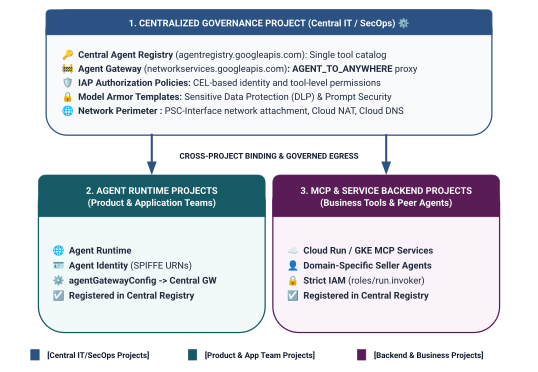
図 2. 3 層のクロス プロジェクト ガバナンス アーキテクチャと境界
統合アクセス ポリシーの 2 階層 ID スコープ モデル
エージェントが Central Agent Gateway を介して通信する場合、Identity-Aware Proxy(IAP v2)は、呼び出し元のエージェント ID(ランタイム コンテナに自動的に発行される暗号で証明された SPIFFE ベースの ID)に基づいて、グローバル IAM アクセス ポリシーに対するアクセスを評価します。
- 階層 1: ベースライン Google Cloud API(ルール 1 の
principalSet://による粗粒度): スポーク プロジェクトのすべてのエージェント ランタイムが、検出、トークン生成、推論のために標準の Google API(aiplatform、iamcredentials、telemetry、agentregistry)にアクセスできるようにするプロジェクト全体の下り(外向き)承認。 - 階層 2: ビジネスツールと A2A サービス(ルール 2 と 3 の
principal://を介してきめ細かい制御): 個々の Reasoning Engine インスタンスにバインドされた厳格な最小権限アクセス。特定の登録済み Agent Registry サービス(destination.agent_registry.agent.name)を対象とする Common Expression Language(CEL)条件で適用されます。
構築内容
PROJECT_GOVERNANCEの一元化された Agent Gateway(centralized-agw)- 厳格な ENFORCE モードの IAP v2 認可サービス拡張機能と Authz ポリシー(
failOpen: false) - 基盤となる IAM 統合アクセス ポリシー(
uap-rules.json)とプロジェクト ポリシー バインディング - プロジェクト間のサービス エージェントの IAM 権限(
ar_agw_cross_project_sa) - 共有の中央 Google Cloud Storage(GCS)ステージング バケット
PROJECT_SELLERSのハンバーガーとピザの販売者のエージェントを分離するPROJECT_CONCIERGEで動的 REST 自動検出を使用して Concierge Agent を購入する- プロジェクト間の mTLS URL を使用した Central Agent Registry のサービス登録
- ライブ検証と Cloud Logging 監査による動的 IAP v2 下り(外向き)ポリシーの更新

図 3. 詳細な実装手順
学習内容
- 一元化されたゲートウェイのプロジェクト間のサービス エージェントの IAM 権限を構成する方法
- マルチプロジェクト環境で中央の Agent Gateway を介して Agent Runtime の下り(外向き)をルーティングする方法
- サービス拡張機能(
iapPolicyVersion: "V2")を使用して Agent Gateway の認可を Identity-Aware Proxy(IAP v2)に委任する方法 - 登録済みの Agent Registry の宛先(
destination.agent_registry.*)を制御する Common Expression Language(CEL)ルールを使用して IAM 統合アクセス ポリシー(UAP)を作成してバインドする方法 - Agent Registry に対して実行時の自動検出を使用して、ハードコードされたエージェント ID と URL を排除する方法
- 実際の境界ゼロトラスト ブロック(
HTTP 403 Forbidden)をテストし、Cloud Logging でライブ ポリシーの更新を確認する方法
必要なもの
- 課金が有効になっている 3 つの Google Cloud プロジェクト:
PROJECT_GOVERNANCE: 一元管理、ゲートウェイ、レジストリ、IAM アクセス ポリシーPROJECT_CONCIERGE: 購入コンシェルジュ オーケストレーター エージェントPROJECT_SELLERS: ハンバーガーとピザのスペシャリスト販売エージェント
- 3 つのプロジェクトすべてで
roles/owner権限または管理者権限を持つ IAM ユーザーまたはサービス アカウント - Google Cloud 組織(SPIFFE 信頼ドメイン マッピング用)
gcloudCLI、python(3.11 以降)、uvがインストールされている Google Cloud Shell またはローカルマシン
これで導入部分は終了です。次は、セットアップと環境のセクションに進みます。
2. セットアップ
このアーキテクチャは 3 つの異なる Google Cloud プロジェクトにまたがっていますが、PROJECT_GOVERNANCE に設定された単一の Cloud Shell ターミナルから、ターミナル デプロイ コマンド、リポジトリのダウンロード、ステージング オペレーションの 100% を実行できます。すべてのデプロイ スクリプトと gcloud コマンドは、CLI フラグ(--project)を介して適切な宛先プロジェクトを明示的にターゲットにします。
まず、Google Cloud プロジェクトのコマンドラインにアクセスします。
shell.cloud.google.comの Cloud Shell。gcloudCLI がインストールされているローカル ターミナル
プロジェクト コンテキストを設定する
# set terminal project context to Central Governance Project
gcloud config set project SET_YOUR_GOVERNANCE_PROJECT_ID_HERE
# login to gcloud cli
gcloud auth login
# login for application default credentials
gcloud auth application-default login
gcloud CLI を更新する(推奨)
# update gcloud components
gcloud components update --quiet
シェル環境変数を設定する
プロジェクト固有の識別子を入力します。
# 1. Project Identifiers
export PROJECT_GOVERNANCE="SET_YOUR_GOVERNANCE_PROJECT_ID_HERE"
export PROJECT_CONCIERGE="SET_YOUR_CONCIERGE_PROJECT_ID_HERE"
export PROJECT_SELLERS="SET_YOUR_SELLERS_PROJECT_ID_HERE"
これらのシェル変数は自動的に導出されます。
# 2. Regional & Gateway Settings
export REGION="us-central1"
export AGW_NAME="centralized-agw"
export UAP_POLICY_NAME="uap-policy-${AGW_NAME}"
export UAP_BINDING_NAME="uap-binding-${AGW_NAME}"

# 3. Retrieve Project Numbers
export PROJECT_NUMBER_GOVERNANCE=$(gcloud projects describe ${PROJECT_GOVERNANCE} --format="value(projectNumber)")
export PROJECT_NUMBER_CONCIERGE=$(gcloud projects describe ${PROJECT_CONCIERGE} --format="value(projectNumber)")
export PROJECT_NUMBER_SELLERS=$(gcloud projects describe ${PROJECT_SELLERS} --format="value(projectNumber)")

# 4. Obtain Organization ID
export ORG_ID=$(gcloud projects get-ancestors ${PROJECT_GOVERNANCE} --format="value(id, type)" | grep organization | awk '{print $1}')

# 5. Set Application Default Credentials (ADC) Quota Project
gcloud auth application-default set-quota-project ${PROJECT_GOVERNANCE}

echo "Governance Project: ${PROJECT_GOVERNANCE} (${PROJECT_NUMBER_GOVERNANCE})"
echo "Concierge Project:  ${PROJECT_CONCIERGE} (${PROJECT_NUMBER_CONCIERGE})"
echo "Sellers Project:    ${PROJECT_SELLERS} (${PROJECT_NUMBER_SELLERS})"
echo "Organization ID:    ${ORG_ID}"
echo "UAP Policy Name:    ${UAP_POLICY_NAME}"
echo "UAP Binding Name:   ${UAP_BINDING_NAME}"
構成ファイル用のローカル ディレクトリを作成する
# create config folder
mkdir -p cfg
統合アクセス ポリシーのアクセス ポリシー管理者ロールを割り当てる
# grant Access Policy Admin and Project IAM Admin to current user in Governance Project
for ROLE in "roles/iam.accessPolicyAdmin" "roles/resourcemanager.projectIamAdmin"; do
  gcloud projects add-iam-policy-binding ${PROJECT_GOVERNANCE} \
    --member="user:$(gcloud config get-value account)" \
    --role="${ROLE}" \
    --condition=None
done
IAP v2 の Cloud Audit データアクセス ログを有効にする
デフォルトでは、意図しないストレージ費用が発生しないように、Google Cloud はデータアクセス監査ログを無効にしています。IAP v2 は認可決定(granted=true と granted=false)をデータアクセス監査ログとして出力するため、PROJECT_GOVERNANCE の iap.googleapis.com に対して ADMIN_READ、DATA_READ、DATA_WRITE のロギングを有効にします。
# 1. export current IAM policy for PROJECT_GOVERNANCE
gcloud projects get-iam-policy ${PROJECT_GOVERNANCE} \
  --format=json > cfg/gov_iam_policy.json
# 2. append auditConfigs for iap.googleapis.com
python3 -c "
import json
with open('cfg/gov_iam_policy.json') as f:
    policy = json.load(f)
audit_configs = [c for c in policy.get('auditConfigs', []) if c.get('service') != 'iap.googleapis.com']
audit_configs.append({
    'service': 'iap.googleapis.com',
    'auditLogConfigs': [
        {'logType': 'ADMIN_READ'},
        {'logType': 'DATA_READ'},
        {'logType': 'DATA_WRITE'}
    ]
})
policy['auditConfigs'] = audit_configs
with open('cfg/gov_iam_policy.json', 'w') as f:
    json.dump(policy, f, indent=2)
"
# 3. apply updated policy
gcloud projects set-iam-policy ${PROJECT_GOVERNANCE} cfg/gov_iam_policy.json
# 4. verify auditConfigs applied
gcloud projects get-iam-policy ${PROJECT_GOVERNANCE} --format="yaml(auditConfigs)"
必要な Google Cloud API を有効にする
# enable google apis (agent platform & security bundle, part 1)
for PROJ in ${PROJECT_GOVERNANCE} ${PROJECT_CONCIERGE} ${PROJECT_SELLERS}; do
  gcloud services enable \
    agentregistry.googleapis.com \
    aiplatform.googleapis.com \
    apphub.googleapis.com \
    apptopology.googleapis.com \
    cloudapiregistry.googleapis.com \
    cloudtrace.googleapis.com \
    compute.googleapis.com \
    dataform.googleapis.com \
    iam.googleapis.com \
    agentidentity.googleapis.com \
    iap.googleapis.com \
    logging.googleapis.com \
    modelarmor.googleapis.com \
    monitoring.googleapis.com \
    networksecurity.googleapis.com \
    networkservices.googleapis.com \
    notebooks.googleapis.com \
    observability.googleapis.com \
    --project=${PROJ}
done
# enable google apis (agent platform bundle, part 2)
for PROJ in ${PROJECT_GOVERNANCE} ${PROJECT_CONCIERGE} ${PROJECT_SELLERS}; do
  gcloud services enable \
    securitycenter.googleapis.com \
    saasservicemgmt.googleapis.com \
    storage.googleapis.com \
    telemetry.googleapis.com \
    texttospeech.googleapis.com \
    --project=${PROJ}
done
# enable google apis (foundational & agent runtime build bundle, part 3)
for PROJ in ${PROJECT_GOVERNANCE} ${PROJECT_CONCIERGE} ${PROJECT_SELLERS}; do
  gcloud services enable \
    artifactregistry.googleapis.com \
    cloudbuild.googleapis.com \
    cloudresourcemanager.googleapis.com \
    iamcredentials.googleapis.com \
    serviceusage.googleapis.com \
    run.googleapis.com \
    orgpolicy.googleapis.com \
    --project=${PROJ}
done
すべてのプロジェクトで API の有効化を検証する
3 つのプロジェクト(PROJECT_GOVERNANCE、PROJECT_CONCIERGE、PROJECT_SELLERS)すべてで同じ API が有効になっていることを確認すると、運用の一貫性が確立され、ランタイム トークンの生成の失敗、スキーマ カタログの作成エラー、テレメトリーのドロップアウトを防ぐことができます。
Cloud Shell で次の検証スクリプトを実行して、3 つのプロジェクトすべてで API のパリティを確認します。
# validate that all required APIs are enabled across all 3 projects
python3 - << 'EOF'
import subprocess
import os
import sys

REQUIRED_APIS = [
    "agentregistry.googleapis.com",
    "aiplatform.googleapis.com",
    "apphub.googleapis.com",
    "apptopology.googleapis.com",
    "cloudapiregistry.googleapis.com",
    "cloudtrace.googleapis.com",
    "compute.googleapis.com",
    "dataform.googleapis.com",
    "iam.googleapis.com",
    "agentidentity.googleapis.com",
    "iap.googleapis.com",
    "logging.googleapis.com",
    "modelarmor.googleapis.com",
    "monitoring.googleapis.com",
    "networksecurity.googleapis.com",
    "networkservices.googleapis.com",
    "notebooks.googleapis.com",
    "observability.googleapis.com",
    "securitycenter.googleapis.com",
    "saasservicemgmt.googleapis.com",
    "storage.googleapis.com",
    "telemetry.googleapis.com",
    "texttospeech.googleapis.com",
    "artifactregistry.googleapis.com",
    "cloudbuild.googleapis.com",
    "cloudresourcemanager.googleapis.com",
    "iamcredentials.googleapis.com",
    "serviceusage.googleapis.com",
    "run.googleapis.com",
    "orgpolicy.googleapis.com"
]

projects = {
    "GOVERNANCE": os.environ.get("PROJECT_GOVERNANCE", ""),
    "CONCIERGE": os.environ.get("PROJECT_CONCIERGE", ""),
    "SELLERS": os.environ.get("PROJECT_SELLERS", "")
}

enabled = {}
for role, proj in projects.items():
    if not proj:
        print(f"Error: Environment variable for {role} is not set.")
        sys.exit(1)
    res = subprocess.run(
        ["gcloud", "services", "list", "--enabled", f"--project={proj}", "--format=value(config.name)"],
        capture_output=True, text=True, check=True
    )
    enabled[role] = set(res.stdout.strip().splitlines())

print(f"\n{'API Name':<36} | {'GOVERNANCE':<12} | {'CONCIERGE':<12} | {'SELLERS':<12}")
print("-" * 78)

all_synced = True
for api in REQUIRED_APIS:
    g_status = "ENABLED" if api in enabled["GOVERNANCE"] else "MISSING"
    c_status = "ENABLED" if api in enabled["CONCIERGE"] else "MISSING"
    s_status = "ENABLED" if api in enabled["SELLERS"] else "MISSING"
    if "MISSING" in (g_status, c_status, s_status):
        all_synced = False
    print(f"{api:<36} | {g_status:<12} | {c_status:<12} | {s_status:<12}")

print("-" * 78)
if all_synced:
    print("✅ All 29 required APIs are ENABLED and synchronized across all three projects.\n")
else:
    print("❌ Discrepancies detected. Please re-run the enablement commands for missing services.\n")
    sys.exit(1)
EOF
検証出力の例:
すべての API が有効になっているはずです。
✅ All 30 required APIs are ENABLED and synchronized across all three projects.
組織のポリシーを構成する
デフォルトの Google Cloud 組織のポリシーは、IAM v3 アクセス ポリシー バインディングをリソース(constraints/iam.managed.disableAccessPolicyBinding)に制限する制約を適用します。
enforce: false を明示的に許可に設定して、プロジェクト レベルで継承された組織のポリシーの制限をオーバーライドします。
# disable iam v3 constraint (allow v3 access policies)
gcloud org-policies set-policy /dev/stdin << EOF
name: projects/${PROJECT_NUMBER_GOVERNANCE}/policies/iam.managed.disableAccessPolicyBinding
spec:
  rules:
  - enforce: false
EOF
# verify org policy constraints on project
gcloud org-policies describe iam.managed.disableAccessPolicyBinding \
  --project=${PROJECT_GOVERNANCE} --effective
これで設定は完了です。次のセクションでは、コア Google API を登録する方法について説明します。
3. Agent Registry
Core Google APIs エンドポイント サービスを登録する
Agent Gateway では、agent_gateway_config で構成されたエージェントがコア Google Cloud バックエンド サービス(aiplatform、IAM 認証情報、テレメトリーなど)に下り(外向き)トラフィックを安全にルーティングできるように、Google API URL を中央エージェント レジストリに登録する必要があります。
Agent Registry で core-gapi-services を作成する
# register core google api endpoints in agent registry with standard and :443 port variants
gcloud agent-registry services create core-gapi-services \
  --project=${PROJECT_GOVERNANCE} \
  --location=${REGION} \
  --display-name="gapi.core.services" \
  --description="Core Google Cloud APIs and Service Endpoints" \
  --endpoint-spec-type=no-spec \
  --interfaces=protocolBinding=JSONRPC,url=https://telemetry.googleapis.com \
  --interfaces=protocolBinding=JSONRPC,url=https://telemetry.mtls.googleapis.com \
  --interfaces=protocolBinding=JSONRPC,url=https://${REGION}-aiplatform.googleapis.com \
  --interfaces=protocolBinding=JSONRPC,url=https://${REGION}-aiplatform.googleapis.com:443 \
  --interfaces=protocolBinding=JSONRPC,url=https://${REGION}-aiplatform.mtls.googleapis.com \
  --interfaces=protocolBinding=JSONRPC,url=https://${REGION}-aiplatform.mtls.googleapis.com:443 \
  --interfaces=protocolBinding=JSONRPC,url=https://aiplatform.googleapis.com \
  --interfaces=protocolBinding=JSONRPC,url=https://aiplatform.googleapis.com:443 \
  --interfaces=protocolBinding=JSONRPC,url=https://aiplatform.mtls.googleapis.com \
  --interfaces=protocolBinding=JSONRPC,url=https://aiplatform.mtls.googleapis.com:443 \
  --interfaces=protocolBinding=JSONRPC,url=https://cloudresourcemanager.googleapis.com \
  --interfaces=protocolBinding=JSONRPC,url=https://iamcredentials.googleapis.com \
  --interfaces=protocolBinding=JSONRPC,url=https://iamcredentials.mtls.googleapis.com \
  --interfaces=protocolBinding=JSONRPC,url=https://agentregistry.googleapis.com \
  --interfaces=protocolBinding=JSONRPC,url=https://agentregistry.mtls.googleapis.com \
  --interfaces=protocolBinding=JSONRPC,url=https://agentregistry.googleapis.com:443 \
  --interfaces=protocolBinding=JSONRPC,url=https://agentregistry.mtls.googleapis.com:443
Core APIs エンドポイント リソース ID を取得する
# capture the underlying Agent Registry endpoint ID
export ENDPOINT_ID=$(gcloud agent-registry services describe core-gapi-services \
  --project=${PROJECT_GOVERNANCE} \
  --location=${REGION} \
  --format="value(registryResource)" | awk -F'/' '{print $NF}')
echo "Core APIs Endpoint ID: ${ENDPOINT_ID}"
エージェント ID の principalSet と principal の違いについて
Google Cloud IAM と Gemini Enterprise Agent Platform では、実行中のエージェント コンテナに発行されたマシン ID は、Identity-Aware Proxy(IAP v2)によって評価される暗号で証明された SPIFFE URN を使用します。IAM 統合アクセス ポリシーを構成するときに、特定の単一の principal または属性ベースの principalSet をターゲットにできます。
ディメンション |
|
|
IAM 構文 |
|
|
粒度 | きめ細かい(インスタンス レベル): 単一の特定の Reasoning Engine コンテナ インスタンスを識別します。 | 粗粒度(プロジェクト レベル): 共通のプロジェクト属性を共有するすべての推論エンジンを識別します。 |
URN パターン |
|
|
Agent Platform のユースケース | Tier 2(ビジネスツールと A2A): 特定のオーケストレーター エージェントがターゲット ドメインツール(購入コンシェルジュ $\rightarrow$ バーガー販売者など)を呼び出すことを承認します。 | Tier 1(基盤となるインフラストラクチャ): プロジェクト内のすべてのエージェントに Google Cloud APIs( |
ライフサイクルの影響 | エージェントが削除されて再作成された場合、新しいエンジン ID には更新された IAM ポリシー バインディングが必要です。 | 追加の IAM 更新を行わなくても、そのプロジェクトに新しくデプロイされたエージェントに自動的に適用されます。 |
統合アクセス ポリシー(UAP / IAP v2)による宣言型ガバナンス
以前の IAP v1 では、下り(外向き)ポリシーは gcloud beta iap web add-iam-policy-binding を使用して個々の Agent Registry リソースに直接関連付けられていました。IAP v2 と統合アクセス ポリシーでは、リソースごとのバインディングが廃止され、単一の一元化された IAM アクセス ポリシー(cfg/uap-rules.json)が使用されます。
core-gapi-services の基本的な下り(外向き)承認は、セクション 5 の統合アクセス ポリシーでルール 1 として構成されます。これにより、すべてのエージェント コンテナにデプロイ前に基本的な下り(外向き)ルートが確立されます。
プリンシパル ID と Workload Identity のメカニズムの詳細については、以下をご覧ください。
これで、コア API エンドポイントの登録は完了です。次は、Agent Gateway を一元的にデプロイするセクションに進みます。
4. Agent Gateway
一元化された Agent Gateway をデプロイする
$PROJECT_GOVERNANCE プロジェクト内の AGENT_TO_ANYWHERE 上り(内向き)モードで一元化された Agent Gateway(centralized-agw)をデプロイします。
Gateway 構成マニフェストを定義する
下り(外向き)トラフィック ガバナンス用の cfg/${AGW_NAME}.yaml を作成します。
# generate agent gateway config yaml
cat > cfg/${AGW_NAME}.yaml << EOF
name: ${AGW_NAME}
protocols:
  - MCP
googleManaged:
  governedAccessPath: AGENT_TO_ANYWHERE
registries:
  - "//agentregistry.googleapis.com/projects/${PROJECT_GOVERNANCE}/locations/${REGION}"
EOF
Agent Gateway の構成をインポートする
# import and create agent gateway
gcloud network-services agent-gateways import ${AGW_NAME} \
  --source="cfg/${AGW_NAME}.yaml" \
  --location=${REGION} \
  --project=${PROJECT_GOVERNANCE}
Agent Gateway の詳細を確認する
# show agent gateway status
gcloud network-services agent-gateways describe ${AGW_NAME} \
  --location=${REGION} \
  --project=${PROJECT_GOVERNANCE}
出力例:
agentGatewayCard:
  mtlsEndpoint: projects/${AGW_TP_ID}/regions/us-central1/serviceAttachments/unitkind1-swp-mtls-psc-sa
  rootCertificates:
  - |
    -----BEGIN CERTIFICATE-----
    MIIDwzCCAqugAwIBAgITNQuWGopdOZaHdcK7r7AYFhonqDANBgkqhkiG9w0BAQsF
    ...
    -----END CERTIFICATE-----
  serviceExtensionsServiceAccount: service-${PROJ_NO}@gcp-sa-dep.iam.gserviceaccount.com
createTime: 'YYYY-MM-DDT12:34:56.789098765Z'
googleManaged:
  governedAccessPath: AGENT_TO_ANYWHERE
name: projects/${PROJECT_GOVERNANCE}/locations/us-central1/agentGateways/centralized-agw
protocols:
- MCP
registries:
- //agentregistry.googleapis.com/projects/${PROJECT_GOVERNANCE}/locations/us-central1
updateTime: 'YYYY-MM-DDT12:34:56.789098765Z'
これでゲートウェイのデプロイは完了です。次の認可の構成セクションに進みます。
5. 認可
Agent Gateway の認可と基盤となる UAP を構成する
Agent Gateway は、Identity-Aware Proxy(IAP v2)統合アクセス ポリシー(UAP)と統合された認可ポリシー(networksecurity.authzPolicies)を使用して、アウトバウンド ツールとエージェントのトラフィックを保護し、管理します。
認可アーキテクチャの概要

図 4. 認可アーキテクチャの概要
認可アーキテクチャは、相互に接続された次の 3 つのレイヤで構成されています。
- IAP サービス拡張機能(
authzExtension): 厳格な境界ゼロトラストの適用用にservice: iap.googleapis.com、metadata: iapPolicyVersion: "V2"、failOpen: falseで構成されたリージョン リソース。 - Gateway 認可ポリシー(
authzPolicy):policyProfile: REQUEST_AUTHZとaction: CUSTOMを使用して Agent Gateway をターゲットとするリージョン リソース。認可チェックを IAP Authz 拡張機能に転送します。 - IAM 統合アクセス ポリシーとバインディング(
accessPolicyとpolicyBinding): IAP によって評価されるグローバル IAM v3 リソース。呼び出し元の SPIFFE ID と CEL カタログ条件に対して、ユニバーサル権限iap.googleapis.com/resources.egressViaIAPを検証します。
ステップ 1: IAP v2 Authz 拡張機能を作成してインポートする
厳密な ENFORCE モードで iapPolicyVersion: "V2" と failOpen: false を使用して、Service Extension マニフェストを作成します。
# create authz extension config file in ENFORCE mode
cat > cfg/${AGW_NAME}-svc-ext-authz-iap.yaml << EOF
name: ${AGW_NAME}-svc-ext-authz-iap
service: iap.googleapis.com
failOpen: false
timeout: 1s
metadata:
  iapPolicyVersion: "V2"
EOF
Authz Extension をインポートします。
# import IAP v2 authz extension
gcloud service-extensions authz-extensions import ${AGW_NAME}-svc-ext-authz-iap \
  --source=cfg/${AGW_NAME}-svc-ext-authz-iap.yaml \
  --location=${REGION} \
  --project=${PROJECT_GOVERNANCE}
Authz 拡張機能がアクティブであることを確認します。
# describe authz extension
gcloud service-extensions authz-extensions describe ${AGW_NAME}-svc-ext-authz-iap \
  --location=${REGION} \
  --project=${PROJECT_GOVERNANCE}
出力例:
createTime: 'YYYY-MM-DDT12:34:56.789098765Z'
failOpen: false
metadata:
  iapPolicyVersion: V2
name: projects/${PROJECT_GOVERNANCE}/locations/us-central1/authzExtensions/centralized-agw-svc-ext-authz-iap
service: iap.googleapis.com
timeout: 1s
ステップ 2: Gateway 認可ポリシーを作成してインポートする
Agent Gateway に接続し、リクエストの検証を IAP Authz 拡張機能に委任する認可ポリシー構成を作成します。
# create authz policy manifest
cat > cfg/${AGW_NAME}-authz-policy-profile-iap.yaml << EOF
name: ${AGW_NAME}-authz-policy-profile-iap
target:
  resources:
    - "projects/${PROJECT_GOVERNANCE}/locations/${REGION}/agentGateways/${AGW_NAME}"
policyProfile: REQUEST_AUTHZ
action: CUSTOM
customProvider:
  authzExtension:
    resources:
      - "projects/${PROJECT_GOVERNANCE}/locations/${REGION}/authzExtensions/${AGW_NAME}-svc-ext-authz-iap"
EOF
認可ポリシーをインポートします。
# import authz policy
gcloud beta network-security authz-policies import ${AGW_NAME}-authz-policy-profile-iap \
  --source=cfg/${AGW_NAME}-authz-policy-profile-iap.yaml \
  --location=${REGION} \
  --project=${PROJECT_GOVERNANCE}
有効な認可ポリシーを確認します。
# describe authz policy
gcloud beta network-security authz-policies describe ${AGW_NAME}-authz-policy-profile-iap \
  --location=${REGION} \
  --project=${PROJECT_GOVERNANCE}
ステップ 3: 最初の統合アクセス ポリシーを作成する(ルール 1: コア Google API)
ルール 1 で 3 つのプロジェクト principalSet が core-gapi-services に到達することを承認する cfg/uap-rules.json を作成します。
# create initial unified access policy rules manifest
cat > cfg/uap-rules.json << EOF
[
  {
    "description": "Rule 1: Allow agent runtimes across all 3 projects to reach Core Google APIs",
    "effect": "ALLOW",
    "principals": [
      "principalSet://agents.global.org-${ORG_ID}.system.id.goog/attribute.platformContainer/aiplatform/projects/${PROJECT_NUMBER_GOVERNANCE}",
      "principalSet://agents.global.org-${ORG_ID}.system.id.goog/attribute.platformContainer/aiplatform/projects/${PROJECT_NUMBER_CONCIERGE}",
      "principalSet://agents.global.org-${ORG_ID}.system.id.goog/attribute.platformContainer/aiplatform/projects/${PROJECT_NUMBER_SELLERS}"
    ],
    "operation": {
      "permissions": [
        "iap.googleapis.com/resources.egressViaIAP"
      ]
    },
    "conditions": {
      "iap.googleapis.com": {
        "expression": \
        "destination.is_registered == true && \
         destination.agent_registry.resource_type == 'ENDPOINT' && ( \
         destination.agent_registry.endpoint.name == 'projects/${PROJECT_GOVERNANCE}/locations/${REGION}/endpoints/core-gapi-services' || \
         destination.agent_registry.endpoint.name == 'projects/${PROJECT_GOVERNANCE}/locations/${REGION}/endpoints/${ENDPOINT_ID}' || \
         destination.agent_registry.endpoint.name == 'projects/${PROJECT_NUMBER_GOVERNANCE}/locations/${REGION}/endpoints/${ENDPOINT_ID}')"
      }
    }
  }
]
EOF
ステップ 4: IAM アクセス ポリシーを作成してバインドする
グローバル IAM アクセス ポリシーを作成します。
# create global IAM access policy
gcloud iam access-policies create ${UAP_POLICY_NAME} \
  --details-rules=cfg/uap-rules.json \
  --project=${PROJECT_GOVERNANCE} \
  --location=global
アクセス ポリシーを PROJECT_GOVERNANCE にバインドします。
# bind access policy to governance project
gcloud iam policy-bindings create ${UAP_BINDING_NAME} \
  --policy="projects/${PROJECT_GOVERNANCE}/locations/global/accessPolicies/${UAP_POLICY_NAME}" \
  --target-resource="//cloudresourcemanager.googleapis.com/projects/${PROJECT_GOVERNANCE}" \
  --project=${PROJECT_GOVERNANCE} \
  --location=global
ポリシー バインディングが有効であることを確認します。
# verify policy binding
gcloud iam policy-bindings describe ${UAP_BINDING_NAME} \
  --project=${PROJECT_GOVERNANCE} \
  --location=global
出力例:
name: projects/${PROJECT_GOVERNANCE}/locations/global/policyBindings/uap-binding-centralized-agw
policy: projects/${PROJECT_GOVERNANCE}/locations/global/accessPolicies/uap-policy-centralized-agw
policyKind: ACCESS_POLICY
target:
  resource: //cloudresourcemanager.googleapis.com/projects/${PROJECT_GOVERNANCE}
基盤となる Google Cloud API 下り(外向き)は、厳格な ENFORCE モードで 3 つのプロジェクトすべてで安全に承認されるようになりました。
これで、Gateway の認可設定は完了です。次の クロス プロジェクト IAM 権限を構成するセクションに進みます。
6. プロジェクト間の IAM
プロジェクト横断的な IAM 権限を構成する
このマルチプロジェクト トポロジでは、Agent Runtime はスポーク プロジェクト(PROJECT_CONCIERGE と PROJECT_SELLERS)に存在し、Central Agent Gateway と Agent Registry は PROJECT_GOVERNANCE に存在します。
Google Cloud プロジェクトは分離されたセキュリティ境界であるため、プロジェクト間のアクセスは、次の 2 つの運用レイヤで明示的に付与する必要があります。
- コントロール プレーン(デプロイ時):
--agent-gateway-configで構成されたエージェント コンテナをデプロイする場合、スポーク プロジェクトのAgent Runtime Service Agent(service-)がコンテナを中央ゲートウェイに接続する必要があります。@gcp-sa-aiplatform.iam.gserviceaccount.com PROJECT_GOVERNANCEでnetworkservices.agentGateways.use、get、operations.getを付与する最小限のカスタムロール(ar_agw_cross_project_sa)を作成します。 - データプレーン(ランタイム実行):
- カタログ検出: スポーク ID は、ターゲット エージェント エンドポイントを動的に解決するために
PROJECT_GOVERNANCEのroles/agentregistry.viewerを必要とします。 - ターゲットの呼び出し: コンシェルジュ エージェントは、販売者の推論エンジンに対してクエリを実行するために、
PROJECT_SELLERSのroles/aiplatform.userを必要とします。
- カタログ検出: スポーク ID は、ターゲット エージェント エンドポイントを動的に解決するために
PROJECT_GOVERNANCE でカスタム IAM ロールを作成する
# create custom role in central governance project
gcloud iam roles create ar_agw_cross_project_sa \
  --project=${PROJECT_GOVERNANCE} \
  --title="Runtime Agent Gateway Cross-Project SA" \
  --description="Custom role for cross-project service agents to access Central Agent Gateway" \
  --permissions="networkservices.agentGateways.get,networkservices.agentGateways.use,networkservices.operations.get" \
  --stage="GA"
Agent Runtime サービス エージェントにカスタムロールを割り当てる
# 1. ensure aiplatform service identities are provisioned across all projects
for PROJ in ${PROJECT_GOVERNANCE} ${PROJECT_CONCIERGE} ${PROJECT_SELLERS}; do
  gcloud beta services identity create --service=aiplatform.googleapis.com --project=${PROJ}
done
# 2. derive aiplatform service agent emails
export CONCIERGE_AI_SA="service-${PROJECT_NUMBER_CONCIERGE}@gcp-sa-aiplatform.iam.gserviceaccount.com"
export CONCIERGE_RE_SA="service-${PROJECT_NUMBER_CONCIERGE}@gcp-sa-aiplatform-re.iam.gserviceaccount.com"
export CONCIERGE_COMPUTE_SA="${PROJECT_NUMBER_CONCIERGE}-compute@developer.gserviceaccount.com"

export SELLERS_AI_SA="service-${PROJECT_NUMBER_SELLERS}@gcp-sa-aiplatform.iam.gserviceaccount.com"
export SELLERS_RE_SA="service-${PROJECT_NUMBER_SELLERS}@gcp-sa-aiplatform-re.iam.gserviceaccount.com"
export SELLERS_COMPUTE_SA="${PROJECT_NUMBER_SELLERS}-compute@developer.gserviceaccount.com"
# 3. grant custom role & network viewer to Concierge and Sellers Service Agents
for SA in ${CONCIERGE_AI_SA} ${SELLERS_AI_SA}; do
  gcloud projects add-iam-policy-binding ${PROJECT_GOVERNANCE} \
    --member="serviceAccount:${SA}" \
    --role="projects/${PROJECT_GOVERNANCE}/roles/ar_agw_cross_project_sa" \
    --condition=None

  gcloud projects add-iam-policy-binding ${PROJECT_GOVERNANCE} \
    --member="serviceAccount:${SA}" \
    --role="roles/networkservices.viewer" \
    --condition=None
done
# 4. grant agent registry viewer on Governance Project for dynamic autodiscovery
for MEMBER in "serviceAccount:${CONCIERGE_AI_SA}" "serviceAccount:${CONCIERGE_RE_SA}" "serviceAccount:${CONCIERGE_COMPUTE_SA}" "serviceAccount:${SELLERS_AI_SA}" "serviceAccount:${SELLERS_RE_SA}" "serviceAccount:${SELLERS_COMPUTE_SA}" "principalSet://agents.global.org-${ORG_ID}.system.id.goog/attribute.platformContainer/aiplatform/projects/${PROJECT_NUMBER_CONCIERGE}" "principalSet://agents.global.org-${ORG_ID}.system.id.goog/attribute.platformContainer/aiplatform/projects/${PROJECT_NUMBER_SELLERS}"; do
  gcloud projects add-iam-policy-binding ${PROJECT_GOVERNANCE} \
    --member="${MEMBER}" \
    --role="roles/agentregistry.viewer" \
    --condition=None
done
# 5. grant agent project viewer on Governance Project for dynamic autodiscovery
for SA in ${CONCIERGE_COMPUTE_SA} ${CONCIERGE_AI_SA}; do
  gcloud projects add-iam-policy-binding ${PROJECT_GOVERNANCE} \
    --member="serviceAccount:${SA}" \
    --role="roles/viewer" \
    --condition=None
done
# 6. grant aitplatform user on Sellers project to Concierge for cross-project A2A invocation
for MEMBER in "serviceAccount:${CONCIERGE_AI_SA}" "serviceAccount:${CONCIERGE_RE_SA}" "serviceAccount:${CONCIERGE_COMPUTE_SA}" "principalSet://agents.global.org-${ORG_ID}.system.id.goog/attribute.platformContainer/aiplatform/projects/${PROJECT_NUMBER_CONCIERGE}"; do
  gcloud projects add-iam-policy-binding ${PROJECT_SELLERS} \
    --member="${MEMBER}" \
    --role="roles/aiplatform.user" \
    --condition=None
done
これで、プロジェクト間の IAM の設定は完了です。次は、販売者エージェントとコンシェルジュ エージェントをデプロイするセクションに進みます。
7. Agent Runtime
販売担当者とコンシェルジュ エージェントをデプロイする
この Codelab で使用するマルチエージェント アプリケーションのコードベースとデプロイ スクリプトは、リモートの Google Cloud GitHub リポジトリで管理されています。次の手順では、リポジトリをローカルにクローンし、必要なファイルを現在の作業ディレクトリ構造にコピーし、一時ファイルをクリーンアップして、uv で依存関係をインストールします。
リモート アーティファクトを取得する
# clone remote repository to temp local dir
git clone https://github.com/GoogleCloudPlatform/cloud-networking-solutions.git ./temp_agw_cuj_arun_multiproject
# copy multi-agent application files to current working directory
cp -r temp_agw_cuj_arun_multiproject/codelabs/agw-cuj-arun-multiproject ./cross-project-multiagent
# remove temporary directory
rm -rf temp_agw_cuj_arun_multiproject
# install dependencies
uv sync --directory ./cross-project-multiagent
共有の中央ステージング バケットを作成する
# create shared central staging bucket
gcloud storage buckets create gs://${PROJECT_GOVERNANCE}-shared-staging \
  --project=${PROJECT_GOVERNANCE} \
  --location=${REGION}
# grant cross-project read/write access to runtime service agents
gcloud storage buckets add-iam-policy-binding gs://${PROJECT_GOVERNANCE}-shared-staging \
  --member="serviceAccount:service-${PROJECT_NUMBER_CONCIERGE}@gcp-sa-aiplatform.iam.gserviceaccount.com" \
  --role="roles/storage.objectAdmin"

gcloud storage buckets add-iam-policy-binding gs://${PROJECT_GOVERNANCE}-shared-staging \
  --member="serviceAccount:service-${PROJECT_NUMBER_SELLERS}@gcp-sa-aiplatform.iam.gserviceaccount.com" \
  --role="roles/storage.objectAdmin"
クロス プロジェクト Agent Gateway バインディングの仕組み
このステップでは、Seller Agent をスポーク プロジェクト(PROJECT_SELLERS)にデプロイし、PROJECT_GOVERNANCE の Central Agent Gateway を介して外向きをルーティングするように構成します。
# !-- for example purposes -- NOT a command to execute --!
# snippet from deploy_burger.py
burger_config = {
    "staging_bucket": staging_bucket_uri,
    "gcs_dir_name": "burger_agent",
    "display_name": "burger-seller-agent-adk",
    "identity_type": "AGENT_IDENTITY",
    "agent_gateway_config": {
        "agent_to_anywhere_config": {
            "agent_gateway": f"projects/{args.governance_project}/locations/{args.region}/agentGateways/{args.gateway}"
        }
    },
}
deployed_burger = client.agent_engines.create(agent=burger_playground, config=burger_config)
ルール 1 は統合アクセス ポリシーで先に確立されているため、Google Cloud APIs へのコンテナ初期化リクエストはゲートウェイを介して中断されることなく許可されます。
ハンバーガーとピザの販売エージェントを PROJECT_SELLERS にデプロイする
# 1. deploy Burger Seller Agent to PROJECT_SELLERS
uv run --directory ./cross-project-multiagent python deploy_burger.py \
  --project=${PROJECT_SELLERS} \
  --region=${REGION} \
  --governance-project=${PROJECT_GOVERNANCE} \
  --gateway=projects/${PROJECT_GOVERNANCE}/locations/${REGION}/agentGateways/${AGW_NAME}
# 2. deploy Pizza Seller Agent to PROJECT_SELLERS
uv run --directory ./cross-project-multiagent python deploy_pizza.py \
  --project=${PROJECT_SELLERS} \
  --region=${REGION} \
  --governance-project=${PROJECT_GOVERNANCE} \
  --gateway=projects/${PROJECT_GOVERNANCE}/locations/${REGION}/agentGateways/${AGW_NAME}
販売者ゲートウェイのルーティングを検証する
# retrieve deployed seller reasoning engine IDs
export BURGER_ENGINE_ID=$(grep BURGER_SELLER_AGENT_ID cross-project-multiagent/burger_agent.env | awk -F'/' '{print $NF}')
export PIZZA_ENGINE_ID=$(grep PIZZA_SELLER_AGENT_ID cross-project-multiagent/pizza_agent.env | awk -F'/' '{print $NF}')

echo "Burger Engine ID: ${BURGER_ENGINE_ID}"
echo "Pizza Engine ID:  ${PIZZA_ENGINE_ID}"
# inspect runtime configuration for both Seller Agents
for ENGINE_ID in ${BURGER_ENGINE_ID} ${PIZZA_ENGINE_ID}; do
  curl -s -X GET "https://${REGION}-aiplatform.googleapis.com/v1beta1/projects/${PROJECT_SELLERS}/locations/${REGION}/reasoningEngines/${ENGINE_ID}" \
    -H "Authorization: Bearer $(gcloud auth application-default print-access-token)" \
    -H "Content-Type: application/json" \
    | jq '{displayName: .displayName, identityType: .spec.identityType, effectiveIdentity: .spec.effectiveIdentity, agentGatewayConfig: .spec.deploymentSpec.agentGatewayConfig}'
done
購買コンシェルジュ エージェントを PROJECT_CONCIERGE にデプロイする
# deploy Purchasing Concierge to PROJECT_CONCIERGE
uv run --directory ./cross-project-multiagent python deploy_concierge_adk.py \
  --project=${PROJECT_CONCIERGE} \
  --region=${REGION} \
  --staging-bucket=gs://${PROJECT_GOVERNANCE}-shared-staging \
  --gateway-name=${AGW_NAME} \
  --gateway-project=${PROJECT_GOVERNANCE}
購入ゲートウェイのルーティングを検証する
# retrieve Concierge engine ID
export CONCIERGE_ENGINE_ID=$(grep CONCIERGE_AGENT_ID cross-project-multiagent/concierge_agent.env | awk -F'/' '{print $NF}')
echo "Concierge Engine ID: ${CONCIERGE_ENGINE_ID}"
# inspect runtime configuration for Purchasing Concierge
curl -s -X GET "https://${REGION}-aiplatform.googleapis.com/v1beta1/projects/${PROJECT_CONCIERGE}/locations/${REGION}/reasoningEngines/${CONCIERGE_ENGINE_ID}" \
  -H "Authorization: Bearer $(gcloud auth application-default print-access-token)" \
  -H "Content-Type: application/json" \
  | jq '{displayName: .displayName, identityType: .spec.identityType, effectiveIdentity: .spec.effectiveIdentity, agentGatewayConfig: .spec.deploymentSpec.agentGatewayConfig}'
出力には、Concierge エージェントのランタイム ID とプロジェクト、Governance プロジェクトの Agent Gateway へのバインディングが表示されます。
{
  "displayName": "purchasing-concierge-adk",
  "identityType": "AGENT_IDENTITY",
  "effectiveIdentity": "agents.global.org-${ORG_ID}.system.id.goog/resources/aiplatform/projects/${PROJECT_CONCIERGE}/locations/us-central1/reasoningEngines/${CONCIERGE_ENGINE_ID}",
  "agentGatewayConfig": {
    "agentToAnywhereConfig": {
      "agentGateway": "projects/${PROJECT_GOVERNANCE}/locations/us-central1/agentGateways/centralized-agw"
    }
  }
}
これでエージェントのデプロイは完了です。次の中央 Agent Registry にエージェントを登録するセクションに進みます。
8. プロジェクト間レジストリ
Agent Registry にエージェントを登録する
クロス プロジェクトのリージョン mTLS エンドポイントと数値のプロジェクト番号を使用して、PROJECT_GOVERNANCE の中央 Agent Registry に 3 つのエージェントすべてを登録します。
Agent Registry にサービスを非 A2A エージェントとして登録する
# 1. register Burger Seller Agent
gcloud agent-registry services create burger-seller-agent \
  --project=${PROJECT_GOVERNANCE} \
  --location=${REGION} \
  --display-name="Burger Seller Agent" \
  --description="Specialist agent that sells burgers and fries" \
  --agent-spec-type=no-spec \
  --interfaces=protocolBinding=JSONRPC,url=https://${REGION}-aiplatform.mtls.googleapis.com/v1/projects/${PROJECT_NUMBER_SELLERS}/locations/${REGION}/reasoningEngines/${BURGER_ENGINE_ID}:query \
  --interfaces=protocolBinding=JSONRPC,url=https://${REGION}-aiplatform.mtls.googleapis.com/v1beta1/projects/${PROJECT_NUMBER_SELLERS}/locations/${REGION}/reasoningEngines/${BURGER_ENGINE_ID}:query
# 2. register Pizza Seller Agent
gcloud agent-registry services create pizza-seller-agent \
  --project=${PROJECT_GOVERNANCE} \
  --location=${REGION} \
  --display-name="Pizza Seller Agent" \
  --description="Specialist agent that sells pizzas and pasta" \
  --agent-spec-type=no-spec \
  --interfaces=protocolBinding=JSONRPC,url=https://${REGION}-aiplatform.mtls.googleapis.com/v1/projects/${PROJECT_NUMBER_SELLERS}/locations/${REGION}/reasoningEngines/${PIZZA_ENGINE_ID}:query \
  --interfaces=protocolBinding=JSONRPC,url=https://${REGION}-aiplatform.mtls.googleapis.com/v1beta1/projects/${PROJECT_NUMBER_SELLERS}/locations/${REGION}/reasoningEngines/${PIZZA_ENGINE_ID}:query
# 3. register Purchasing Concierge Agent
gcloud agent-registry services create purchasing-concierge-adk \
  --project=${PROJECT_GOVERNANCE} \
  --location=${REGION} \
  --display-name="Purchasing Concierge Agent" \
  --description="Orchestrator concierge agent that routes purchasing requests" \
  --agent-spec-type=no-spec \
  --interfaces=protocolBinding=JSONRPC,url=https://${REGION}-aiplatform.mtls.googleapis.com/v1/projects/${PROJECT_NUMBER_CONCIERGE}/locations/${REGION}/reasoningEngines/${CONCIERGE_ENGINE_ID}:query \
  --interfaces=protocolBinding=JSONRPC,url=https://${REGION}-aiplatform.mtls.googleapis.com/v1beta1/projects/${PROJECT_NUMBER_CONCIERGE}/locations/${REGION}/reasoningEngines/${CONCIERGE_ENGINE_ID}:query
基盤となる Agent Registry ID を取得する
# capture underlying Agent Registry Agent UUIDs
export BURGER_AGENT_ID=$(gcloud agent-registry services describe burger-seller-agent --project=${PROJECT_GOVERNANCE} --location=${REGION} --format="value(registryResource)" | awk -F'/' '{print $NF}')
export PIZZA_AGENT_ID=$(gcloud agent-registry services describe pizza-seller-agent --project=${PROJECT_GOVERNANCE} --location=${REGION} --format="value(registryResource)" | awk -F'/' '{print $NF}')
export CONCIERGE_AGENT_ID=$(gcloud agent-registry services describe purchasing-concierge-adk --project=${PROJECT_GOVERNANCE} --location=${REGION} --format="value(registryResource)" | awk -F'/' '{print $NF}')

echo "Burger Agent ID:    ${BURGER_AGENT_ID}"
echo "Pizza Agent ID:     ${PIZZA_AGENT_ID}"
echo "Concierge Agent ID: ${CONCIERGE_AGENT_ID}"
これでレジストリの構成は完了です。次の A2A 下り(外向き)ポリシーを構成するセクションに進みます。
9. UAP ポリシー
統合アクセス ポリシーで A2A 下り(外向き)ポリシーを構成する
厳密な ENFORCE モードの Agent Gateway のデフォルト拒否アーキテクチャの場合:
- ルール 1(ベースライン Google Cloud API): 3 つのプロジェクトすべてで、エージェント コンテナが
core-gapi-servicesに到達できるようにします。 - ルール 2(Burger Seller Agent: ALLOW): Purchasing Concierge Agent インスタンスが Burger Seller Agent を呼び出すことを許可します。
- Pizza Seller Agent(デフォルトで拒否): ポリシー ルールから意図的に除外されています。
ENFORCEモード(failOpen: false)では、コンシェルジュがピザ販売者を呼び出そうとすると、ゲートウェイ境界でHTTP 403 Forbiddenにより直ちに終了します。
コンシェルジュ エージェントの ID を作成する
# formulate the exact SPIFFE machine identity for the Concierge Agent
export CONCIERGE_SPIFFE_PRINCIPAL="principal://agents.global.org-${ORG_ID}.system.id.goog/resources/aiplatform/projects/${PROJECT_NUMBER_CONCIERGE}/locations/${REGION}/reasoningEngines/${CONCIERGE_ENGINE_ID}"
echo "Concierge SPIFFE Principal: ${CONCIERGE_SPIFFE_PRINCIPAL}"
ルール 1 と 2 でマニフェストを更新する
新しい cfg/uap-rules-update-2.json を作成して、ルール 1(Core API)と ルール 2(Burger Seller Agent)を含めます。
# create addendum to update policy manifest with Rule 2 for Burger Agent
cat > cfg/uap-rules-update-2.json << EOF
[
  {
    "description": "Rule 2: Allow Purchasing Concierge to invoke Burger Seller Agent via Central Gateway",
    "effect": "ALLOW",
    "principals": [
      "${CONCIERGE_SPIFFE_PRINCIPAL}"
    ],
    "operation": {
      "permissions": [
        "iap.googleapis.com/resources.egressViaIAP"
      ]
    },
    "conditions": {
      "iap.googleapis.com": {
        "expression": \
        "destination.is_registered == true && \
         destination.agent_registry.resource_type == 'AGENT' && ( \
         destination.agent_registry.agent.name == 'projects/${PROJECT_GOVERNANCE}/locations/${REGION}/agents/burger-seller-agent' || \
         destination.agent_registry.agent.name == 'projects/${PROJECT_GOVERNANCE}/locations/${REGION}/agents/${BURGER_AGENT_ID}' || \
         destination.agent_registry.agent.name == 'projects/${PROJECT_NUMBER_GOVERNANCE}/locations/${REGION}/agents/${BURGER_AGENT_ID}')"
      }
    }
  }
]
EOF
更新されたアクセス ポリシーを適用する
# update IAM access policy with Burger rule
gcloud iam access-policies update ${UAP_POLICY_NAME} \
  --add-details-rules=cfg/uap-rules-update-2.json \
  --project=${PROJECT_GOVERNANCE} \
  --location=global
IAM アクセス ポリシーの詳細を確認する
# inspect updated access policy
gcloud iam access-policies describe ${UAP_POLICY_NAME} \
  --project=${PROJECT_GOVERNANCE} \
  --location=global
出力例:
details:
  rules:
  - conditions:
      iap.googleapis.com:
        expression: destination.is_registered == true && destination.agent_registry.resource_type
          == 'ENDPOINT' && (destination.agent_registry.endpoint.name == 'projects/${PROJECT_GOVERNANCE}/locations/us-central1/endpoints/core-gapi-services'
          || destination.agent_registry.endpoint.name == 'projects/${PROJECT_NUMBER_GOVERNANCE}/locations/us-central1/endpoints/${ENDPOINT_ID}')
    description: 'Rule 1: Allow agent runtimes across all 3 projects to reach Core
      Google APIs'
    effect: ALLOW
    operation:
      permissions:
      - iap.googleapis.com/resources.egressViaIAP
    principals:
    - principalSet://agents.global.org-${ORG_ID}.system.id.goog/attribute.platformContainer/aiplatform/projects/${PROJECT_NUMBER_GOVERNANCE}
    - principalSet://agents.global.org-${ORG_ID}.system.id.goog/attribute.platformContainer/aiplatform/projects/${PROJECT_NUMBER_CONCIERGE}
    - principalSet://agents.global.org-${ORG_ID}.system.id.goog/attribute.platformContainer/aiplatform/projects/${PROJECT_NUMBER_SELLERS}
  - conditions:
      iap.googleapis.com:
        expression: (destination.is_registered == true) && (destination.agent_registry.resource_type
          == 'AGENT') && (destination.agent_registry.agent.name == 'projects/${PROJECT_GOVERNANCE}/locations/us-central1/agents/burger-seller-agent'
          || destination.agent_registry.agent.name == 'projects/${PROJECT_NUMBER_GOVERNANCE}/locations/us-central1/agents/${BURGER_AGENT_ID}')
    description: 'Rule 2: Allow Purchasing Concierge to invoke Burger Seller Agent
      via Central Gateway'
    effect: ALLOW
    operation:
      permissions:
      - iap.googleapis.com/resources.egressViaIAP
    principals:
    - principal://agents.global.org-${ORG_ID}.system.id.goog/resources/aiplatform/projects/${PROJECT_NUMBER_CONCIERGE}/locations/us-central1/reasoningEngines/${CONCIERGE_ENGINE_ID}
name: projects/${PROJECT_GOVERNANCE}/locations/global/accessPolicies/uap-policy-centralized-agw
これでポリシーの設定は完了です。次は、ガバナンス ポリシーをテストして検証するセクションに進みます。
10. ポリシーを確認する
Cloud Logging を使用してガバナンス ポリシーをテストして検証する
このセクションでは、Agent Runtime AI Playground でプロジェクト間のエージェント間(A2A)インタラクションをテストし、厳格な ENFORCE モードで実際の境界 HTTP 403 Forbidden ブロックを観察し、統合アクセス ポリシーをライブで変更して、即時注文承認を検証します。
ステップ 1: PROJECT_CONCIERGE で Agent Runtime AI プレイグラウンドを開く
- Google Cloud Console を開きます。
- 上部のプロジェクト セレクタ バーで、
PROJECT_CONCIERGEに切り替えます。 - ナビゲーション メニューで、[Agent Platform] > [エージェント] > [デプロイ] に移動します。
purchasing-concierge-adkをクリックします。- [Playground] を選択して、画面の右側にインタラクティブ チャット インターフェースを開きます。
ステップ 2: ハンバーガーの注文をテストする(ルール 2 に一致 -> 200 OK)
Playground のチャット ウィンドウで、次の注文プロンプトを送信します。
I would like 10 Classic Cheeseburgers. Place this order now.
確認の返信が必要な場合は、次の返信を送信します。
Confirmed, please place the order.
または、Cloud Shell / ターミナルからプログラムでテストします。
uv run --directory ./cross-project-multiagent python -c "
import vertexai
from vertexai.preview import reasoning_engines
vertexai.init(project='${PROJECT_CONCIERGE}', location='${REGION}')
agent = reasoning_engines.ReasoningEngine('projects/${PROJECT_CONCIERGE}/locations/${REGION}/reasoningEngines/${CONCIERGE_ENGINE_ID}')
response = agent.query(input={'message': 'I would like 22 Spicy Cajun Burgers please. Place this order now.'})
print(response)
"
確認応答が必要な場合は、次のコマンドを使用します。
uv run --directory ./cross-project-multiagent python -c "
import vertexai
from vertexai.preview import reasoning_engines
vertexai.init(project='${PROJECT_CONCIERGE}', location='${REGION}')
agent = reasoning_engines.ReasoningEngine('projects/${PROJECT_CONCIERGE}/locations/${REGION}/reasoningEngines/${CONCIERGE_ENGINE_ID}')
response = agent.query(input='Yes please place the order now.')
print(response['text'])
"
舞台裏で発生している状況:
- 動的検出: セッションの起動時に、購買コンシェルジュは
PROJECT_GOVERNANCEの Agent Registry(ルール 1 で承認された Agent Gateway を介してcore-gapi-services経由)にクエリを実行して、burger-seller-agentのリージョン mTLS エンドポイントを検出しました。 - インテント解決と A2A 呼び出し: Purchasing Concierge 内の Gemini は、食品注文のインテントを解析し、
https://${REGION}-aiplatform.mtls.googleapis.com/.../reasoningEngines/${BURGER_ENGINE_ID}へのアウトバウンド RPC を介して Burger Seller Agent を呼び出します。 - Gateway のインターセプトと SPIFFE の伝播: 下り(外向き)トラフィックは
agent_gateway_configによってキャプチャされ、PROJECT_GOVERNANCEの中央 Agent Gateway に転送されます。このとき、コンシェルジュの暗号 SPIFFE ID(principal://...)が伝播されます。 - IAP v2 ポリシーの評価: Central Agent Gateway が IAP 認可拡張機能(
authzExtension)を呼び出します。IAP v2 は、IAM 統合アクセス ポリシーのルール 2 を評価します。呼び出し元が${CONCIERGE_SPIFFE_PRINCIPAL}に一致し、ターゲットがburger-seller-agentに一致するため、IAP はALLOW(granted: true)を返します。 - クロス プロジェクト実行: Agent Gateway は、承認されたリクエストをクロス プロジェクトで
PROJECT_SELLERSにプロキシします。ここで、Burger Seller Reasoning Engine が注文を処理して確認を返します。
想定されるレスポンス:
Your order for 10 Classic Cheeseburger(s) has been placed!
Here is a summary of your order:
- 10x Classic Cheeseburger @ IDR 85,000/each = IDR 850,000

Total: IDR 850,000
Your Order ID is: e8f9c732-f347-4cc4-acff-cfe09ccbeddd
ステップ 3: Agent Gateway と IAP v2 の監査ログを調べる(HTTP 200 / ALLOWED)
PROJECT_GOVERNANCE で Agent Gateway リクエストログをクエリします。
# query Agent Gateway logs for successful 200 OK requests
gcloud logging read "
  logName=\"projects/${PROJECT_GOVERNANCE}/logs/networkservices.googleapis.com%2Fgateway_requests\"
  AND jsonPayload.authzPolicyInfo.result=\"ALLOWED\"
" \
  --project="${PROJECT_GOVERNANCE}" \
  --limit=10 \
  --format="table(
    timestamp.date('%H:%M:%S'):label=TIME,
    httpRequest.requestMethod:label=METHOD,
    httpRequest.status:label=STATUS,
    jsonPayload.authzPolicyInfo.result:label=AUTHZ,
    httpRequest.requestUrl:label=URL
  )"
ログには、両方のスポーク プロジェクト(PROJECT_CONCIERGE と PROJECT_SELLERS)から発信されるアウトバウンド トラフィックがキャプチャされ、Gemini 推論呼び出し(generateContent)、Cloud Trace テレメトリー(/v1/traces)、IAM 認証情報のルックアップの出力フィールドが含まれている必要があります。これらは、ルール 1(core-gapi-services)によって透過的にインターセプトされ、承認されます。
IAP v2 Cloud Audit データアクセス ログをクエリして、ポリシー バージョン POLICY_VERSION_V2 を確認します。
# query IAP v2 audit logs with shortened principal and resource fields
gcloud logging read "
  logName=\"projects/${PROJECT_GOVERNANCE}/logs/cloudaudit.googleapis.com%2Fdata_access\"
  AND protoPayload.serviceName=\"iap.googleapis.com\"
" \
  --project="${PROJECT_GOVERNANCE}" \
  --limit=5 \
  --format="table(
    timestamp.date('%H:%M:%S'):label=TIME,
    protoPayload.authenticationInfo.principalSubject.sub('\.global\..*\/reasoningEngines\/', '.[...]/reasoningEngines/'):label=CALLER,
    protoPayload.authorizationInfo[0].granted:label=GRANTED,
    protoPayload.metadata.destination.agent_registry.resource_type.basename():label=TYPE,
    protoPayload.metadata.destination.agent_registry.resource_id.basename():label=RESOURCE_ID,
    protoPayload.authorizationInfo[0].permission.basename():label=PERMISSION
  )"
出力例:
TIME      CALLER                                                            GRANTED  TYPE      RESOURCE_ID     PERMISSION
HH:MM:SS  principal://agents.[...]/reasoningEngines/${CONCIERGE_ENGINE_ID}  True     Endpoint  ${ENDPOINT_ID}  resources.egressViaIAP
HH:MM:SS  principal://agents.[...]/reasoningEngines/${BURGER_ENGINE_ID}     True     Endpoint  ${ENDPOINT_ID}  resources.egressViaIAP
HH:MM:SS  principal://agents.[...]/reasoningEngines/${CONCIERGE_ENGINE_ID}  True     Endpoint  ${ENDPOINT_ID}  resources.egressViaIAP
HH:MM:SS  principal://agents.[...]/reasoningEngines/${BURGER_ENGINE_ID}     True     Endpoint  ${ENDPOINT_ID}  resources.egressViaIAP
ステップ 4: ピザの注文をテストする(デフォルト拒否 -> HTTP 403 Forbidden が適用される)
同じ Playground のチャット ウィンドウで、次のピザ注文のプロンプトを送信します。
I would like 10 BBQ Chicken Pizzas. Place this order now.
確認の返信が必要な場合は、次の返信を送信します。
Confirmed, please place the order.
または、Cloud Shell / ターミナルからプログラムでテストします。
uv run --directory ./cross-project-multiagent python -c "
import vertexai
from vertexai.preview import reasoning_engines
vertexai.init(project='${PROJECT_CONCIERGE}', location='${REGION}')
agent = reasoning_engines.ReasoningEngine('projects/${PROJECT_CONCIERGE}/locations/${REGION}/reasoningEngines/${CONCIERGE_ENGINE_ID}')
response = agent.query(input='I would like 8 Hawaiian pizzas, please. Place this order now.')
print(response)
"
確認応答が必要な場合は、次のコマンドを使用します。
uv run --directory ./cross-project-multiagent python -c "
import vertexai
from vertexai.preview import reasoning_engines
vertexai.init(project='${PROJECT_CONCIERGE}', location='${REGION}')
agent = reasoning_engines.ReasoningEngine('projects/${PROJECT_CONCIERGE}/locations/${REGION}/reasoningEngines/${CONCIERGE_ENGINE_ID}')
response = agent.query(input='Yes please place the order now.')
print(response['text'])
"
想定されるレスポンス:
I apologize, but I am unable to process that request at the moment. It seems
there was an issue connecting to the pizza seller agent. Please try again later.
舞台裏で発生している状況:
- 動的検出: Purchasing Concierge は、起動時に Central Agent Registry から
pizza-seller-agentエンドポイントを解決しました。 - インテント解決と A2A 呼び出し: Purchasing Concierge 内の Gemini が、
PROJECT_SELLERSの Pizza Seller エンドポイントにピザの注文リクエストをディスパッチしようとします。 - Gateway Interception: アウトバウンド RPC は
agent_gateway_configによってキャプチャされ、Central Agent Gateway に転送されます。 - IAP v2 ポリシーの評価(デフォルト拒否): 中央 Agent Gateway が IAP v2 を呼び出します。
pizza-seller-agentに一致する統合アクセス ポリシーにルールがないため、IAP はDENY(granted: false)を返します。 - 厳格な境界ブロック: Authz 拡張機能が自動適用モード(
failOpen: false)であるため、中央 Agent Gateway はアウトバウンド接続を直ちに終了し、HTTP 403 Forbiddenを返します。トラフィックはゲートウェイから離れることはなく、PROJECT_SELLERSに到達することもありません。
ステップ 5: Agent Gateway ログでブロックされたリクエスト(HTTP 403 / DENIED)を確認する
# query Agent Gateway logs for blocked 403 requests
gcloud logging read "
  logName=\"projects/${PROJECT_GOVERNANCE}/logs/networkservices.googleapis.com%2Fgateway_requests\"
  AND httpRequest.status=403
" \
  --project="${PROJECT_GOVERNANCE}" \
  --limit=5 \
  --format="table(
    timestamp.date('%H:%M:%S'):label=TIME,
    httpRequest.requestMethod:label=METHOD,
    httpRequest.status:label=STATUS,
    jsonPayload.authzPolicyInfo.result:label=AUTHZ,
    httpRequest.requestUrl:label=URL
  )"
拒否されたログ出力の例:
TIME      METHOD  STATUS  AUTHZ   URL
HH:MM:SS  POST    403     DENIED  https://us-central1-aiplatform.mtls.googleapis.com/v1beta1/projects/${PROJECT_SELLERS}/locations/us-central1/reasoningEngines/${PIZZA_ENGINE_ID}:query
拒否された決定について IAP v2 データアクセス監査ログをクエリします。
# query IAP v2 audit logs with shortened principal and resource fields
gcloud logging read "
  logName=\"projects/${PROJECT_GOVERNANCE}/logs/cloudaudit.googleapis.com%2Fdata_access\"
  AND protoPayload.serviceName=\"iap.googleapis.com\"
" \
  --project="${PROJECT_GOVERNANCE}" \
  --limit=5 \
  --format="table(
    timestamp.date('%H:%M:%S'):label=TIME,
    protoPayload.authenticationInfo.principalSubject.sub('\.global\..*\/reasoningEngines\/', '.[...]/reasoningEngines/'):label=CALLER,
    protoPayload.authorizationInfo[0].granted:label=GRANTED,
    protoPayload.metadata.destination.agent_registry.resource_type.basename():label=TYPE,
    protoPayload.metadata.destination.agent_registry.resource_id.basename():label=RESOURCE_ID,
    protoPayload.authorizationInfo[0].permission.basename():label=PERMISSION
  )"
拒否された監査ログ出力の例:
TIME      CALLER                                                            GRANTED  TYPE      RESOURCE_ID     PERMISSION
HH:MM:SS  principal://agents.[...]/reasoningEngines/${PIZZA_ENGINE_ID}      True     Endpoint  ${REGISTRY_ID}  resources.egressViaIAP
HH:MM:SS  principal://agents.[...]/reasoningEngines/${PIZZA_ENGINE_ID}      True     Endpoint  ${REGISTRY_ID}  resources.egressViaIAP
HH:MM:SS  principal://agents.[...]/reasoningEngines/${CONCIERGE_ENGINE_ID}  False    Agent     ${REGISTRY_ID}  resources.egressViaIAP
HH:MM:SS  principal://agents.[...]/reasoningEngines/${PIZZA_ENGINE_ID}      True     Endpoint  ${REGISTRY_ID}  resources.egressViaIAP
ステップ 6: Pizza エージェントに下り(外向き)アクセス権を動的に付与する
ルール 1(コア API)、ルール 2(ハンバーガー販売エージェント)、ルール 3(ピザ販売エージェント)を含む新しい cfg/uap-rules-update-3.json を作成します。
# create addendum to update policy manifest with Rule 3 for Pizza Agent
cat > cfg/uap-rules-update-3.json << EOF
[
  {
    "description": "Rule 3: Allow Purchasing Concierge to invoke Pizza Seller Agent via Central Gateway",
    "effect": "ALLOW",
    "principals": [
      "${CONCIERGE_SPIFFE_PRINCIPAL}"
    ],
    "operation": {
      "permissions": [
        "iap.googleapis.com/resources.egressViaIAP"
      ]
    },
    "conditions": {
      "iap.googleapis.com": {
        "expression": \
        "destination.is_registered == true && \
         destination.agent_registry.resource_type == 'AGENT' && ( \
         destination.agent_registry.agent.name == 'projects/${PROJECT_GOVERNANCE}/locations/${REGION}/agents/pizza-seller-agent' || \
         destination.agent_registry.agent.name == 'projects/${PROJECT_GOVERNANCE}/locations/${REGION}/agents/${PIZZA_AGENT_ID}' || \
         destination.agent_registry.agent.name == 'projects/${PROJECT_NUMBER_GOVERNANCE}/locations/${REGION}/agents/${PIZZA_AGENT_ID}')"
      }
    }
  }
]
EOF
ポリシーの更新をライブで適用します。
# update IAM access policy with Pizza rule
gcloud iam access-policies update ${UAP_POLICY_NAME} \
  --add-details-rules=cfg/uap-rules-update-3.json \
  --project=${PROJECT_GOVERNANCE} \
  --location=global
ステップ 7: Pizza エージェントに再度クエリを実行する(すぐに 200 OK 成功)
Playground のチャット ウィンドウで、ピザの注文プロンプトを再送信します。
I would like 10 BBQ Chicken Pizzas. Place this order now.
確認の返信が必要な場合は、次の返信を送信します。
Confirmed, please place the order.
または、Cloud Shell / ターミナルからプログラムでテストします。
uv run --directory ./cross-project-multiagent python -c "
import vertexai
from vertexai.preview import reasoning_engines
vertexai.init(project='${PROJECT_CONCIERGE}', location='${REGION}')
agent = reasoning_engines.ReasoningEngine('projects/${PROJECT_CONCIERGE}/locations/${REGION}/reasoningEngines/${CONCIERGE_ENGINE_ID}')
response = agent.query(input='I would like 11 Veggie pizzas, please. Place this order now.')
print(response)
"
確認応答が必要な場合は、次のコマンドを使用します。
uv run --directory ./cross-project-multiagent python -c "
import vertexai
from vertexai.preview import reasoning_engines
vertexai.init(project='${PROJECT_CONCIERGE}', location='${REGION}')
agent = reasoning_engines.ReasoningEngine('projects/${PROJECT_CONCIERGE}/locations/${REGION}/reasoningEngines/${CONCIERGE_ENGINE_ID}')
response = agent.query(input='Yes please place the order now.')
print(response['text'])
"
想定されるレスポンス:
Your order has been placed!

**Order ID:** 8d6c13d7-31dc-4d80-b6a7-80d1e50b6411

**Order Details:**
*   10 x BBQ Chicken Pizza @ IDR 130,000 each = IDR 1,300,000

**Total: IDR 1,300,000**
舞台裏で発生している状況:
- 動的ポリシーの更新: IAM 統合アクセス ポリシーを更新すると、IAP 評価エンジンで直ちに有効になります。ダウンタイムは発生せず、コンテナを再デプロイする必要もありません。
- A2A 呼び出し: Concierge は、Central Agent Gateway を介してリクエストをディスパッチします。
- IAP v2 ポリシー評価(承認): IAP v2 はルール 3 に一致し、呼び出し元の ID とターゲット CEL 式を検証して、
ALLOW(granted: true)を返します。 - クロス プロジェクト実行: Central Agent Gateway は、承認されたトラフィックを
PROJECT_SELLERSにプロキシします。ここで、Pizza Seller が注文を処理します。
ステップ 8: Agent Gateway ログでピザ リクエストが許可されていることを確認する
# query Agent Gateway logs for successful 200 OK requests
gcloud logging read "
  logName=\"projects/${PROJECT_GOVERNANCE}/logs/networkservices.googleapis.com%2Fgateway_requests\"
  AND jsonPayload.authzPolicyInfo.result=\"ALLOWED\"
" \
  --project="${PROJECT_GOVERNANCE}" \
  --limit=10 \
  --format="table(
    timestamp.date('%H:%M:%S'):label=TIME,
    httpRequest.requestMethod:label=METHOD,
    httpRequest.status:label=STATUS,
    jsonPayload.authzPolicyInfo.result:label=AUTHZ,
    httpRequest.requestUrl:label=URL
  )"
付与されたログの出力例:
TIME      METHOD  STATUS  AUTHZ    URL
HH:MM:SS  POST    200     ALLOWED  https://us-central1-aiplatform.mtls.googleapis.com/v1beta1/projects/${PROJECT_SELLERS}/locations/us-central1/publishers/google/models/gemini-2.5-flash:generateContent
HH:MM:SS  POST    200     ALLOWED  https://us-central1-aiplatform.mtls.googleapis.com/v1beta1/projects/${PROJECT_SELLERS}/locations/us-central1/reasoningEngines/${PIZZA_ENGINE_ID}:query
これでテストと検証は完了です。次のクリーンアップ セクションに進みます。
11. クリーンアップ
この Codelab で使用したリソースについて、Google Cloud アカウントに課金されないようにするには、依存関係の逆順で厳密に分解手順を実行します。
1. Reasoning Engine のデプロイをクリーンアップする
両方のランタイム プロジェクトで付属の cleanup_old_deployments.py スクリプトを実行して、推論エンジンを削除し、長時間実行オペレーションを待ちます。
# delete all Reasoning Engines deployed in Concierge and Sellers projects
uv run --directory ./cross-project-multiagent python cleanup_old_deployments.py --project=${PROJECT_CONCIERGE} --region=${REGION}
uv run --directory ./cross-project-multiagent python cleanup_old_deployments.py --project=${PROJECT_SELLERS} --region=${REGION}
また、次のコマンドを使用して、Reasoning Engine をインラインで一覧表示して削除することもできます。
uv run --directory ./cross-project-multiagent python -c '
import vertexai
import os
from vertexai.preview import reasoning_engines

region = os.environ.get("REGION", "us-central1")
for proj in [os.environ.get("PROJECT_CONCIERGE"), os.environ.get("PROJECT_SELLERS")]:
    if not proj:
        continue
    print(f"Cleaning reasoning engines in {proj}...")
    vertexai.init(project=proj, location=region)
    for eng in reasoning_engines.ReasoningEngine.list():
        print(f"  Deleting {eng.resource_name} ({eng.display_name})...")
        eng.delete()
'
2. Agent Registry サービスを削除する
# delete agent registry services in Central Governance Project
for SERVICE in burger-seller-agent pizza-seller-agent purchasing-concierge-adk core-gapi-services; do
  gcloud agent-registry services delete ${SERVICE} \
    --project=${PROJECT_GOVERNANCE} \
    --location=${REGION} \
    --quiet || true
done
3. IAM 統合アクセス ポリシー バインディングとアクセス ポリシーを削除する
# 1. delete IAM policy binding
gcloud -q iam policy-bindings delete ${UAP_BINDING_NAME} \
  --project=${PROJECT_GOVERNANCE} \
  --location=global || true

# 2. delete IAM access policy
gcloud -q iam access-policies delete ${UAP_POLICY_NAME} \
  --project=${PROJECT_GOVERNANCE} \
  --location=global || true
4. Agent Gateway とセキュリティ ポリシーを削除する
# 1. delete authorization policy
gcloud beta network-security authz-policies delete ${AGW_NAME}-authz-policy-profile-iap \
  --location=${REGION} \
  --project=${PROJECT_GOVERNANCE} --quiet || true

# 2. delete authorization extension
gcloud service-extensions authz-extensions delete ${AGW_NAME}-svc-ext-authz-iap \
  --location=${REGION} \
  --project=${PROJECT_GOVERNANCE} --quiet || true
# 3. delete agent gateway
gcloud network-services agent-gateways delete ${AGW_NAME} \
  --project=${PROJECT_GOVERNANCE} \
  --location=${REGION} --quiet || true
5. プロジェクト間の IAM バインディングとカスタムロールを削除する
# 1. remove custom role and network viewer bindings for spoke service agents
for NUM in "${PROJECT_NUMBER_CONCIERGE}" "${PROJECT_NUMBER_SELLERS}"; do
  SA="service-${NUM}@gcp-sa-aiplatform.iam.gserviceaccount.com"

  gcloud projects remove-iam-policy-binding ${PROJECT_GOVERNANCE} \
    --member="serviceAccount:${SA}" \
    --role="projects/${PROJECT_GOVERNANCE}/roles/ar_agw_cross_project_sa" --quiet || true

  gcloud projects remove-iam-policy-binding ${PROJECT_GOVERNANCE} \
    --member="serviceAccount:${SA}" \
    --role="roles/networkservices.viewer" --quiet || true
done
# 2. remove registry viewer permissions across both spoke projects
for NUM in "${PROJECT_NUMBER_CONCIERGE}" "${PROJECT_NUMBER_SELLERS}"; do
  for MEMBER in \
    "serviceAccount:service-${NUM}@gcp-sa-aiplatform.iam.gserviceaccount.com" \
    "serviceAccount:service-${NUM}@gcp-sa-aiplatform-re.iam.gserviceaccount.com" \
    "serviceAccount:${NUM}-compute@developer.gserviceaccount.com" \
    "principalSet://agents.global.org-${ORG_ID}.system.id.goog/attribute.platformContainer/aiplatform/projects/${NUM}"; do
      gcloud projects remove-iam-policy-binding ${PROJECT_GOVERNANCE} \
        --member="${MEMBER}" \
        --role="roles/agentregistry.viewer" --quiet || true
  done
done
# 3. remove project viewer permissions
for MEMBER in \
  "serviceAccount:${PROJECT_NUMBER_CONCIERGE}-compute@developer.gserviceaccount.com" \
  "serviceAccount:service-${PROJECT_NUMBER_CONCIERGE}@gcp-sa-aiplatform.iam.gserviceaccount.com"; do
    gcloud projects remove-iam-policy-binding ${PROJECT_GOVERNANCE} \
      --member="${MEMBER}" \
      --role="roles/viewer" --quiet || true
done
# 4. remove spoke-to-spoke delegation in Sellers project
for MEMBER in \
  "serviceAccount:service-${PROJECT_NUMBER_CONCIERGE}@gcp-sa-aiplatform.iam.gserviceaccount.com" \
  "serviceAccount:service-${PROJECT_NUMBER_CONCIERGE}@gcp-sa-aiplatform-re.iam.gserviceaccount.com" \
  "serviceAccount:${PROJECT_NUMBER_CONCIERGE}-compute@developer.gserviceaccount.com" \
  "principalSet://agents.global.org-${ORG_ID}.system.id.goog/attribute.platformContainer/aiplatform/projects/${PROJECT_NUMBER_CONCIERGE}"; do
    gcloud projects remove-iam-policy-binding ${PROJECT_SELLERS} \
      --member="${MEMBER}" \
      --role="roles/aiplatform.user" --quiet || true
done
# 5. delete custom IAM role after all bindings have been unlinked
gcloud iam roles delete ar_agw_cross_project_sa \
  --project=${PROJECT_GOVERNANCE} --quiet || true
設定フェーズで roles/iam.accessPolicyAdmin と roles/resourcemanager.projectIamAdmin を割り当てた場合は、アクティブなユーザー アカウントから削除して最小権限を復元します。
# 6. remove Access Policy Admin and Project IAM Admin roles from user
for ROLE in "roles/iam.accessPolicyAdmin" "roles/resourcemanager.projectIamAdmin"; do
  gcloud projects remove-iam-policy-binding ${PROJECT_GOVERNANCE} \
    --member="user:$(gcloud config get-value account)" \
    --role="${ROLE}" \
    --condition=None --quiet || true
done
6. 監査データ ロギングと組織のポリシーの制約を元に戻す
# 1. Export current Central Governance IAM policy
gcloud projects get-iam-policy ${PROJECT_GOVERNANCE} --format=json > cfg/gov_iam_policy.json
# 2. Filter out iap.googleapis.com from auditConfigs
python3 -c "
import json
with open('cfg/gov_iam_policy.json') as f:
    policy = json.load(f)

if 'auditConfigs' in policy:
    # Remove iap.googleapis.com; if nothing else remains, clear the list
    policy['auditConfigs'] = [
        ac for ac in policy['auditConfigs'] if ac.get('service') != 'iap.googleapis.com'
    ]

with open('cfg/gov_iam_policy.json', 'w') as f:
    json.dump(policy, f, indent=2)
"
# 3. Apply the updated policy to revert audit logging to default
gcloud projects set-iam-policy ${PROJECT_GOVERNANCE} cfg/gov_iam_policy.json
7. 組織のポリシーの制約を元に戻す
# revert iam v3 access policy binding org policy on project to org level setting
gcloud org-policies delete iam.managed.disableAccessPolicyBinding --project=${PROJECT_GOVERNANCE}
8. 共有 GCS ステージング バケットとローカル アーティファクトを削除する
# delete central staging bucket
gcloud storage rm -r gs://${PROJECT_GOVERNANCE}-shared-staging
# remove local configuration manifests, environment files, and application
rm -rf cfg/ cross-project-multiagent/ *.env
これでクリーンアップは完了です。次はまとめに進みます。
12. おわりに
おめでとうございます!Vertex AI Agent Runtime、Central Agent Gateway、Agent Registry、IAM 統合アクセス ポリシー(UAP)を使用して、Google Cloud にマルチプロジェクト エージェント間(A2A)アーキテクチャをデプロイして管理しました。
主なコンセプトの概要
- 一元化された下り(外向き)境界:
agentGatewayConfigを使用して、PROJECT_GOVERNANCEの中央 Agent Gateway を介してスポーク ランタイム コンテナ(PROJECT_CONCIERGE、PROJECT_SELLERS)をルーティングしました。 - 宣言型ガバナンス(UAP): リソースごとの断片化されたバインディングを、IAP v2 によってゲートウェイで評価される単一の監査可能な IAM アクセス ポリシーに置き換えました。
- 暗号 ID: 有効期間の長い鍵ではなく、コンテナ SPIFFE ID(
principal://...)を使用して最小権限の下り(外向き)を適用します。 - 動的サービス ディスカバリ: 中央 Agent Registry を介して実行時にピア Agent Endpoint を解決し、ハードコードされた URL とプロジェクト ID を排除します。
- ランタイム ポリシーの俊敏性: ポリシーの更新により、
pizza-seller-agentをデフォルト拒否(403 Forbidden)から許可(200 OK)にリアルタイムで移行し、コンテナの再起動はゼロでした。

Cosmopup のコメント: 「エージェントは素晴らしい。エージェントがプロジェクト間の作業をすべて行ってくれるので、私は昼寝という主な目標に集中できます。」