

1. บทนำ
เมื่อองค์กรระดับองค์กรนำ Generative AI มาใช้ สถาปัตยกรรมก็พัฒนาอย่างรวดเร็วจากแชทบอทแบบสแตนด์อโลนและแบบโมโนลิธไปเป็นระบบแบบหลายเอเจนต์แบบกระจาย (Agent-to-Agent / A2A) ในโทโพโลยีที่ทันสมัยเหล่านี้ เอเจนต์ Orchestrator ระดับสูงจะประสานงานเวิร์กโฟลว์ทางธุรกิจที่ซับซ้อนโดยมอบหมายงานให้กับเอเจนต์ Worker เฉพาะโดเมน เซิร์ฟเวอร์เครื่องมือ Model Context Protocol (MCP) และฐานข้อมูลระดับองค์กรแบ็กเอนด์ในโปรเจ็กต์ Google Cloud ที่เป็นอิสระ
อย่างไรก็ตาม การใช้งานระบบแบบหลายเอเจนต์ในวงกว้างทำให้เกิดความท้าทายด้านความปลอดภัย การกำกับดูแล และการปฏิบัติงานที่สำคัญ ดังนี้
- Shadow Agent และการขยายเครื่องมือ: เมื่อทีมพัฒนาติดตั้งใช้งานเอเจนต์ในโปรเจ็กต์ที่แยกจากกันโดยไม่มีแคตตาล็อกส่วนกลาง องค์กรจะมองไม่เห็นว่ามีเครื่องมือและเอเจนต์ย่อยใดอยู่บ้าง
- การส่งข้อมูลขาออกจากโปรเจ็กต์โดยไม่มีการตรวจสอบ: การอนุญาตให้ตัวแทนใช้เส้นทางเครือข่ายโดยตรงที่ไม่มีการตรวจสอบจะทำให้เกิดความเสี่ยงในการนำข้อมูลออกไปและข้ามขอบเขตด้านความปลอดภัย
- การผสานรวมที่เขียนโค้ดแบบตายตัวซึ่งไม่ยืดหยุ่น: การเขียนโค้ดแบบตายตัวสำหรับ URL ของเอเจนต์ปลายทางและรหัสของ Reasoning Engine จะสร้างการอ้างอิงที่เปราะบางซึ่งจะหยุดทำงานระหว่างการอัปเกรดหรือการติดตั้งใช้งานใหม่
- ไม่มีการระบุตัวตนที่มีสิทธิ์น้อยที่สุด: บัญชีบริการที่ใช้ร่วมกันไม่สามารถให้การปฏิเสธความรับผิดทางคริปโตกราฟีที่ระดับอินสแตนซ์ของตัวแทนแต่ละราย
แพลตฟอร์มเอเจนต์ Gemini Enterprise มีระนาบการควบคุมการกำกับดูแลและการเชื่อมต่อแบบรวมที่ประกอบด้วยเสาหลัก 4 ประการเพื่อแก้ปัญหาความท้าทายเหล่านี้
- เกตเวย์ของเอเจนต์ (
networkservices.googleapis.com): พร็อกซีการบังคับใช้นโยบายและเครือข่ายระดับภูมิภาคที่มีการจัดการ เมื่อทำงานในAGENT_TO_ANYWHEREโหมดขาออก ระบบจะสกัดกั้นการรับส่งข้อมูลของเอเจนต์ขาออก มอบหมายการประเมินการให้สิทธิ์ให้กับส่วนขยายความปลอดภัย และกำหนดเส้นทางคำขอทั่วทั้งขอบเขตของโปรเจ็กต์ - Agent Registry (
agentregistry.googleapis.com): แคตตาล็อกบริการขององค์กรเดียว ซึ่งมีไดเรกทอรีแบบรวมที่ผ่านการตรวจสอบของเครื่องมือ เซิร์ฟเวอร์ MCP และเอเจนต์เพียร์ทั้งหมดที่พร้อมใช้งานทั่วทั้งองค์กร ทำให้สามารถค้นหาอัตโนมัติแบบไดนามิกในรันไทม์โดยไม่มีฮาร์ดโค้ดของปลายทาง - การกำกับดูแลข้อมูลประจำตัวของตัวแทนและ IAP เวอร์ชัน 2 (
iap.googleapis.comและiam.googleapis.com): กรอบการจัดการข้อมูลประจำตัวและการเข้าถึงแบบเข้ารหัส เอเจนต์ที่ดำเนินการจะได้รับ URN ของเครื่อง SPIFFE ที่รับรองและไม่ซ้ำกัน (principal://...) ระบบจะประเมินการออกขาออกเทียบกับนโยบายการเข้าถึงแบบรวม (UAP / IAP v2) ของ IAM ที่มีศูนย์กลางเพื่อยืนยันสิทธิ์สากลiap.googleapis.com/resources.egressViaIAPโดยใช้เงื่อนไขแคตตาล็อก Common Expression Language (CEL) ที่สมบูรณ์ (destination.agent_registry.*) - Agent Runtime (เครื่องมือให้เหตุผล): แพลตฟอร์มการดำเนินการแบบ Serverless ที่มีการจัดการครบวงจรสำหรับแอปพลิเคชันแบบ Agent ที่ใช้ Python ซึ่งมีการเชื่อมโยงการกำหนดค่าดั้งเดิม (
agent_gateway_config) กับเกตเวย์ส่วนกลาง
สถานการณ์ทางธุรกิจของ Codelab: การจัดซื้ออาหารและเครื่องดื่มหลายโปรเจ็กต์
ใน Codelab นี้ คุณจะได้สร้างและควบคุมระบบนิเวศการซื้อแบบหลายโปรเจ็กต์ในโลกแห่งความเป็นจริงซึ่งครอบคลุมโปรเจ็กต์ Google Cloud ที่แตกต่างกัน 3 โปรเจ็กต์ ดังนี้
- โปรเจ็กต์การกำกับดูแลส่วนกลาง (
PROJECT_GOVERNANCE): เป็นของทีมไอทีส่วนกลางและ SecOps ซึ่งโฮสต์เกตเวย์ของเอเจนต์ส่วนกลาง, รีจิสทรีของเอเจนต์ส่วนกลาง และนโยบายการเข้าถึงแบบรวมของ IAM - โปรเจ็กต์ Consumer Orchestrator (
PROJECT_CONCIERGE): เป็นของทีมจัดซื้อ ซึ่งโฮสต์ตัวแทนบริการด้านการซื้อที่ค้นหาผู้ให้บริการและกำหนดเส้นทางคำสั่งซื้อของลูกค้าแบบไดนามิก - โปรเจ็กต์ของผู้ให้บริการโดเมน (
PROJECT_SELLERS): เป็นของผู้ให้บริการภายนอกหรือผู้ให้บริการระดับแผนก ซึ่งโฮสต์ตัวแทนผู้ขายเบอร์เกอร์และตัวแทนผู้ขายพิซซ่า

รูปที่ 1 สถาปัตยกรรมการกำกับดูแลแบบรวมศูนย์หลายโปรเจ็กต์
เหตุใดจึงต้องมีการกํากับดูแลแบบรวมศูนย์ข้ามโปรเจ็กต์
ในองค์กรขนาดใหญ่ ทีมผลิตภัณฑ์และกลุ่มวิทยาศาสตร์ข้อมูลจะสร้างเอเจนต์ AI ในโปรเจ็กต์ Google Cloud ที่เป็นอิสระหลายสิบโปรเจ็กต์ การให้แต่ละทีมควบคุมการลงทะเบียนเครื่องมือ เส้นทางเครือข่ายขาออก และแนวทางการรักษาความปลอดภัยโดยตรงจะทำให้เกิดการขยายเครื่องมือที่ไม่ผ่านการตรวจสอบ นโยบาย DLP ที่ไม่สอดคล้องกัน ขาออกของ VPC ที่ไม่มีการตรวจสอบ และบันทึกการตรวจสอบที่กระจัดกระจาย
การกํากับดูแลแบบรวมศูนย์ข้ามโปรเจ็กต์จะแยกการเขียนนโยบายจากการดำเนินการของเอเจนต์
- ไอทีส่วนกลางและ SecOps จะสร้างนโยบายความปลอดภัย ตรวจสอบเครื่องมือ และตรวจสอบการรับส่งข้อมูลขาออกภายในโปรเจ็กต์การกำกับดูแลแบบรวมศูนย์เดียว
- ทีมผลิตภัณฑ์และแอปพลิเคชันมุ่งเน้นเฉพาะตรรกะทางธุรกิจในโปรเจ็กต์รันไทม์ของเอเจนต์ที่เป็นอิสระ โดยเชื่อมโยงกับเกตเวย์ส่วนกลางโดยตรงโดยไม่ต้องมีค่าใช้จ่ายในการดำเนินงานในการจัดการ VPC ในพื้นที่ การเชื่อมต่อ หรือเครื่องมือนโยบายที่กระจัดกระจาย
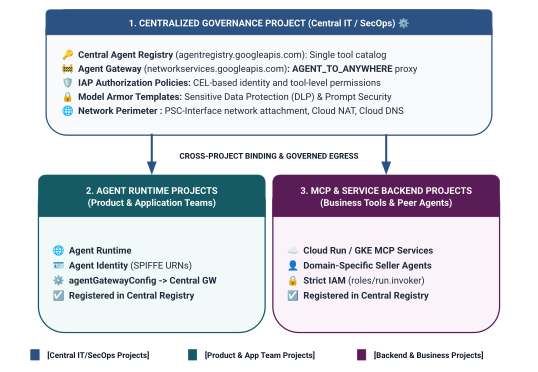
รูปที่ 2 สถาปัตยกรรมและการแบ่งขอบเขตการกำกับดูแลแบบ 3 ระดับข้ามโปรเจ็กต์
รูปแบบการกำหนดขอบเขตตัวตนแบบ 2 ระดับในนโยบายการเข้าถึงแบบรวม
เมื่อตัวแทนสื่อสารผ่าน Central Agent Gateway, Identity-Aware Proxy (IAP v2) จะประเมินการเข้าถึงตามข้อมูลประจำตัวของตัวแทนของผู้โทร ซึ่งเป็นข้อมูลประจำตัวที่อิงตาม SPIFFE ที่ได้รับการรับรองด้วยการเข้ารหัสซึ่งออกให้กับคอนเทนเนอร์รันไทม์โดยอัตโนมัติ โดยเทียบกับนโยบายการเข้าถึง IAM ทั่วโลก ดังนี้
- ระดับที่ 1: Google Cloud API พื้นฐาน (แบบหยาบผ่าน
principalSet://ในกฎข้อที่ 1): การให้สิทธิ์ขาออกระดับโปรเจ็กต์ที่อนุญาตให้รันไทม์ของเอเจนต์ทั้งหมดในโปรเจ็กต์ Spoke เข้าถึง Google API มาตรฐาน (aiplatform,iamcredentials,telemetry,agentregistry) เพื่อการค้นหา การสร้างโทเค็น และการอนุมาน - ระดับที่ 2: เครื่องมือทางธุรกิจและบริการ A2A (ละเอียดผ่าน
principal://ในกฎข้อ 2 และ 3): การเข้าถึงที่มีสิทธิ์น้อยที่สุดอย่างเข้มงวดซึ่งเชื่อมโยงกับอินสแตนซ์ Reasoning Engine แต่ละรายการ บังคับใช้ด้วยเงื่อนไข Common Expression Language (CEL) ที่กำหนดเป้าหมายไปยังบริการ Agent Registry ที่ลงทะเบียนไว้โดยเฉพาะ (destination.agent_registry.agent.name)
สิ่งที่คุณสร้าง
- Centralized Agent Gateway (
centralized-agw) ในPROJECT_GOVERNANCE - ส่วนขยายบริการให้สิทธิ์ IAP v2 และนโยบาย Authz ในโหมดบังคับใช้แบบเข้มงวด (
failOpen: false) - นโยบายการเข้าถึงแบบรวมของ IAM พื้นฐาน (
uap-rules.json) และการเชื่อมโยงนโยบายของโปรเจ็กต์ - สิทธิ์ IAM ของตัวแทนบริการข้ามโปรเจ็กต์ (
ar_agw_cross_project_sa) - Bucket พื้นที่งานส่วนกลางของ Google Cloud Storage (GCS) ที่ใช้ร่วมกัน
- ตัวแทนผู้ขายเบอร์เกอร์และพิซซ่าที่แยกกันใน
PROJECT_SELLERS - ตัวแทนบริการด้านการซื้อที่มีการค้นหาอัตโนมัติแบบไดนามิกของ REST ใน
PROJECT_CONCIERGE - การลงทะเบียนบริการใน Central Agent Registry ด้วย URL ของ mTLS ข้ามโปรเจ็กต์
- การอัปเดตนโยบายขาออกของ IAP v2 แบบไดนามิกพร้อมการยืนยันแบบเรียลไทม์และการตรวจสอบ Cloud Logging

รูปที่ 3 ลำดับการติดตั้งใช้งานแบบทีละขั้นตอน
สิ่งที่คุณจะได้เรียนรู้
- วิธีกำหนดค่าสิทธิ์ IAM ของตัวแทนบริการข้ามโปรเจ็กต์สำหรับเกตเวย์แบบรวมศูนย์
- วิธีกำหนดเส้นทางการออกของ Agent Runtime ผ่าน Agent Gateway ส่วนกลางในสภาพแวดล้อมแบบหลายโปรเจ็กต์
- วิธีมอบสิทธิ์การให้สิทธิ์ Agent Gateway ให้กับ Identity-Aware Proxy (IAP v2) โดยใช้ส่วนขยายบริการ (
iapPolicyVersion: "V2") - วิธีเขียนและเชื่อมโยงนโยบายการเข้าถึงแบบรวม (UAP) ของ IAM กับกฎ Common Expression Language (CEL) ที่ควบคุมปลายทางรีจิสทรีของตัวแทนที่ลงทะเบียน (
destination.agent_registry.*) - วิธีกำจัดรหัสเอเจนต์และ URL แบบฮาร์ดโค้ดโดยใช้การค้นหาอัตโนมัติรันไทม์กับรีจิสทรีของเอเจนต์
- วิธีทดสอบการบล็อกแบบ Zero Trust ที่ขอบเขตจริง (
HTTP 403 Forbidden) และยืนยันการอัปเดตนโยบายแบบเรียลไทม์ใน Cloud Logging
สิ่งที่ต้องมี
- โปรเจ็กต์ Google Cloud 3 รายการที่เปิดใช้การเรียกเก็บเงิน:
PROJECT_GOVERNANCE: นโยบายการกำกับดูแลส่วนกลาง เกตเวย์ รีจิสทรี และการเข้าถึง IAMPROJECT_CONCIERGE: ตัวแทนผู้ประสานงานการซื้อPROJECT_SELLERS: ตัวแทนผู้ขายที่เชี่ยวชาญด้านเบอร์เกอร์และพิซซ่า
- ผู้ใช้ IAM หรือบัญชีบริการที่มีสิทธิ์
roles/ownerหรือสิทธิ์ระดับผู้ดูแลระบบในทั้ง 3 โปรเจ็กต์ - องค์กร Google Cloud (สำหรับการแมปโดเมนที่เชื่อถือได้ของ SPIFFE)
- Google Cloud Shell หรือเครื่องภายในที่มีการติดตั้ง
gcloudCLI,python(3.11+) และuv
เรามาถึงส่วนท้ายของส่วนแนะนำแล้ว... ต่อไปจะเป็นส่วนการตั้งค่าและสภาพแวดล้อม
2. ตั้งค่า
แม้ว่าสถาปัตยกรรมนี้จะครอบคลุมโปรเจ็กต์ Google Cloud ที่แตกต่างกัน 3 โปรเจ็กต์ แต่คุณก็สามารถเรียกใช้คำสั่งการติดตั้งใช้งานเทอร์มินัล การดาวน์โหลดที่เก็บ และการดำเนินการ Staging ได้ 100% จากเทอร์มินัล Cloud Shell เดียวที่ตั้งค่าเป็น PROJECT_GOVERNANCE สคริปต์การติดตั้งใช้งานและgcloudคำสั่งทุกรายการจะกำหนดเป้าหมายไปยังโปรเจ็กต์ปลายทางที่เหมาะสมอย่างชัดเจนผ่านแฟล็ก CLI (--project)
เริ่มต้นด้วยการเข้าถึงบรรทัดคำสั่งของโปรเจ็กต์ที่อยู่ในระบบคลาวด์ของ Google โดยทำดังนี้
- Cloud Shell ที่
shell.cloud.google.comหรือ - เทอร์มินัลในเครื่องที่
gcloudCLI ติดตั้งแล้ว
กำหนดบริบทของโปรเจ็กต์
# set terminal project context to Central Governance Project
gcloud config set project SET_YOUR_GOVERNANCE_PROJECT_ID_HERE
# login to gcloud cli
gcloud auth login
# login for application default credentials
gcloud auth application-default login
อัปเดต gcloud CLI (แนะนำ)
# update gcloud components
gcloud components update --quiet
ตั้งค่าตัวแปรสภาพแวดล้อมของ Shell
ป้อนตัวระบุเฉพาะของโปรเจ็กต์
# 1. Project Identifiers
export PROJECT_GOVERNANCE="SET_YOUR_GOVERNANCE_PROJECT_ID_HERE"
export PROJECT_CONCIERGE="SET_YOUR_CONCIERGE_PROJECT_ID_HERE"
export PROJECT_SELLERS="SET_YOUR_SELLERS_PROJECT_ID_HERE"
ระบบจะดึงตัวแปรเชลล์เหล่านี้โดยอัตโนมัติ
# 2. Regional & Gateway Settings
export REGION="us-central1"
export AGW_NAME="centralized-agw"
export UAP_POLICY_NAME="uap-policy-${AGW_NAME}"
export UAP_BINDING_NAME="uap-binding-${AGW_NAME}"

# 3. Retrieve Project Numbers
export PROJECT_NUMBER_GOVERNANCE=$(gcloud projects describe ${PROJECT_GOVERNANCE} --format="value(projectNumber)")
export PROJECT_NUMBER_CONCIERGE=$(gcloud projects describe ${PROJECT_CONCIERGE} --format="value(projectNumber)")
export PROJECT_NUMBER_SELLERS=$(gcloud projects describe ${PROJECT_SELLERS} --format="value(projectNumber)")

# 4. Obtain Organization ID
export ORG_ID=$(gcloud projects get-ancestors ${PROJECT_GOVERNANCE} --format="value(id, type)" | grep organization | awk '{print $1}')

# 5. Set Application Default Credentials (ADC) Quota Project
gcloud auth application-default set-quota-project ${PROJECT_GOVERNANCE}

echo "Governance Project: ${PROJECT_GOVERNANCE} (${PROJECT_NUMBER_GOVERNANCE})"
echo "Concierge Project:  ${PROJECT_CONCIERGE} (${PROJECT_NUMBER_CONCIERGE})"
echo "Sellers Project:    ${PROJECT_SELLERS} (${PROJECT_NUMBER_SELLERS})"
echo "Organization ID:    ${ORG_ID}"
echo "UAP Policy Name:    ${UAP_POLICY_NAME}"
echo "UAP Binding Name:   ${UAP_BINDING_NAME}"
สร้างไดเรกทอรีในเครื่องสำหรับไฟล์การกำหนดค่า
# create config folder
mkdir -p cfg
กำหนดบทบาทผู้ดูแลระบบนโยบายการเข้าถึงสำหรับนโยบายการเข้าถึงแบบรวม
# grant Access Policy Admin and Project IAM Admin to current user in Governance Project
for ROLE in "roles/iam.accessPolicyAdmin" "roles/resourcemanager.projectIamAdmin"; do
  gcloud projects add-iam-policy-binding ${PROJECT_GOVERNANCE} \
    --member="user:$(gcloud config get-value account)" \
    --role="${ROLE}" \
    --condition=None
done
เปิดใช้บันทึกการเข้าถึงข้อมูลการตรวจสอบของ Cloud สำหรับ IAP v2
โดยค่าเริ่มต้น Google Cloud จะปิดใช้บันทึกการตรวจสอบการเข้าถึงข้อมูลเพื่อป้องกันค่าใช้จ่ายในการจัดเก็บที่ไม่ต้องการ เนื่องจาก IAP v2 จะส่งการตัดสินการให้สิทธิ์ (granted=true และ granted=false) เป็นบันทึกการตรวจสอบการเข้าถึงข้อมูล ให้เปิดใช้การบันทึก ADMIN_READ, DATA_READ และ DATA_WRITE สำหรับ iap.googleapis.com ใน PROJECT_GOVERNANCE ดังนี้
# 1. export current IAM policy for PROJECT_GOVERNANCE
gcloud projects get-iam-policy ${PROJECT_GOVERNANCE} \
  --format=json > cfg/gov_iam_policy.json
# 2. append auditConfigs for iap.googleapis.com
python3 -c "
import json
with open('cfg/gov_iam_policy.json') as f:
    policy = json.load(f)
audit_configs = [c for c in policy.get('auditConfigs', []) if c.get('service') != 'iap.googleapis.com']
audit_configs.append({
    'service': 'iap.googleapis.com',
    'auditLogConfigs': [
        {'logType': 'ADMIN_READ'},
        {'logType': 'DATA_READ'},
        {'logType': 'DATA_WRITE'}
    ]
})
policy['auditConfigs'] = audit_configs
with open('cfg/gov_iam_policy.json', 'w') as f:
    json.dump(policy, f, indent=2)
"
# 3. apply updated policy
gcloud projects set-iam-policy ${PROJECT_GOVERNANCE} cfg/gov_iam_policy.json
# 4. verify auditConfigs applied
gcloud projects get-iam-policy ${PROJECT_GOVERNANCE} --format="yaml(auditConfigs)"
เปิดใช้ Google Cloud APIs ที่จำเป็น
# enable google apis (agent platform & security bundle, part 1)
for PROJ in ${PROJECT_GOVERNANCE} ${PROJECT_CONCIERGE} ${PROJECT_SELLERS}; do
  gcloud services enable \
    agentregistry.googleapis.com \
    aiplatform.googleapis.com \
    apphub.googleapis.com \
    apptopology.googleapis.com \
    cloudapiregistry.googleapis.com \
    cloudtrace.googleapis.com \
    compute.googleapis.com \
    dataform.googleapis.com \
    iam.googleapis.com \
    agentidentity.googleapis.com \
    iap.googleapis.com \
    logging.googleapis.com \
    modelarmor.googleapis.com \
    monitoring.googleapis.com \
    networksecurity.googleapis.com \
    networkservices.googleapis.com \
    notebooks.googleapis.com \
    observability.googleapis.com \
    --project=${PROJ}
done
# enable google apis (agent platform bundle, part 2)
for PROJ in ${PROJECT_GOVERNANCE} ${PROJECT_CONCIERGE} ${PROJECT_SELLERS}; do
  gcloud services enable \
    securitycenter.googleapis.com \
    saasservicemgmt.googleapis.com \
    storage.googleapis.com \
    telemetry.googleapis.com \
    texttospeech.googleapis.com \
    --project=${PROJ}
done
# enable google apis (foundational & agent runtime build bundle, part 3)
for PROJ in ${PROJECT_GOVERNANCE} ${PROJECT_CONCIERGE} ${PROJECT_SELLERS}; do
  gcloud services enable \
    artifactregistry.googleapis.com \
    cloudbuild.googleapis.com \
    cloudresourcemanager.googleapis.com \
    iamcredentials.googleapis.com \
    serviceusage.googleapis.com \
    run.googleapis.com \
    orgpolicy.googleapis.com \
    --project=${PROJ}
done
ตรวจสอบการเปิดใช้ API ในทุกโปรเจ็กต์
การตรวจสอบว่าทั้ง 3 โปรเจ็กต์ (PROJECT_GOVERNANCE, PROJECT_CONCIERGE และ PROJECT_SELLERS) มีการเปิดใช้ API เดียวกันทุกประการจะช่วยสร้างความสอดคล้องในการดำเนินงานและป้องกันไม่ให้เกิดความล้มเหลวในการสร้างโทเค็นรันไทม์ ข้อผิดพลาดในการจัดแคตตาล็อกสคีมา หรือการขาดหายไปของข้อมูลการวัดและส่งข้อมูล
เรียกใช้สคริปต์การตรวจสอบต่อไปนี้ใน Cloud Shell เพื่อยืนยันความเท่าเทียมของ API ในทั้ง 3 โปรเจ็กต์
# validate that all required APIs are enabled across all 3 projects
python3 - << 'EOF'
import subprocess
import os
import sys

REQUIRED_APIS = [
    "agentregistry.googleapis.com",
    "aiplatform.googleapis.com",
    "apphub.googleapis.com",
    "apptopology.googleapis.com",
    "cloudapiregistry.googleapis.com",
    "cloudtrace.googleapis.com",
    "compute.googleapis.com",
    "dataform.googleapis.com",
    "iam.googleapis.com",
    "agentidentity.googleapis.com",
    "iap.googleapis.com",
    "logging.googleapis.com",
    "modelarmor.googleapis.com",
    "monitoring.googleapis.com",
    "networksecurity.googleapis.com",
    "networkservices.googleapis.com",
    "notebooks.googleapis.com",
    "observability.googleapis.com",
    "securitycenter.googleapis.com",
    "saasservicemgmt.googleapis.com",
    "storage.googleapis.com",
    "telemetry.googleapis.com",
    "texttospeech.googleapis.com",
    "artifactregistry.googleapis.com",
    "cloudbuild.googleapis.com",
    "cloudresourcemanager.googleapis.com",
    "iamcredentials.googleapis.com",
    "serviceusage.googleapis.com",
    "run.googleapis.com",
    "orgpolicy.googleapis.com"
]

projects = {
    "GOVERNANCE": os.environ.get("PROJECT_GOVERNANCE", ""),
    "CONCIERGE": os.environ.get("PROJECT_CONCIERGE", ""),
    "SELLERS": os.environ.get("PROJECT_SELLERS", "")
}

enabled = {}
for role, proj in projects.items():
    if not proj:
        print(f"Error: Environment variable for {role} is not set.")
        sys.exit(1)
    res = subprocess.run(
        ["gcloud", "services", "list", "--enabled", f"--project={proj}", "--format=value(config.name)"],
        capture_output=True, text=True, check=True
    )
    enabled[role] = set(res.stdout.strip().splitlines())

print(f"\n{'API Name':<36} | {'GOVERNANCE':<12} | {'CONCIERGE':<12} | {'SELLERS':<12}")
print("-" * 78)

all_synced = True
for api in REQUIRED_APIS:
    g_status = "ENABLED" if api in enabled["GOVERNANCE"] else "MISSING"
    c_status = "ENABLED" if api in enabled["CONCIERGE"] else "MISSING"
    s_status = "ENABLED" if api in enabled["SELLERS"] else "MISSING"
    if "MISSING" in (g_status, c_status, s_status):
        all_synced = False
    print(f"{api:<36} | {g_status:<12} | {c_status:<12} | {s_status:<12}")

print("-" * 78)
if all_synced:
    print("✅ All 29 required APIs are ENABLED and synchronized across all three projects.\n")
else:
    print("❌ Discrepancies detected. Please re-run the enablement commands for missing services.\n")
    sys.exit(1)
EOF
ตัวอย่างเอาต์พุตการตรวจสอบความถูกต้อง
คุณควรเห็นว่า API ทั้งหมดเปิดใช้อยู่
✅ All 30 required APIs are ENABLED and synchronized across all three projects.
กำหนดค่านโยบายองค์กร
นโยบายองค์กร Google Cloud เริ่มต้นจะบังคับใช้ข้อจํากัดที่จํากัดการเชื่อมโยงนโยบายการเข้าถึง IAM v3 กับทรัพยากร (constraints/iam.managed.disableAccessPolicyBinding)
ลบล้างข้อจำกัดของนโยบายองค์กรที่รับค่ามาในระดับโปรเจ็กต์โดยตั้งค่า enforce: false เป็นอนุญาตอย่างชัดเจน
# disable iam v3 constraint (allow v3 access policies)
gcloud org-policies set-policy /dev/stdin << EOF
name: projects/${PROJECT_NUMBER_GOVERNANCE}/policies/iam.managed.disableAccessPolicyBinding
spec:
  rules:
  - enforce: false
EOF
# verify org policy constraints on project
gcloud org-policies describe iam.managed.disableAccessPolicyBinding \
  --project=${PROJECT_GOVERNANCE} --effective
ส่วนการตั้งค่าสิ้นสุดลงแล้ว... ไปที่ส่วนลงทะเบียน Core Google APIs กันต่อ
3. Agent Registry
ลงทะเบียนบริการปลายทางของ Core Google APIs
Agent Gateway กำหนดให้ต้องลงทะเบียน URL ของ Google API ในรีจิสทรีของ Central Agent เพื่อให้ Agent ที่กำหนดค่าด้วย agent_gateway_config สามารถกำหนดเส้นทางการรับส่งข้อมูลขาออกไปยังบริการแบ็กเอนด์หลักของ Google Cloud (เช่น aiplatform, ข้อมูลเข้าสู่ระบบ IAM และการวัดและส่งข้อมูล) ได้อย่างปลอดภัย
สร้าง core-gapi-services ในรีจิสทรีของ Agent
# register core google api endpoints in agent registry with standard and :443 port variants
gcloud agent-registry services create core-gapi-services \
  --project=${PROJECT_GOVERNANCE} \
  --location=${REGION} \
  --display-name="gapi.core.services" \
  --description="Core Google Cloud APIs and Service Endpoints" \
  --endpoint-spec-type=no-spec \
  --interfaces=protocolBinding=JSONRPC,url=https://telemetry.googleapis.com \
  --interfaces=protocolBinding=JSONRPC,url=https://telemetry.mtls.googleapis.com \
  --interfaces=protocolBinding=JSONRPC,url=https://${REGION}-aiplatform.googleapis.com \
  --interfaces=protocolBinding=JSONRPC,url=https://${REGION}-aiplatform.googleapis.com:443 \
  --interfaces=protocolBinding=JSONRPC,url=https://${REGION}-aiplatform.mtls.googleapis.com \
  --interfaces=protocolBinding=JSONRPC,url=https://${REGION}-aiplatform.mtls.googleapis.com:443 \
  --interfaces=protocolBinding=JSONRPC,url=https://aiplatform.googleapis.com \
  --interfaces=protocolBinding=JSONRPC,url=https://aiplatform.googleapis.com:443 \
  --interfaces=protocolBinding=JSONRPC,url=https://aiplatform.mtls.googleapis.com \
  --interfaces=protocolBinding=JSONRPC,url=https://aiplatform.mtls.googleapis.com:443 \
  --interfaces=protocolBinding=JSONRPC,url=https://cloudresourcemanager.googleapis.com \
  --interfaces=protocolBinding=JSONRPC,url=https://iamcredentials.googleapis.com \
  --interfaces=protocolBinding=JSONRPC,url=https://iamcredentials.mtls.googleapis.com \
  --interfaces=protocolBinding=JSONRPC,url=https://agentregistry.googleapis.com \
  --interfaces=protocolBinding=JSONRPC,url=https://agentregistry.mtls.googleapis.com \
  --interfaces=protocolBinding=JSONRPC,url=https://agentregistry.googleapis.com:443 \
  --interfaces=protocolBinding=JSONRPC,url=https://agentregistry.mtls.googleapis.com:443
บันทึกรหัสทรัพยากรของปลายทาง Capture Core APIs
# capture the underlying Agent Registry endpoint ID
export ENDPOINT_ID=$(gcloud agent-registry services describe core-gapi-services \
  --project=${PROJECT_GOVERNANCE} \
  --location=${REGION} \
  --format="value(registryResource)" | awk -F'/' '{print $NF}')
echo "Core APIs Endpoint ID: ${ENDPOINT_ID}"
ทำความเข้าใจ principalSet กับ principal ในข้อมูลระบุตัวตนของ Agent
ใน Google Cloud IAM และ Gemini Enterprise Agent Platform ข้อมูลประจำตัวของเครื่องที่ออกให้กับคอนเทนเนอร์ของเอเจนต์ที่ดำเนินการจะใช้ URN ของ SPIFFE ที่ได้รับการรับรองด้วยการเข้ารหัสซึ่งประเมินโดย Identity-Aware Proxy (IAP v2) เมื่อกำหนดค่านโยบายการเข้าถึงแบบรวม IAM คุณสามารถกำหนดเป้าหมายเป็น principal เดียวที่เฉพาะเจาะจง หรือ principalSet ตามแอตทริบิวต์ได้
มิติข้อมูล |
|
|
ไวยากรณ์ IAM |
|
|
ระดับรายละเอียด | แบบละเอียด (ระดับอินสแตนซ์): ระบุอินสแตนซ์คอนเทนเนอร์ Reasoning Engine ที่เฉพาะเจาะจงรายการเดียว | แบบหยาบ (ระดับโปรเจ็กต์): ระบุเครื่องมือการให้เหตุผลทั้งหมดที่แชร์แอตทริบิวต์โปรเจ็กต์ร่วมกัน |
รูปแบบ URN |
|
|
กรณีการใช้งานในแพลตฟอร์มเอเจนต์ | ระดับ 2 (เครื่องมือทางธุรกิจและ A2A): การให้สิทธิ์ตัวแทนผู้ประสานงานที่เฉพาะเจาะจงเพื่อเรียกใช้เครื่องมือโดเมนเป้าหมาย (เช่น เจ้าหน้าที่บริการด้านการซื้อ $\rightarrow$ ผู้ขายเบอร์เกอร์) | ระดับที่ 1 (โครงสร้างพื้นฐาน): การให้สิทธิ์เข้าถึงขาออกแก่ตัวแทนทั้งหมดในโปรเจ็กต์ไปยัง Google Cloud API ( |
ผลกระทบต่อวงจรผลิตภัณฑ์ | หากมีการลบและสร้างเอเจนต์ขึ้นมาใหม่ รหัสเครื่องยนต์ใหม่ของเอเจนต์จะต้องมีการอัปเดตการเชื่อมโยงนโยบาย IAM | ใช้กับเอเจนต์ที่เพิ่งติดตั้งใช้งานในโปรเจ็กต์นั้นโดยอัตโนมัติโดยไม่ต้องอัปเดต IAM เพิ่มเติม |
การกำกับดูแลแบบประกาศด้วยนโยบายการเข้าถึงแบบรวม (UAP / IAP v2)
ใน IAP v1 แบบเดิม ระบบจะแนบนโยบายขาออกกับทรัพยากร Agent Registry แต่ละรายการโดยตรงโดยใช้ gcloud beta iap web add-iam-policy-binding ในส่วนนโยบายการเข้าถึงแบบรวมและ IAP v2 ระบบจะยกเลิกการเชื่อมโยงต่อทรัพยากรเพื่อใช้นโยบายการเข้าถึง IAM แบบรวมศูนย์เดียว (cfg/uap-rules.json) แทน
การให้สิทธิ์ขาออกพื้นฐานสำหรับ core-gapi-services จะได้รับการกำหนดค่าเป็นกฎ 1 ในนโยบายการเข้าถึงแบบรวมในส่วนที่ 5 เพื่อให้มั่นใจว่าคอนเทนเนอร์ของตัวแทนทั้งหมดมีเส้นทางการส่งออกพื้นฐานก่อนการติดตั้งใช้งาน
ดูรายละเอียดทางเทคนิคเพิ่มเติมเกี่ยวกับตัวระบุหลักและกลไกการทำงานของ Workload Identity ได้ที่
- Cloud IAM ของ Google: ตัวระบุผู้รับสิทธิ์และชุดผู้รับสิทธิ์
- วิธีการทำงานของข้อมูลประจำตัวของตัวแทน
- การกำหนดค่านโยบายการเข้าถึงแบบรวมของ IAM สำหรับเกตเวย์ของตัวแทน
การลงทะเบียนปลายทาง API หลักเสร็จสมบูรณ์แล้ว... ไปที่ส่วนติดตั้งใช้งานเกตเวย์ตัวแทนแบบรวมศูนย์กันต่อ
4. Agent Gateway
ติดตั้งใช้งาน Centralized Agent Gateway
ติดตั้งใช้งาน Agent Gateway (centralized-agw) ที่มีศูนย์กลางในโหมดขาออกของ AGENT_TO_ANYWHERE ภายในโปรเจ็กต์ $PROJECT_GOVERNANCE
กำหนดไฟล์ Manifest การกำหนดค่าเกตเวย์
สร้าง cfg/${AGW_NAME}.yaml สำหรับการกำกับดูแลการรับส่งข้อมูลขาออก
# generate agent gateway config yaml
cat > cfg/${AGW_NAME}.yaml << EOF
name: ${AGW_NAME}
protocols:
  - MCP
googleManaged:
  governedAccessPath: AGENT_TO_ANYWHERE
registries:
  - "//agentregistry.googleapis.com/projects/${PROJECT_GOVERNANCE}/locations/${REGION}"
EOF
การกำหนดค่าเกตเวย์ของ Agent การนำเข้า
# import and create agent gateway
gcloud network-services agent-gateways import ${AGW_NAME} \
  --source="cfg/${AGW_NAME}.yaml" \
  --location=${REGION} \
  --project=${PROJECT_GOVERNANCE}
ยืนยันรายละเอียดเกตเวย์ของตัวแทน
# show agent gateway status
gcloud network-services agent-gateways describe ${AGW_NAME} \
  --location=${REGION} \
  --project=${PROJECT_GOVERNANCE}
เอาต์พุตตัวอย่าง
agentGatewayCard:
  mtlsEndpoint: projects/${AGW_TP_ID}/regions/us-central1/serviceAttachments/unitkind1-swp-mtls-psc-sa
  rootCertificates:
  - |
    -----BEGIN CERTIFICATE-----
    MIIDwzCCAqugAwIBAgITNQuWGopdOZaHdcK7r7AYFhonqDANBgkqhkiG9w0BAQsF
    ...
    -----END CERTIFICATE-----
  serviceExtensionsServiceAccount: service-${PROJ_NO}@gcp-sa-dep.iam.gserviceaccount.com
createTime: 'YYYY-MM-DDT12:34:56.789098765Z'
googleManaged:
  governedAccessPath: AGENT_TO_ANYWHERE
name: projects/${PROJECT_GOVERNANCE}/locations/us-central1/agentGateways/centralized-agw
protocols:
- MCP
registries:
- //agentregistry.googleapis.com/projects/${PROJECT_GOVERNANCE}/locations/us-central1
updateTime: 'YYYY-MM-DDT12:34:56.789098765Z'
การติดตั้งใช้งานเกตเวย์เสร็จสิ้นแล้ว... ไปที่ส่วนกำหนดค่าการให้สิทธิ์กันต่อ
5. การให้สิทธิ์
กำหนดค่าการให้สิทธิ์เกตเวย์ของ Agent และ UAP พื้นฐาน
Agent Gateway จะรักษาความปลอดภัยและควบคุมการเข้าชมเครื่องมือและ Agent ขาออกโดยใช้นโยบายการให้สิทธิ์ (networksecurity.authzPolicies) ที่ผสานรวมกับนโยบายการเข้าถึงแบบรวม (UAP) ของ Identity-Aware Proxy (IAP v2)
ภาพรวมสถาปัตยกรรมการให้สิทธิ์

รูปที่ 4 ภาพรวมสถาปัตยกรรมการให้สิทธิ์
สถาปัตยกรรมการให้สิทธิ์ประกอบด้วย 3 เลเยอร์ที่เชื่อมต่อกัน ดังนี้
- ส่วนขยายบริการ IAP (
authzExtension): ทรัพยากรระดับภูมิภาคที่กำหนดค่าด้วยservice: iap.googleapis.com,metadata: iapPolicyVersion: "V2"และfailOpen: falseเพื่อบังคับใช้ Zero Trust ที่เข้มงวด - นโยบายการให้สิทธิ์ของเกตเวย์ (
authzPolicy): ทรัพยากรที่เข้าถึงได้ในภูมิภาคที่กำหนดเป้าหมายไปยัง Agent Gateway ด้วยpolicyProfile: REQUEST_AUTHZและaction: CUSTOMซึ่งจะกำหนดเส้นทางการตรวจสอบการให้สิทธิ์ไปยังส่วนขยาย Authz ของ IAP - นโยบายการเข้าถึงและการเชื่อมโยงแบบรวมของ IAM (
accessPolicyและpolicyBinding): ทรัพยากร IAM v3 ทั่วโลกที่ IAP ประเมิน โดยจะยืนยันสิทธิ์สากลiap.googleapis.com/resources.egressViaIAPกับข้อมูลประจำตัว SPIFFE ของผู้โทรและเงื่อนไขแคตตาล็อก CEL
ขั้นตอนที่ 1: สร้างและนำเข้าส่วนขยายการให้สิทธิ์ IAP v2
สร้างไฟล์ Manifest ของส่วนขยายบริการด้วย iapPolicyVersion: "V2" และ failOpen: false ในโหมด ENFORCE ที่เข้มงวด
# create authz extension config file in ENFORCE mode
cat > cfg/${AGW_NAME}-svc-ext-authz-iap.yaml << EOF
name: ${AGW_NAME}-svc-ext-authz-iap
service: iap.googleapis.com
failOpen: false
timeout: 1s
metadata:
  iapPolicyVersion: "V2"
EOF
นำเข้าส่วนขยาย Authz
# import IAP v2 authz extension
gcloud service-extensions authz-extensions import ${AGW_NAME}-svc-ext-authz-iap \
  --source=cfg/${AGW_NAME}-svc-ext-authz-iap.yaml \
  --location=${REGION} \
  --project=${PROJECT_GOVERNANCE}
ตรวจสอบว่าส่วนขยาย Authz ทำงานอยู่
# describe authz extension
gcloud service-extensions authz-extensions describe ${AGW_NAME}-svc-ext-authz-iap \
  --location=${REGION} \
  --project=${PROJECT_GOVERNANCE}
เอาต์พุตตัวอย่าง
createTime: 'YYYY-MM-DDT12:34:56.789098765Z'
failOpen: false
metadata:
  iapPolicyVersion: V2
name: projects/${PROJECT_GOVERNANCE}/locations/us-central1/authzExtensions/centralized-agw-svc-ext-authz-iap
service: iap.googleapis.com
timeout: 1s
ขั้นตอนที่ 2: สร้างและนำเข้านโยบายการให้สิทธิ์เกตเวย์
สร้างการกำหนดค่านโยบายการให้สิทธิ์ที่แนบกับ Agent Gateway และมอบสิทธิ์การยืนยันคำขอให้กับส่วนขยาย Authz ของ IAP โดยทำดังนี้
# create authz policy manifest
cat > cfg/${AGW_NAME}-authz-policy-profile-iap.yaml << EOF
name: ${AGW_NAME}-authz-policy-profile-iap
target:
  resources:
    - "projects/${PROJECT_GOVERNANCE}/locations/${REGION}/agentGateways/${AGW_NAME}"
policyProfile: REQUEST_AUTHZ
action: CUSTOM
customProvider:
  authzExtension:
    resources:
      - "projects/${PROJECT_GOVERNANCE}/locations/${REGION}/authzExtensions/${AGW_NAME}-svc-ext-authz-iap"
EOF
นำเข้านโยบายการให้สิทธิ์
# import authz policy
gcloud beta network-security authz-policies import ${AGW_NAME}-authz-policy-profile-iap \
  --source=cfg/${AGW_NAME}-authz-policy-profile-iap.yaml \
  --location=${REGION} \
  --project=${PROJECT_GOVERNANCE}
ตรวจสอบนโยบายการให้สิทธิ์ที่ใช้งานอยู่
# describe authz policy
gcloud beta network-security authz-policies describe ${AGW_NAME}-authz-policy-profile-iap \
  --location=${REGION} \
  --project=${PROJECT_GOVERNANCE}
ขั้นตอนที่ 3: สร้างนโยบายการเข้าถึงแบบรวมเริ่มต้น (กฎที่ 1: Google API หลัก)
สร้าง cfg/uap-rules.json โดยมีกฎ 1 ที่ให้สิทธิ์โปรเจ็กต์ 3 รายการ principalSet ในการเข้าถึง core-gapi-services ดังนี้
# create initial unified access policy rules manifest
cat > cfg/uap-rules.json << EOF
[
  {
    "description": "Rule 1: Allow agent runtimes across all 3 projects to reach Core Google APIs",
    "effect": "ALLOW",
    "principals": [
      "principalSet://agents.global.org-${ORG_ID}.system.id.goog/attribute.platformContainer/aiplatform/projects/${PROJECT_NUMBER_GOVERNANCE}",
      "principalSet://agents.global.org-${ORG_ID}.system.id.goog/attribute.platformContainer/aiplatform/projects/${PROJECT_NUMBER_CONCIERGE}",
      "principalSet://agents.global.org-${ORG_ID}.system.id.goog/attribute.platformContainer/aiplatform/projects/${PROJECT_NUMBER_SELLERS}"
    ],
    "operation": {
      "permissions": [
        "iap.googleapis.com/resources.egressViaIAP"
      ]
    },
    "conditions": {
      "iap.googleapis.com": {
        "expression": \
        "destination.is_registered == true && \
         destination.agent_registry.resource_type == 'ENDPOINT' && ( \
         destination.agent_registry.endpoint.name == 'projects/${PROJECT_GOVERNANCE}/locations/${REGION}/endpoints/core-gapi-services' || \
         destination.agent_registry.endpoint.name == 'projects/${PROJECT_GOVERNANCE}/locations/${REGION}/endpoints/${ENDPOINT_ID}' || \
         destination.agent_registry.endpoint.name == 'projects/${PROJECT_NUMBER_GOVERNANCE}/locations/${REGION}/endpoints/${ENDPOINT_ID}')"
      }
    }
  }
]
EOF
ขั้นตอนที่ 4: สร้างและเชื่อมโยงนโยบายการเข้าถึง IAM
สร้างนโยบายการเข้าถึง IAM ทั่วโลก
# create global IAM access policy
gcloud iam access-policies create ${UAP_POLICY_NAME} \
  --details-rules=cfg/uap-rules.json \
  --project=${PROJECT_GOVERNANCE} \
  --location=global
เชื่อมโยงนโยบายการเข้าถึงกับ PROJECT_GOVERNANCE โดยทำดังนี้
# bind access policy to governance project
gcloud iam policy-bindings create ${UAP_BINDING_NAME} \
  --policy="projects/${PROJECT_GOVERNANCE}/locations/global/accessPolicies/${UAP_POLICY_NAME}" \
  --target-resource="//cloudresourcemanager.googleapis.com/projects/${PROJECT_GOVERNANCE}" \
  --project=${PROJECT_GOVERNANCE} \
  --location=global
ตรวจสอบว่าการเชื่อมโยงนโยบายใช้งานอยู่โดยทำดังนี้
# verify policy binding
gcloud iam policy-bindings describe ${UAP_BINDING_NAME} \
  --project=${PROJECT_GOVERNANCE} \
  --location=global
เอาต์พุตตัวอย่าง
name: projects/${PROJECT_GOVERNANCE}/locations/global/policyBindings/uap-binding-centralized-agw
policy: projects/${PROJECT_GOVERNANCE}/locations/global/accessPolicies/uap-policy-centralized-agw
policyKind: ACCESS_POLICY
target:
  resource: //cloudresourcemanager.googleapis.com/projects/${PROJECT_GOVERNANCE}
ตอนนี้การออกของ Google Cloud API พื้นฐานได้รับอนุญาตอย่างปลอดภัยในทั้ง 3 โปรเจ็กต์ในโหมด ENFORCE ที่เข้มงวด
การตั้งค่าการให้สิทธิ์เกตเวย์เสร็จสมบูรณ์แล้ว... ไปที่ส่วนกำหนดค่าสิทธิ์ IAM ข้ามโปรเจ็กต์กันต่อ
6. IAM ข้ามโปรเจ็กต์
กำหนดค่าสิทธิ์ IAM ข้ามโปรเจ็กต์
ในโทโพโลยีแบบหลายโปรเจ็กต์นี้ Agent Runtime จะอยู่ในโปรเจ็กต์ Spoke (PROJECT_CONCIERGE และ PROJECT_SELLERS) ส่วน Central Agent Gateway และ Agent Registry จะอยู่ใน PROJECT_GOVERNANCE
เนื่องจากโปรเจ็กต์ Google Cloud เป็นขอบเขตการรักษาความปลอดภัยที่แยกกัน การเข้าถึงข้ามโปรเจ็กต์จึงต้องได้รับอนุญาตอย่างชัดเจนใน 2 ชั้นการทำงาน ดังนี้
- Control Plane (เวลาในการติดตั้งใช้งาน): เมื่อติดตั้งใช้งานคอนเทนเนอร์ของเอเจนต์ที่กำหนดค่าด้วย
--agent-gateway-configAgent Runtime Service Agent (service-) ของโปรเจ็กต์ Spoke ต้องแนบคอนเทนเนอร์กับเกตเวย์ส่วนกลาง เราสร้างบทบาทที่กำหนดเองขั้นต่ำ (@gcp-sa-aiplatform.iam.gserviceaccount.com ar_agw_cross_project_sa) ที่ให้สิทธิ์networkservices.agentGateways.use,getและoperations.getในPROJECT_GOVERNANCE - Data Plane (การดำเนินการรันไทม์):
- การค้นพบแคตตาล็อก: ข้อมูลประจำตัวของ Spoke ต้องมี
roles/agentregistry.viewerในPROJECT_GOVERNANCEเพื่อแก้ไขปลายทางของเอเจนต์เป้าหมายแบบไดนามิก - การเรียกใช้เป้าหมาย: เอเจนต์ Concierge ต้องมี
roles/aiplatform.userในPROJECT_SELLERSเพื่อเรียกใช้การค้นหาเทียบกับเครื่องมือให้เหตุผลของผู้ขาย
- การค้นพบแคตตาล็อก: ข้อมูลประจำตัวของ Spoke ต้องมี
สร้างบทบาท IAM ที่กำหนดเองใน PROJECT_GOVERNANCE
# create custom role in central governance project
gcloud iam roles create ar_agw_cross_project_sa \
  --project=${PROJECT_GOVERNANCE} \
  --title="Runtime Agent Gateway Cross-Project SA" \
  --description="Custom role for cross-project service agents to access Central Agent Gateway" \
  --permissions="networkservices.agentGateways.get,networkservices.agentGateways.use,networkservices.operations.get" \
  --stage="GA"
มอบหมายบทบาทที่กำหนดเองให้กับตัวแทนบริการ Agent Runtime
# 1. ensure aiplatform service identities are provisioned across all projects
for PROJ in ${PROJECT_GOVERNANCE} ${PROJECT_CONCIERGE} ${PROJECT_SELLERS}; do
  gcloud beta services identity create --service=aiplatform.googleapis.com --project=${PROJ}
done
# 2. derive aiplatform service agent emails
export CONCIERGE_AI_SA="service-${PROJECT_NUMBER_CONCIERGE}@gcp-sa-aiplatform.iam.gserviceaccount.com"
export CONCIERGE_RE_SA="service-${PROJECT_NUMBER_CONCIERGE}@gcp-sa-aiplatform-re.iam.gserviceaccount.com"
export CONCIERGE_COMPUTE_SA="${PROJECT_NUMBER_CONCIERGE}-compute@developer.gserviceaccount.com"

export SELLERS_AI_SA="service-${PROJECT_NUMBER_SELLERS}@gcp-sa-aiplatform.iam.gserviceaccount.com"
export SELLERS_RE_SA="service-${PROJECT_NUMBER_SELLERS}@gcp-sa-aiplatform-re.iam.gserviceaccount.com"
export SELLERS_COMPUTE_SA="${PROJECT_NUMBER_SELLERS}-compute@developer.gserviceaccount.com"
# 3. grant custom role & network viewer to Concierge and Sellers Service Agents
for SA in ${CONCIERGE_AI_SA} ${SELLERS_AI_SA}; do
  gcloud projects add-iam-policy-binding ${PROJECT_GOVERNANCE} \
    --member="serviceAccount:${SA}" \
    --role="projects/${PROJECT_GOVERNANCE}/roles/ar_agw_cross_project_sa" \
    --condition=None

  gcloud projects add-iam-policy-binding ${PROJECT_GOVERNANCE} \
    --member="serviceAccount:${SA}" \
    --role="roles/networkservices.viewer" \
    --condition=None
done
# 4. grant agent registry viewer on Governance Project for dynamic autodiscovery
for MEMBER in "serviceAccount:${CONCIERGE_AI_SA}" "serviceAccount:${CONCIERGE_RE_SA}" "serviceAccount:${CONCIERGE_COMPUTE_SA}" "serviceAccount:${SELLERS_AI_SA}" "serviceAccount:${SELLERS_RE_SA}" "serviceAccount:${SELLERS_COMPUTE_SA}" "principalSet://agents.global.org-${ORG_ID}.system.id.goog/attribute.platformContainer/aiplatform/projects/${PROJECT_NUMBER_CONCIERGE}" "principalSet://agents.global.org-${ORG_ID}.system.id.goog/attribute.platformContainer/aiplatform/projects/${PROJECT_NUMBER_SELLERS}"; do
  gcloud projects add-iam-policy-binding ${PROJECT_GOVERNANCE} \
    --member="${MEMBER}" \
    --role="roles/agentregistry.viewer" \
    --condition=None
done
# 5. grant agent project viewer on Governance Project for dynamic autodiscovery
for SA in ${CONCIERGE_COMPUTE_SA} ${CONCIERGE_AI_SA}; do
  gcloud projects add-iam-policy-binding ${PROJECT_GOVERNANCE} \
    --member="serviceAccount:${SA}" \
    --role="roles/viewer" \
    --condition=None
done
# 6. grant aitplatform user on Sellers project to Concierge for cross-project A2A invocation
for MEMBER in "serviceAccount:${CONCIERGE_AI_SA}" "serviceAccount:${CONCIERGE_RE_SA}" "serviceAccount:${CONCIERGE_COMPUTE_SA}" "principalSet://agents.global.org-${ORG_ID}.system.id.goog/attribute.platformContainer/aiplatform/projects/${PROJECT_NUMBER_CONCIERGE}"; do
  gcloud projects add-iam-policy-binding ${PROJECT_SELLERS} \
    --member="${MEMBER}" \
    --role="roles/aiplatform.user" \
    --condition=None
done
การตั้งค่า IAM ข้ามโปรเจ็กต์ก็มีเพียงเท่านี้... ต่อไปคือส่วนการติดตั้งใช้งานเอเจนต์ผู้ขายและเอเจนต์อำนวยความสะดวก
7. รันไทม์ของ Agent
ติดตั้งใช้งาน Seller Agent และ Concierge Agent
เราดูแลรักษาฐานของโค้ดของแอปพลิเคชันแบบหลาย Agent และสคริปต์การทำให้ใช้งานได้ที่ใช้สำหรับ Codelab นี้ไว้ในที่เก็บ Google Cloud GitHub ระยะไกล ขั้นตอนต่อไปนี้จะโคลนที่เก็บในเครื่อง คัดลอกไฟล์ที่จำเป็นไปยังโครงสร้างไดเรกทอรีการทำงานปัจจุบัน ล้างไฟล์ชั่วคราว และติดตั้งทรัพยากร Dependency ด้วย uv
ดึงข้อมูลอาร์ติแฟกต์ระยะไกล
# clone remote repository to temp local dir
git clone https://github.com/GoogleCloudPlatform/cloud-networking-solutions.git ./temp_agw_cuj_arun_multiproject
# copy multi-agent application files to current working directory
cp -r temp_agw_cuj_arun_multiproject/codelabs/agw-cuj-arun-multiproject ./cross-project-multiagent
# remove temporary directory
rm -rf temp_agw_cuj_arun_multiproject
# install dependencies
uv sync --directory ./cross-project-multiagent
สร้างที่เก็บข้อมูลกลางที่ใช้ร่วมกัน
# create shared central staging bucket
gcloud storage buckets create gs://${PROJECT_GOVERNANCE}-shared-staging \
  --project=${PROJECT_GOVERNANCE} \
  --location=${REGION}
# grant cross-project read/write access to runtime service agents
gcloud storage buckets add-iam-policy-binding gs://${PROJECT_GOVERNANCE}-shared-staging \
  --member="serviceAccount:service-${PROJECT_NUMBER_CONCIERGE}@gcp-sa-aiplatform.iam.gserviceaccount.com" \
  --role="roles/storage.objectAdmin"

gcloud storage buckets add-iam-policy-binding gs://${PROJECT_GOVERNANCE}-shared-staging \
  --member="serviceAccount:service-${PROJECT_NUMBER_SELLERS}@gcp-sa-aiplatform.iam.gserviceaccount.com" \
  --role="roles/storage.objectAdmin"
วิธีการทำงานของการเชื่อมโยงเกตเวย์ของเอเจนต์ข้ามโปรเจ็กต์
ในขั้นตอนนี้ คุณจะติดตั้งใช้งาน Seller Agent ในโปรเจ็กต์ Spoke (PROJECT_SELLERS) ขณะกำหนดค่าให้กำหนดเส้นทางการออกผ่าน Central Agent Gateway ใน PROJECT_GOVERNANCE ดังนี้
# !-- for example purposes -- NOT a command to execute --!
# snippet from deploy_burger.py
burger_config = {
    "staging_bucket": staging_bucket_uri,
    "gcs_dir_name": "burger_agent",
    "display_name": "burger-seller-agent-adk",
    "identity_type": "AGENT_IDENTITY",
    "agent_gateway_config": {
        "agent_to_anywhere_config": {
            "agent_gateway": f"projects/{args.governance_project}/locations/{args.region}/agentGateways/{args.gateway}"
        }
    },
}
deployed_burger = client.agent_engines.create(agent=burger_playground, config=burger_config)
เนื่องจากกฎข้อที่ 1 ได้รับการกำหนดไว้ก่อนหน้านี้ในนโยบายการเข้าถึงแบบรวมของเรา คำขอการเริ่มต้นคอนเทนเนอร์ไปยัง Google Cloud API จึงได้รับอนุญาตผ่านเกตเวย์โดยไม่มีการหยุดชะงัก
ติดตั้งใช้งานเอเจนต์ผู้ขายเบอร์เกอร์และพิซซ่าใน PROJECT_SELLERS
# 1. deploy Burger Seller Agent to PROJECT_SELLERS
uv run --directory ./cross-project-multiagent python deploy_burger.py \
  --project=${PROJECT_SELLERS} \
  --region=${REGION} \
  --governance-project=${PROJECT_GOVERNANCE} \
  --gateway=projects/${PROJECT_GOVERNANCE}/locations/${REGION}/agentGateways/${AGW_NAME}
# 2. deploy Pizza Seller Agent to PROJECT_SELLERS
uv run --directory ./cross-project-multiagent python deploy_pizza.py \
  --project=${PROJECT_SELLERS} \
  --region=${REGION} \
  --governance-project=${PROJECT_GOVERNANCE} \
  --gateway=projects/${PROJECT_GOVERNANCE}/locations/${REGION}/agentGateways/${AGW_NAME}
ตรวจสอบการกำหนดเส้นทางเกตเวย์ของผู้ขาย
# retrieve deployed seller reasoning engine IDs
export BURGER_ENGINE_ID=$(grep BURGER_SELLER_AGENT_ID cross-project-multiagent/burger_agent.env | awk -F'/' '{print $NF}')
export PIZZA_ENGINE_ID=$(grep PIZZA_SELLER_AGENT_ID cross-project-multiagent/pizza_agent.env | awk -F'/' '{print $NF}')

echo "Burger Engine ID: ${BURGER_ENGINE_ID}"
echo "Pizza Engine ID:  ${PIZZA_ENGINE_ID}"
# inspect runtime configuration for both Seller Agents
for ENGINE_ID in ${BURGER_ENGINE_ID} ${PIZZA_ENGINE_ID}; do
  curl -s -X GET "https://${REGION}-aiplatform.googleapis.com/v1beta1/projects/${PROJECT_SELLERS}/locations/${REGION}/reasoningEngines/${ENGINE_ID}" \
    -H "Authorization: Bearer $(gcloud auth application-default print-access-token)" \
    -H "Content-Type: application/json" \
    | jq '{displayName: .displayName, identityType: .spec.identityType, effectiveIdentity: .spec.effectiveIdentity, agentGatewayConfig: .spec.deploymentSpec.agentGatewayConfig}'
done
ติดตั้งใช้งาน Agent ของเจ้าหน้าที่บริการด้านการซื้อใน PROJECT_CONCIERGE
# deploy Purchasing Concierge to PROJECT_CONCIERGE
uv run --directory ./cross-project-multiagent python deploy_concierge_adk.py \
  --project=${PROJECT_CONCIERGE} \
  --region=${REGION} \
  --staging-bucket=gs://${PROJECT_GOVERNANCE}-shared-staging \
  --gateway-name=${AGW_NAME} \
  --gateway-project=${PROJECT_GOVERNANCE}
ตรวจสอบการกำหนดเส้นทางการชำระเงิน
# retrieve Concierge engine ID
export CONCIERGE_ENGINE_ID=$(grep CONCIERGE_AGENT_ID cross-project-multiagent/concierge_agent.env | awk -F'/' '{print $NF}')
echo "Concierge Engine ID: ${CONCIERGE_ENGINE_ID}"
# inspect runtime configuration for Purchasing Concierge
curl -s -X GET "https://${REGION}-aiplatform.googleapis.com/v1beta1/projects/${PROJECT_CONCIERGE}/locations/${REGION}/reasoningEngines/${CONCIERGE_ENGINE_ID}" \
  -H "Authorization: Bearer $(gcloud auth application-default print-access-token)" \
  -H "Content-Type: application/json" \
  | jq '{displayName: .displayName, identityType: .spec.identityType, effectiveIdentity: .spec.effectiveIdentity, agentGatewayConfig: .spec.deploymentSpec.agentGatewayConfig}'
เอาต์พุตควรแสดงข้อมูลประจำตัวของรันไทม์ของตัวแทน Concierge และโปรเจ็กต์ รวมถึงการเชื่อมโยงกับ Agent Gateway ของโปรเจ็กต์การกำกับดูแล
{
  "displayName": "purchasing-concierge-adk",
  "identityType": "AGENT_IDENTITY",
  "effectiveIdentity": "agents.global.org-${ORG_ID}.system.id.goog/resources/aiplatform/projects/${PROJECT_CONCIERGE}/locations/us-central1/reasoningEngines/${CONCIERGE_ENGINE_ID}",
  "agentGatewayConfig": {
    "agentToAnywhereConfig": {
      "agentGateway": "projects/${PROJECT_GOVERNANCE}/locations/us-central1/agentGateways/centralized-agw"
    }
  }
}
การติดตั้งใช้งาน Agent ก็มีเพียงเท่านี้... ต่อไปเราจะไปที่ส่วนลงทะเบียน Agent ใน Central Agent Registry
8. รีจิสทรีข้ามโปรเจ็กต์
ลงทะเบียน Agent ใน Central Agent Registry
ลงทะเบียน Agent ทั้ง 3 รายใน Central Agent Registry ใน PROJECT_GOVERNANCE โดยใช้ปลายทาง mTLS ระดับภูมิภาคแบบข้ามโปรเจ็กต์และหมายเลขโปรเจ็กต์ที่เป็นตัวเลข
ลงทะเบียนบริการเป็นเอเจนต์ที่ไม่ใช่ A2A ใน Agent Registry
# 1. register Burger Seller Agent
gcloud agent-registry services create burger-seller-agent \
  --project=${PROJECT_GOVERNANCE} \
  --location=${REGION} \
  --display-name="Burger Seller Agent" \
  --description="Specialist agent that sells burgers and fries" \
  --agent-spec-type=no-spec \
  --interfaces=protocolBinding=JSONRPC,url=https://${REGION}-aiplatform.mtls.googleapis.com/v1/projects/${PROJECT_NUMBER_SELLERS}/locations/${REGION}/reasoningEngines/${BURGER_ENGINE_ID}:query \
  --interfaces=protocolBinding=JSONRPC,url=https://${REGION}-aiplatform.mtls.googleapis.com/v1beta1/projects/${PROJECT_NUMBER_SELLERS}/locations/${REGION}/reasoningEngines/${BURGER_ENGINE_ID}:query
# 2. register Pizza Seller Agent
gcloud agent-registry services create pizza-seller-agent \
  --project=${PROJECT_GOVERNANCE} \
  --location=${REGION} \
  --display-name="Pizza Seller Agent" \
  --description="Specialist agent that sells pizzas and pasta" \
  --agent-spec-type=no-spec \
  --interfaces=protocolBinding=JSONRPC,url=https://${REGION}-aiplatform.mtls.googleapis.com/v1/projects/${PROJECT_NUMBER_SELLERS}/locations/${REGION}/reasoningEngines/${PIZZA_ENGINE_ID}:query \
  --interfaces=protocolBinding=JSONRPC,url=https://${REGION}-aiplatform.mtls.googleapis.com/v1beta1/projects/${PROJECT_NUMBER_SELLERS}/locations/${REGION}/reasoningEngines/${PIZZA_ENGINE_ID}:query
# 3. register Purchasing Concierge Agent
gcloud agent-registry services create purchasing-concierge-adk \
  --project=${PROJECT_GOVERNANCE} \
  --location=${REGION} \
  --display-name="Purchasing Concierge Agent" \
  --description="Orchestrator concierge agent that routes purchasing requests" \
  --agent-spec-type=no-spec \
  --interfaces=protocolBinding=JSONRPC,url=https://${REGION}-aiplatform.mtls.googleapis.com/v1/projects/${PROJECT_NUMBER_CONCIERGE}/locations/${REGION}/reasoningEngines/${CONCIERGE_ENGINE_ID}:query \
  --interfaces=protocolBinding=JSONRPC,url=https://${REGION}-aiplatform.mtls.googleapis.com/v1beta1/projects/${PROJECT_NUMBER_CONCIERGE}/locations/${REGION}/reasoningEngines/${CONCIERGE_ENGINE_ID}:query
บันทึกรหัสรีจิสทรีของตัวแทนพื้นฐาน
# capture underlying Agent Registry Agent UUIDs
export BURGER_AGENT_ID=$(gcloud agent-registry services describe burger-seller-agent --project=${PROJECT_GOVERNANCE} --location=${REGION} --format="value(registryResource)" | awk -F'/' '{print $NF}')
export PIZZA_AGENT_ID=$(gcloud agent-registry services describe pizza-seller-agent --project=${PROJECT_GOVERNANCE} --location=${REGION} --format="value(registryResource)" | awk -F'/' '{print $NF}')
export CONCIERGE_AGENT_ID=$(gcloud agent-registry services describe purchasing-concierge-adk --project=${PROJECT_GOVERNANCE} --location=${REGION} --format="value(registryResource)" | awk -F'/' '{print $NF}')

echo "Burger Agent ID:    ${BURGER_AGENT_ID}"
echo "Pizza Agent ID:     ${PIZZA_AGENT_ID}"
echo "Concierge Agent ID: ${CONCIERGE_AGENT_ID}"
การกำหนดค่ารีจิสทรีเสร็จสมบูรณ์แล้ว... ไปที่ส่วนกำหนดค่านโยบายขาออก A2A กันต่อ
9. นโยบาย UAP
กำหนดค่านโยบายขาออก A2A ในนโยบายการเข้าถึงแบบรวม
ภายใต้สถาปัตยกรรม Default Deny ของ Agent Gateway ในโหมด ENFORCE ที่เข้มงวด
- กฎ 1 (Google Cloud APIs พื้นฐาน): อนุญาตให้คอนเทนเนอร์ของเอเจนต์ในทั้ง 3 โปรเจ็กต์เข้าถึง
core-gapi-services - กฎ 2 (เอเจนต์ผู้ขายเบอร์เกอร์: อนุญาต): อนุญาตให้อินสแตนซ์เอเจนต์บริการด้านการซื้อเรียกใช้เอเจนต์ผู้ขายเบอร์เกอร์โดยเฉพาะ
- Pizza Seller Agent (ปฏิเสธโดยค่าเริ่มต้น): ไม่ได้รวมไว้ในกฎนโยบายโดยเจตนา ใน
ENFORCEโหมด (failOpen: false) ความพยายามใดๆ ของ Concierge ในการเรียกใช้ผู้ขายพิซซ่าจะสิ้นสุดลงทันทีที่ขอบเขตเกตเวย์ด้วยHTTP 403 Forbidden
กำหนดตัวตนของตัวแทน Concierge
# formulate the exact SPIFFE machine identity for the Concierge Agent
export CONCIERGE_SPIFFE_PRINCIPAL="principal://agents.global.org-${ORG_ID}.system.id.goog/resources/aiplatform/projects/${PROJECT_NUMBER_CONCIERGE}/locations/${REGION}/reasoningEngines/${CONCIERGE_ENGINE_ID}"
echo "Concierge SPIFFE Principal: ${CONCIERGE_SPIFFE_PRINCIPAL}"
อัปเดตไฟล์ Manifest ด้วยกฎ 1 และ 2
สร้าง cfg/uap-rules-update-2.json ใหม่เพื่อรวม กฎ 1 (Core API) และตอนนี้ กฎ 2 (ตัวแทนผู้ขายเบอร์เกอร์)
# create addendum to update policy manifest with Rule 2 for Burger Agent
cat > cfg/uap-rules-update-2.json << EOF
[
  {
    "description": "Rule 2: Allow Purchasing Concierge to invoke Burger Seller Agent via Central Gateway",
    "effect": "ALLOW",
    "principals": [
      "${CONCIERGE_SPIFFE_PRINCIPAL}"
    ],
    "operation": {
      "permissions": [
        "iap.googleapis.com/resources.egressViaIAP"
      ]
    },
    "conditions": {
      "iap.googleapis.com": {
        "expression": \
        "destination.is_registered == true && \
         destination.agent_registry.resource_type == 'AGENT' && ( \
         destination.agent_registry.agent.name == 'projects/${PROJECT_GOVERNANCE}/locations/${REGION}/agents/burger-seller-agent' || \
         destination.agent_registry.agent.name == 'projects/${PROJECT_GOVERNANCE}/locations/${REGION}/agents/${BURGER_AGENT_ID}' || \
         destination.agent_registry.agent.name == 'projects/${PROJECT_NUMBER_GOVERNANCE}/locations/${REGION}/agents/${BURGER_AGENT_ID}')"
      }
    }
  }
]
EOF
ใช้นโยบายการเข้าถึงที่ปรับปรุงแล้ว
# update IAM access policy with Burger rule
gcloud iam access-policies update ${UAP_POLICY_NAME} \
  --add-details-rules=cfg/uap-rules-update-2.json \
  --project=${PROJECT_GOVERNANCE} \
  --location=global
ยืนยันรายละเอียดนโยบายการเข้าถึง IAM
# inspect updated access policy
gcloud iam access-policies describe ${UAP_POLICY_NAME} \
  --project=${PROJECT_GOVERNANCE} \
  --location=global
เอาต์พุตตัวอย่าง
details:
  rules:
  - conditions:
      iap.googleapis.com:
        expression: destination.is_registered == true && destination.agent_registry.resource_type
          == 'ENDPOINT' && (destination.agent_registry.endpoint.name == 'projects/${PROJECT_GOVERNANCE}/locations/us-central1/endpoints/core-gapi-services'
          || destination.agent_registry.endpoint.name == 'projects/${PROJECT_NUMBER_GOVERNANCE}/locations/us-central1/endpoints/${ENDPOINT_ID}')
    description: 'Rule 1: Allow agent runtimes across all 3 projects to reach Core
      Google APIs'
    effect: ALLOW
    operation:
      permissions:
      - iap.googleapis.com/resources.egressViaIAP
    principals:
    - principalSet://agents.global.org-${ORG_ID}.system.id.goog/attribute.platformContainer/aiplatform/projects/${PROJECT_NUMBER_GOVERNANCE}
    - principalSet://agents.global.org-${ORG_ID}.system.id.goog/attribute.platformContainer/aiplatform/projects/${PROJECT_NUMBER_CONCIERGE}
    - principalSet://agents.global.org-${ORG_ID}.system.id.goog/attribute.platformContainer/aiplatform/projects/${PROJECT_NUMBER_SELLERS}
  - conditions:
      iap.googleapis.com:
        expression: (destination.is_registered == true) && (destination.agent_registry.resource_type
          == 'AGENT') && (destination.agent_registry.agent.name == 'projects/${PROJECT_GOVERNANCE}/locations/us-central1/agents/burger-seller-agent'
          || destination.agent_registry.agent.name == 'projects/${PROJECT_NUMBER_GOVERNANCE}/locations/us-central1/agents/${BURGER_AGENT_ID}')
    description: 'Rule 2: Allow Purchasing Concierge to invoke Burger Seller Agent
      via Central Gateway'
    effect: ALLOW
    operation:
      permissions:
      - iap.googleapis.com/resources.egressViaIAP
    principals:
    - principal://agents.global.org-${ORG_ID}.system.id.goog/resources/aiplatform/projects/${PROJECT_NUMBER_CONCIERGE}/locations/us-central1/reasoningEngines/${CONCIERGE_ENGINE_ID}
name: projects/${PROJECT_GOVERNANCE}/locations/global/accessPolicies/uap-policy-centralized-agw
การตั้งค่านโยบายเสร็จสิ้นแล้ว... ไปที่ส่วนทดสอบและยืนยันนโยบายการกำกับดูแลกันต่อ
10. ยืนยันนโยบาย
ทดสอบและยืนยันนโยบายการกำกับดูแลผ่าน Cloud Logging
ในส่วนนี้ คุณจะได้ทดสอบการโต้ตอบแบบเอเจนต์ต่อเอเจนต์ (A2A) ข้ามโปรเจ็กต์ใน AI Playground ของ Agent Runtime สังเกตการHTTP 403 Forbiddenบล็อกขอบเขตจริงในโหมดENFORCEเข้มงวด แก้ไขนโยบายการเข้าถึงแบบรวมแบบเรียลไทม์ และตรวจสอบการอนุมัติคำสั่งซื้อทันที
ขั้นตอนที่ 1: เปิด Agent Runtime AI Playground ใน PROJECT_CONCIERGE
- เปิด คอนโซล Google Cloud
- ในแถบตัวเลือกโปรเจ็กต์ด้านบน ให้เปลี่ยนไปใช้
PROJECT_CONCIERGE - ในเมนูการนำทาง ให้ไปที่แพลตฟอร์มเอเจนต์ > เอเจนต์ > การติดตั้งใช้งาน
- คลิก
purchasing-concierge-adk - เลือก Playground เพื่อเปิดอินเทอร์เฟซแชทแบบอินเทอร์แอกทีฟทางด้านขวาของหน้าจอ
ขั้นตอนที่ 2: ทดสอบคำสั่งซื้อเบอร์เกอร์ (กฎ 2 ตรงกัน -> 200 OK)
ในหน้าต่างแชทของ Playground ให้ส่งพรอมต์คำสั่งต่อไปนี้
I would like 10 Classic Cheeseburgers. Place this order now.
และหากจำเป็นต้องมีการตอบกลับเพื่อยืนยัน ให้ส่งการตอบกลับต่อไปนี้
Confirmed, please place the order.
หรือจะทดสอบแบบเป็นโปรแกรมจาก Cloud Shell / เทอร์มินัลก็ได้ โดยทำดังนี้
uv run --directory ./cross-project-multiagent python -c "
import vertexai
from vertexai.preview import reasoning_engines
vertexai.init(project='${PROJECT_CONCIERGE}', location='${REGION}')
agent = reasoning_engines.ReasoningEngine('projects/${PROJECT_CONCIERGE}/locations/${REGION}/reasoningEngines/${CONCIERGE_ENGINE_ID}')
response = agent.query(input={'message': 'I would like 22 Spicy Cajun Burgers please. Place this order now.'})
print(response)
"
และหากต้องการการตอบกลับเพื่อยืนยัน ให้ใช้คำสั่งนี้
uv run --directory ./cross-project-multiagent python -c "
import vertexai
from vertexai.preview import reasoning_engines
vertexai.init(project='${PROJECT_CONCIERGE}', location='${REGION}')
agent = reasoning_engines.ReasoningEngine('projects/${PROJECT_CONCIERGE}/locations/${REGION}/reasoningEngines/${CONCIERGE_ENGINE_ID}')
response = agent.query(input='Yes please place the order now.')
print(response['text'])
"
สิ่งที่เกิดขึ้นเบื้องหลัง
- การค้นพบแบบไดนามิก: ในระหว่างการเริ่มต้นเซสชัน ผู้ช่วยการซื้อจะค้นหา Central Agent Registry ใน
PROJECT_GOVERNANCE(ผ่านcore-gapi-servicesผ่าน Agent Gateway ที่ได้รับอนุญาตตามกฎข้อ 1) เพื่อค้นหาปลายทาง mTLS ระดับภูมิภาคสำหรับburger-seller-agent - การแก้ปัญหาความตั้งใจและการเรียกใช้ A2A: Gemini ในเจ้าหน้าที่บริการด้านการซื้อจะแยกวิเคราะห์ความตั้งใจในการสั่งอาหารและเรียกใช้ตัวแทนผู้ขายเบอร์เกอร์ผ่าน RPC ขาออกไปยัง
https://${REGION}-aiplatform.mtls.googleapis.com/.../reasoningEngines/${BURGER_ENGINE_ID} - การสกัดกั้นเกตเวย์และการเผยแพร่ SPIFFE:
agent_gateway_configจะจับการรับส่งข้อมูลขาออกและนำไปยัง Central Agent Gateway ในPROJECT_GOVERNANCEโดยมีข้อมูลประจำตัว SPIFFE ที่เข้ารหัสของ Concierge (principal://...) - การประเมินนโยบาย IAP v2: Central Agent Gateway เรียกใช้ส่วนขยายการให้สิทธิ์ IAP (
authzExtension) IAP v2 ประเมินกฎ 2 ในนโยบายการเข้าถึงแบบรวมของ IAM เนื่องจากผู้โทรตรงกับ${CONCIERGE_SPIFFE_PRINCIPAL}และเป้าหมายตรงกับburger-seller-agentIAP จึงแสดงผลALLOW(granted: true) - การดำเนินการข้ามโปรเจ็กต์: Agent Gateway จะพร็อกซีคำขอที่ได้รับอนุญาตข้ามโปรเจ็กต์ไปยัง
PROJECT_SELLERSซึ่งเป็นที่ที่เครื่องมือให้เหตุผลของผู้ขายเบอร์เกอร์จะประมวลผลคำสั่งซื้อและส่งการยืนยันกลับ
การตอบกลับที่คาดหวัง
Your order for 10 Classic Cheeseburger(s) has been placed!
Here is a summary of your order:
- 10x Classic Cheeseburger @ IDR 85,000/each = IDR 850,000

Total: IDR 850,000
Your Order ID is: e8f9c732-f347-4cc4-acff-cfe09ccbeddd
ขั้นตอนที่ 3: ตรวจสอบบันทึกการตรวจสอบของ Agent Gateway และ IAP v2 (HTTP 200 / อนุญาต)
บันทึกคำขอของ Agent Gateway ใน PROJECT_GOVERNANCE
# query Agent Gateway logs for successful 200 OK requests
gcloud logging read "
  logName=\"projects/${PROJECT_GOVERNANCE}/logs/networkservices.googleapis.com%2Fgateway_requests\"
  AND jsonPayload.authzPolicyInfo.result=\"ALLOWED\"
" \
  --project="${PROJECT_GOVERNANCE}" \
  --limit=10 \
  --format="table(
    timestamp.date('%H:%M:%S'):label=TIME,
    httpRequest.requestMethod:label=METHOD,
    httpRequest.status:label=STATUS,
    jsonPayload.authzPolicyInfo.result:label=AUTHZ,
    httpRequest.requestUrl:label=URL
  )"
บันทึกควรบันทึกการรับส่งขาออกที่มาจากทั้งโปรเจ็กต์ Spoke (PROJECT_CONCIERGE และ PROJECT_SELLERS) โดยมีฟิลด์ขาออกสำหรับการเรียกใช้การให้เหตุผลของ Gemini (generateContent), การวัดและส่งข้อมูลทางไกลของ Cloud Trace (/v1/traces) และการค้นหาข้อมูลเข้าสู่ระบบ IAM ซึ่งจะได้รับการสกัดกั้นและให้สิทธิ์อย่างโปร่งใสโดยกฎข้อที่ 1 (core-gapi-services)
เรียกใช้การค้นหาบันทึกการเข้าถึงข้อมูล Cloud Audit ของ IAP v2 เพื่อยืนยันเวอร์ชันนโยบาย POLICY_VERSION_V2
# query IAP v2 audit logs with shortened principal and resource fields
gcloud logging read "
  logName=\"projects/${PROJECT_GOVERNANCE}/logs/cloudaudit.googleapis.com%2Fdata_access\"
  AND protoPayload.serviceName=\"iap.googleapis.com\"
" \
  --project="${PROJECT_GOVERNANCE}" \
  --limit=5 \
  --format="table(
    timestamp.date('%H:%M:%S'):label=TIME,
    protoPayload.authenticationInfo.principalSubject.sub('\.global\..*\/reasoningEngines\/', '.[...]/reasoningEngines/'):label=CALLER,
    protoPayload.authorizationInfo[0].granted:label=GRANTED,
    protoPayload.metadata.destination.agent_registry.resource_type.basename():label=TYPE,
    protoPayload.metadata.destination.agent_registry.resource_id.basename():label=RESOURCE_ID,
    protoPayload.authorizationInfo[0].permission.basename():label=PERMISSION
  )"
ตัวอย่างเอาต์พุต
TIME      CALLER                                                            GRANTED  TYPE      RESOURCE_ID     PERMISSION
HH:MM:SS  principal://agents.[...]/reasoningEngines/${CONCIERGE_ENGINE_ID}  True     Endpoint  ${ENDPOINT_ID}  resources.egressViaIAP
HH:MM:SS  principal://agents.[...]/reasoningEngines/${BURGER_ENGINE_ID}     True     Endpoint  ${ENDPOINT_ID}  resources.egressViaIAP
HH:MM:SS  principal://agents.[...]/reasoningEngines/${CONCIERGE_ENGINE_ID}  True     Endpoint  ${ENDPOINT_ID}  resources.egressViaIAP
HH:MM:SS  principal://agents.[...]/reasoningEngines/${BURGER_ENGINE_ID}     True     Endpoint  ${ENDPOINT_ID}  resources.egressViaIAP
ขั้นตอนที่ 4: ทดสอบการสั่งพิซซ่า (ปฏิเสธโดยค่าเริ่มต้น -> บังคับใช้ HTTP 403 Forbidden)
ในหน้าต่างแชท Playground เดียวกัน ให้ส่งพรอมต์คำสั่งพิซซ่าต่อไปนี้
I would like 10 BBQ Chicken Pizzas. Place this order now.
และหากจำเป็นต้องมีการตอบกลับเพื่อยืนยัน ให้ส่งการตอบกลับต่อไปนี้
Confirmed, please place the order.
หรือจะทดสอบแบบเป็นโปรแกรมจาก Cloud Shell / เทอร์มินัลก็ได้ โดยทำดังนี้
uv run --directory ./cross-project-multiagent python -c "
import vertexai
from vertexai.preview import reasoning_engines
vertexai.init(project='${PROJECT_CONCIERGE}', location='${REGION}')
agent = reasoning_engines.ReasoningEngine('projects/${PROJECT_CONCIERGE}/locations/${REGION}/reasoningEngines/${CONCIERGE_ENGINE_ID}')
response = agent.query(input='I would like 8 Hawaiian pizzas, please. Place this order now.')
print(response)
"
และหากต้องการการตอบกลับเพื่อยืนยัน ให้ใช้คำสั่งนี้
uv run --directory ./cross-project-multiagent python -c "
import vertexai
from vertexai.preview import reasoning_engines
vertexai.init(project='${PROJECT_CONCIERGE}', location='${REGION}')
agent = reasoning_engines.ReasoningEngine('projects/${PROJECT_CONCIERGE}/locations/${REGION}/reasoningEngines/${CONCIERGE_ENGINE_ID}')
response = agent.query(input='Yes please place the order now.')
print(response['text'])
"
การตอบกลับที่คาดหวัง
I apologize, but I am unable to process that request at the moment. It seems
there was an issue connecting to the pizza seller agent. Please try again later.
สิ่งที่เกิดขึ้นเบื้องหลัง
- การค้นพบแบบไดนามิก: เจ้าหน้าที่บริการด้านการซื้อแก้ไขปลายทาง
pizza-seller-agentจากรีจิสทรีเอเจนต์ส่วนกลางในระหว่างการเริ่มต้น - การแก้ปัญหาความตั้งใจและการเรียกใช้ A2A: Gemini ในเจ้าหน้าที่บริการด้านการซื้อพยายามส่งคำขอสั่งพิซซ่าไปยังปลายทางผู้ขายพิซซ่าใน
PROJECT_SELLERS - การสกัดกั้นเกตเวย์:
agent_gateway_configจะจับ RPC ขาออกและนำไปยังเกตเวย์ของ Central Agent - การประเมินนโยบาย IAP v2 (ปฏิเสธโดยค่าเริ่มต้น): เกตเวย์ของ Central Agent จะเรียกใช้ IAP v2 เนื่องจากไม่มีกฎในนโยบายการเข้าถึงแบบรวมที่ตรงกับ
pizza-seller-agentIAP จึงแสดงผลDENY(granted: false) - การบล็อกขอบเขตที่เข้มงวด: เนื่องจากส่วนขยาย Authz อยู่ในโหมด ENFORCE (
failOpen: false) เกตเวย์ของ Central Agent จึงสิ้นสุดการเชื่อมต่อขาออกทันทีและแสดงHTTP 403 Forbiddenการเข้าชมจะไม่ผ่านเกตเวย์และไม่ถึงPROJECT_SELLERS
ขั้นตอนที่ 5: ตรวจสอบบันทึกเกตเวย์ของตัวแทนสำหรับคำขอที่ถูกบล็อก (HTTP 403 / DENIED)
# query Agent Gateway logs for blocked 403 requests
gcloud logging read "
  logName=\"projects/${PROJECT_GOVERNANCE}/logs/networkservices.googleapis.com%2Fgateway_requests\"
  AND httpRequest.status=403
" \
  --project="${PROJECT_GOVERNANCE}" \
  --limit=5 \
  --format="table(
    timestamp.date('%H:%M:%S'):label=TIME,
    httpRequest.requestMethod:label=METHOD,
    httpRequest.status:label=STATUS,
    jsonPayload.authzPolicyInfo.result:label=AUTHZ,
    httpRequest.requestUrl:label=URL
  )"
ตัวอย่างเอาต์พุตของบันทึกที่ถูกปฏิเสธ
TIME      METHOD  STATUS  AUTHZ   URL
HH:MM:SS  POST    403     DENIED  https://us-central1-aiplatform.mtls.googleapis.com/v1beta1/projects/${PROJECT_SELLERS}/locations/us-central1/reasoningEngines/${PIZZA_ENGINE_ID}:query
ค้นหาบันทึกการตรวจสอบการเข้าถึงข้อมูล IAP v2 สำหรับการตัดสินใจที่ถูกปฏิเสธ
# query IAP v2 audit logs with shortened principal and resource fields
gcloud logging read "
  logName=\"projects/${PROJECT_GOVERNANCE}/logs/cloudaudit.googleapis.com%2Fdata_access\"
  AND protoPayload.serviceName=\"iap.googleapis.com\"
" \
  --project="${PROJECT_GOVERNANCE}" \
  --limit=5 \
  --format="table(
    timestamp.date('%H:%M:%S'):label=TIME,
    protoPayload.authenticationInfo.principalSubject.sub('\.global\..*\/reasoningEngines\/', '.[...]/reasoningEngines/'):label=CALLER,
    protoPayload.authorizationInfo[0].granted:label=GRANTED,
    protoPayload.metadata.destination.agent_registry.resource_type.basename():label=TYPE,
    protoPayload.metadata.destination.agent_registry.resource_id.basename():label=RESOURCE_ID,
    protoPayload.authorizationInfo[0].permission.basename():label=PERMISSION
  )"
ตัวอย่างเอาต์พุตบันทึกการตรวจสอบที่ถูกปฏิเสธ
TIME      CALLER                                                            GRANTED  TYPE      RESOURCE_ID     PERMISSION
HH:MM:SS  principal://agents.[...]/reasoningEngines/${PIZZA_ENGINE_ID}      True     Endpoint  ${REGISTRY_ID}  resources.egressViaIAP
HH:MM:SS  principal://agents.[...]/reasoningEngines/${PIZZA_ENGINE_ID}      True     Endpoint  ${REGISTRY_ID}  resources.egressViaIAP
HH:MM:SS  principal://agents.[...]/reasoningEngines/${CONCIERGE_ENGINE_ID}  False    Agent     ${REGISTRY_ID}  resources.egressViaIAP
HH:MM:SS  principal://agents.[...]/reasoningEngines/${PIZZA_ENGINE_ID}      True     Endpoint  ${REGISTRY_ID}  resources.egressViaIAP
ขั้นตอนที่ 6: ให้สิทธิ์การเข้าถึงขาออกแบบไดนามิกแก่ Pizza Agent
สร้าง cfg/uap-rules-update-3.json ใหม่เพื่อรวมกฎข้อที่ 1 (Core API), กฎข้อที่ 2 (ตัวแทนผู้ขายเบอร์เกอร์) และตอนนี้คือกฎข้อที่ 3 (ตัวแทนผู้ขายพิซซ่า)
# create addendum to update policy manifest with Rule 3 for Pizza Agent
cat > cfg/uap-rules-update-3.json << EOF
[
  {
    "description": "Rule 3: Allow Purchasing Concierge to invoke Pizza Seller Agent via Central Gateway",
    "effect": "ALLOW",
    "principals": [
      "${CONCIERGE_SPIFFE_PRINCIPAL}"
    ],
    "operation": {
      "permissions": [
        "iap.googleapis.com/resources.egressViaIAP"
      ]
    },
    "conditions": {
      "iap.googleapis.com": {
        "expression": \
        "destination.is_registered == true && \
         destination.agent_registry.resource_type == 'AGENT' && ( \
         destination.agent_registry.agent.name == 'projects/${PROJECT_GOVERNANCE}/locations/${REGION}/agents/pizza-seller-agent' || \
         destination.agent_registry.agent.name == 'projects/${PROJECT_GOVERNANCE}/locations/${REGION}/agents/${PIZZA_AGENT_ID}' || \
         destination.agent_registry.agent.name == 'projects/${PROJECT_NUMBER_GOVERNANCE}/locations/${REGION}/agents/${PIZZA_AGENT_ID}')"
      }
    }
  }
]
EOF
ใช้การปรับปรุงนโยบายแบบเรียลไทม์
# update IAM access policy with Pizza rule
gcloud iam access-policies update ${UAP_POLICY_NAME} \
  --add-details-rules=cfg/uap-rules-update-3.json \
  --project=${PROJECT_GOVERNANCE} \
  --location=global
ขั้นตอนที่ 7: ถามตัวแทนพิซซ่าอีกครั้ง (สำเร็จทันทีด้วยรหัส 200 OK)
ในหน้าต่างแชทของ Playground ให้ส่งพรอมต์คำสั่งพิซซ่าอีกครั้งโดยทำดังนี้
I would like 10 BBQ Chicken Pizzas. Place this order now.
และหากจำเป็นต้องมีการตอบกลับเพื่อยืนยัน ให้ส่งการตอบกลับต่อไปนี้
Confirmed, please place the order.
หรือจะทดสอบแบบเป็นโปรแกรมจาก Cloud Shell / เทอร์มินัลก็ได้ โดยทำดังนี้
uv run --directory ./cross-project-multiagent python -c "
import vertexai
from vertexai.preview import reasoning_engines
vertexai.init(project='${PROJECT_CONCIERGE}', location='${REGION}')
agent = reasoning_engines.ReasoningEngine('projects/${PROJECT_CONCIERGE}/locations/${REGION}/reasoningEngines/${CONCIERGE_ENGINE_ID}')
response = agent.query(input='I would like 11 Veggie pizzas, please. Place this order now.')
print(response)
"
และหากต้องการการตอบกลับเพื่อยืนยัน ให้ใช้คำสั่งนี้
uv run --directory ./cross-project-multiagent python -c "
import vertexai
from vertexai.preview import reasoning_engines
vertexai.init(project='${PROJECT_CONCIERGE}', location='${REGION}')
agent = reasoning_engines.ReasoningEngine('projects/${PROJECT_CONCIERGE}/locations/${REGION}/reasoningEngines/${CONCIERGE_ENGINE_ID}')
response = agent.query(input='Yes please place the order now.')
print(response['text'])
"
การตอบกลับที่คาดหวัง
Your order has been placed!

**Order ID:** 8d6c13d7-31dc-4d80-b6a7-80d1e50b6411

**Order Details:**
*   10 x BBQ Chicken Pizza @ IDR 130,000 each = IDR 1,300,000

**Total: IDR 1,300,000**
สิ่งที่เกิดขึ้นเบื้องหลัง
- การรีเฟรชนโยบายแบบไดนามิก: การอัปเดตนโยบายการเข้าถึงแบบรวมของ IAM จะมีผลทันทีในเครื่องมือประเมิน IAP โดยไม่ต้องหยุดทำงานและไม่ต้องติดตั้งใช้งานคอนเทนเนอร์ใหม่
- การเรียกใช้ A2A: เจ้าหน้าที่บริการส่งคำขอผ่านเกตเวย์เอเจนต์กลาง
- การประเมินนโยบาย IAP เวอร์ชัน 2 (การอนุมัติ): IAP เวอร์ชัน 2 ตรงกับกฎข้อที่ 3, ยืนยันตัวตนผู้โทรและนิพจน์ CEL เป้าหมาย และแสดงผล
ALLOW(granted: true) - การดำเนินการข้ามโปรเจ็กต์: Central Agent Gateway จะพร็อกซีการเข้าชมที่ได้รับอนุญาตไปยัง
PROJECT_SELLERSซึ่งผู้ขายพิซซ่าจะประมวลผลคำสั่งซื้อ
ขั้นตอนที่ 8: ตรวจสอบบันทึกเกตเวย์ของตัวแทนสำหรับคำขอพิซซ่าที่ได้รับ
# query Agent Gateway logs for successful 200 OK requests
gcloud logging read "
  logName=\"projects/${PROJECT_GOVERNANCE}/logs/networkservices.googleapis.com%2Fgateway_requests\"
  AND jsonPayload.authzPolicyInfo.result=\"ALLOWED\"
" \
  --project="${PROJECT_GOVERNANCE}" \
  --limit=10 \
  --format="table(
    timestamp.date('%H:%M:%S'):label=TIME,
    httpRequest.requestMethod:label=METHOD,
    httpRequest.status:label=STATUS,
    jsonPayload.authzPolicyInfo.result:label=AUTHZ,
    httpRequest.requestUrl:label=URL
  )"
ตัวอย่างเอาต์พุตของบันทึกที่ได้รับสิทธิ์
TIME      METHOD  STATUS  AUTHZ    URL
HH:MM:SS  POST    200     ALLOWED  https://us-central1-aiplatform.mtls.googleapis.com/v1beta1/projects/${PROJECT_SELLERS}/locations/us-central1/publishers/google/models/gemini-2.5-flash:generateContent
HH:MM:SS  POST    200     ALLOWED  https://us-central1-aiplatform.mtls.googleapis.com/v1beta1/projects/${PROJECT_SELLERS}/locations/us-central1/reasoningEngines/${PIZZA_ENGINE_ID}:query
การทดสอบและการยืนยันเสร็จสิ้นแล้ว... ไปที่ส่วนล้างข้อมูลกันต่อ
11. ล้างข้อมูล
โปรดทำตามขั้นตอนการลบออกตามลำดับการอ้างอิงย้อนกลับอย่างเคร่งครัดเพื่อเลี่ยงไม่ให้เกิดการเรียกเก็บเงินกับบัญชี Google Cloud สำหรับทรัพยากรที่ใช้ใน Codelab นี้
1. ล้างข้อมูลการติดตั้งใช้งาน Reasoning Engine
เรียกใช้สคริปต์ cleanup_old_deployments.py ที่รวมไว้ในโปรเจ็กต์รันไทม์ทั้ง 2 รายการเพื่อลบเครื่องมือให้เหตุผลและรอการดำเนินการที่ใช้เวลานาน
# delete all Reasoning Engines deployed in Concierge and Sellers projects
uv run --directory ./cross-project-multiagent python cleanup_old_deployments.py --project=${PROJECT_CONCIERGE} --region=${REGION}
uv run --directory ./cross-project-multiagent python cleanup_old_deployments.py --project=${PROJECT_SELLERS} --region=${REGION}
หรือจะแสดงและลบเครื่องมือให้เหตุผลในบรรทัดก็ได้ โดยทำดังนี้
uv run --directory ./cross-project-multiagent python -c '
import vertexai
import os
from vertexai.preview import reasoning_engines

region = os.environ.get("REGION", "us-central1")
for proj in [os.environ.get("PROJECT_CONCIERGE"), os.environ.get("PROJECT_SELLERS")]:
    if not proj:
        continue
    print(f"Cleaning reasoning engines in {proj}...")
    vertexai.init(project=proj, location=region)
    for eng in reasoning_engines.ReasoningEngine.list():
        print(f"  Deleting {eng.resource_name} ({eng.display_name})...")
        eng.delete()
'
2. ลบบริการรีจิสทรีของ Agent
# delete agent registry services in Central Governance Project
for SERVICE in burger-seller-agent pizza-seller-agent purchasing-concierge-adk core-gapi-services; do
  gcloud agent-registry services delete ${SERVICE} \
    --project=${PROJECT_GOVERNANCE} \
    --location=${REGION} \
    --quiet || true
done
3. ลบการเชื่อมโยงนโยบายการเข้าถึงแบบรวมและนโยบายการเข้าถึงของ IAM
# 1. delete IAM policy binding
gcloud -q iam policy-bindings delete ${UAP_BINDING_NAME} \
  --project=${PROJECT_GOVERNANCE} \
  --location=global || true

# 2. delete IAM access policy
gcloud -q iam access-policies delete ${UAP_POLICY_NAME} \
  --project=${PROJECT_GOVERNANCE} \
  --location=global || true
4. ลบเกตเวย์ของตัวแทนและนโยบายความปลอดภัย
# 1. delete authorization policy
gcloud beta network-security authz-policies delete ${AGW_NAME}-authz-policy-profile-iap \
  --location=${REGION} \
  --project=${PROJECT_GOVERNANCE} --quiet || true

# 2. delete authorization extension
gcloud service-extensions authz-extensions delete ${AGW_NAME}-svc-ext-authz-iap \
  --location=${REGION} \
  --project=${PROJECT_GOVERNANCE} --quiet || true
# 3. delete agent gateway
gcloud network-services agent-gateways delete ${AGW_NAME} \
  --project=${PROJECT_GOVERNANCE} \
  --location=${REGION} --quiet || true
5. นำการเชื่อมโยง IAM ข้ามโปรเจ็กต์และบทบาทที่กำหนดเองออก
# 1. remove custom role and network viewer bindings for spoke service agents
for NUM in "${PROJECT_NUMBER_CONCIERGE}" "${PROJECT_NUMBER_SELLERS}"; do
  SA="service-${NUM}@gcp-sa-aiplatform.iam.gserviceaccount.com"

  gcloud projects remove-iam-policy-binding ${PROJECT_GOVERNANCE} \
    --member="serviceAccount:${SA}" \
    --role="projects/${PROJECT_GOVERNANCE}/roles/ar_agw_cross_project_sa" --quiet || true

  gcloud projects remove-iam-policy-binding ${PROJECT_GOVERNANCE} \
    --member="serviceAccount:${SA}" \
    --role="roles/networkservices.viewer" --quiet || true
done
# 2. remove registry viewer permissions across both spoke projects
for NUM in "${PROJECT_NUMBER_CONCIERGE}" "${PROJECT_NUMBER_SELLERS}"; do
  for MEMBER in \
    "serviceAccount:service-${NUM}@gcp-sa-aiplatform.iam.gserviceaccount.com" \
    "serviceAccount:service-${NUM}@gcp-sa-aiplatform-re.iam.gserviceaccount.com" \
    "serviceAccount:${NUM}-compute@developer.gserviceaccount.com" \
    "principalSet://agents.global.org-${ORG_ID}.system.id.goog/attribute.platformContainer/aiplatform/projects/${NUM}"; do
      gcloud projects remove-iam-policy-binding ${PROJECT_GOVERNANCE} \
        --member="${MEMBER}" \
        --role="roles/agentregistry.viewer" --quiet || true
  done
done
# 3. remove project viewer permissions
for MEMBER in \
  "serviceAccount:${PROJECT_NUMBER_CONCIERGE}-compute@developer.gserviceaccount.com" \
  "serviceAccount:service-${PROJECT_NUMBER_CONCIERGE}@gcp-sa-aiplatform.iam.gserviceaccount.com"; do
    gcloud projects remove-iam-policy-binding ${PROJECT_GOVERNANCE} \
      --member="${MEMBER}" \
      --role="roles/viewer" --quiet || true
done
# 4. remove spoke-to-spoke delegation in Sellers project
for MEMBER in \
  "serviceAccount:service-${PROJECT_NUMBER_CONCIERGE}@gcp-sa-aiplatform.iam.gserviceaccount.com" \
  "serviceAccount:service-${PROJECT_NUMBER_CONCIERGE}@gcp-sa-aiplatform-re.iam.gserviceaccount.com" \
  "serviceAccount:${PROJECT_NUMBER_CONCIERGE}-compute@developer.gserviceaccount.com" \
  "principalSet://agents.global.org-${ORG_ID}.system.id.goog/attribute.platformContainer/aiplatform/projects/${PROJECT_NUMBER_CONCIERGE}"; do
    gcloud projects remove-iam-policy-binding ${PROJECT_SELLERS} \
      --member="${MEMBER}" \
      --role="roles/aiplatform.user" --quiet || true
done
# 5. delete custom IAM role after all bindings have been unlinked
gcloud iam roles delete ar_agw_cross_project_sa \
  --project=${PROJECT_GOVERNANCE} --quiet || true
หากคุณมอบหมาย roles/iam.accessPolicyAdmin และ roles/resourcemanager.projectIamAdmin ในระหว่างขั้นตอนการตั้งค่า ให้นำออกจากบัญชีผู้ใช้ที่ใช้งานอยู่เพื่อคืนค่าสิทธิ์ขั้นต่ำ
# 6. remove Access Policy Admin and Project IAM Admin roles from user
for ROLE in "roles/iam.accessPolicyAdmin" "roles/resourcemanager.projectIamAdmin"; do
  gcloud projects remove-iam-policy-binding ${PROJECT_GOVERNANCE} \
    --member="user:$(gcloud config get-value account)" \
    --role="${ROLE}" \
    --condition=None --quiet || true
done
6. เปลี่ยนกลับการบันทึกข้อมูลการตรวจสอบและข้อจำกัดของนโยบายขององค์กร
# 1. Export current Central Governance IAM policy
gcloud projects get-iam-policy ${PROJECT_GOVERNANCE} --format=json > cfg/gov_iam_policy.json
# 2. Filter out iap.googleapis.com from auditConfigs
python3 -c "
import json
with open('cfg/gov_iam_policy.json') as f:
    policy = json.load(f)

if 'auditConfigs' in policy:
    # Remove iap.googleapis.com; if nothing else remains, clear the list
    policy['auditConfigs'] = [
        ac for ac in policy['auditConfigs'] if ac.get('service') != 'iap.googleapis.com'
    ]

with open('cfg/gov_iam_policy.json', 'w') as f:
    json.dump(policy, f, indent=2)
"
# 3. Apply the updated policy to revert audit logging to default
gcloud projects set-iam-policy ${PROJECT_GOVERNANCE} cfg/gov_iam_policy.json
7. เปลี่ยนกลับข้อจำกัดของนโยบายองค์กร
# revert iam v3 access policy binding org policy on project to org level setting
gcloud org-policies delete iam.managed.disableAccessPolicyBinding --project=${PROJECT_GOVERNANCE}
8. ลบที่เก็บข้อมูลชั่วคราวของ GCS ที่แชร์และอาร์ติแฟกต์ในเครื่อง
# delete central staging bucket
gcloud storage rm -r gs://${PROJECT_GOVERNANCE}-shared-staging
# remove local configuration manifests, environment files, and application
rm -rf cfg/ cross-project-multiagent/ *.env
ส่วนการทำความสะอาดข้อมูลก็มีเพียงเท่านี้... ต่อไปเราจะไปที่บทสรุปกัน
12. บทสรุป
ยินดีด้วย คุณได้ติดตั้งใช้งานและควบคุมสถาปัตยกรรม Agent-to-Agent (A2A) แบบหลายโปรเจ็กต์ใน Google Cloud โดยใช้ Vertex AI Agent Runtime, Central Agent Gateway, Agent Registry และนโยบายการเข้าถึงแบบรวม (UAP) ของ IAM
สรุปแนวคิดหลัก
- ขอบเขตขาออกส่วนกลาง: คอนเทนเนอร์รันไทม์ของ Spoke ที่กำหนดเส้นทาง (
PROJECT_CONCIERGE,PROJECT_SELLERS) ผ่านเกตเวย์ตัวแทนส่วนกลางในPROJECT_GOVERNANCEโดยใช้agentGatewayConfig - การกำกับดูแลแบบประกาศ (UAP): แทนที่การเชื่อมโยงต่อทรัพยากรที่กระจัดกระจายด้วยนโยบายการเข้าถึง IAM แบบเดียวที่ตรวจสอบได้ ซึ่ง IAP v2 จะประเมินที่เกตเวย์
- ข้อมูลประจำตัวแบบเข้ารหัส: บังคับใช้สิทธิ์ขั้นต่ำที่สุดสำหรับขาออกโดยใช้ข้อมูลประจำตัว SPIFFE ของคอนเทนเนอร์ (
principal://...) แทนคีย์ที่มีอายุการใช้งานยาวนาน - การค้นหาบริการแบบไดนามิก: แก้ไขปลายทางของเอเจนต์เพียร์ไทม์รันผ่านรีจิสทรีเอเจนต์กลาง ซึ่งจะช่วยขจัด URL และรหัสโปรเจ็กต์แบบฮาร์ดโค้ด
- ความคล่องตัวของนโยบายรันไทม์: เปลี่ยนจาก
pizza-seller-agentปฏิเสธโดยค่าเริ่มต้น (403 Forbidden) เป็นอนุญาต (200 OK) แบบเรียลไทม์ผ่านการอัปเดตนโยบาย โดยไม่ต้องรีสตาร์ทคอนเทนเนอร์

Cosmopup กล่าวว่า "เอเจนต์ยอดเยี่ยมมาก พวกเขาทำงานข้ามโปรเจ็กต์ทั้งหมดในขณะที่ฉันมุ่งเน้นไปที่เป้าหมายหลักของฉัน นั่นคือการงีบหลับ!"
ขั้นตอนถัดไปและเอกสาร
- ภาพรวมแพลตฟอร์ม Agent ของ Gemini Enterprise
- กำหนดค่าและติดตั้งใช้งาน Agent Gateway
- ข้อมูลเจาะลึกเกี่ยวกับข้อมูลประจำตัวของเอเจนต์และการรับรอง SPIFFE
- นโยบายการเข้าถึงแบบรวมของ IAM และแอตทริบิวต์ CEL
- ภาพรวมแคตตาล็อกบริการของ Agent Registry
- การป้องกันโมเดลและข้อมูลที่ละเอียดอ่อน
- อินเทอร์เฟซ Private Service Connect (PSC-I) ที่มี Agent Gateway